Screenshot 2026-01-15 151148.png
Screenshot 2026-01-16 161132.png
Screenshot 2026-01-16 164023.png
Screenshot 2026-01-16 152156.png
Screenshot 2026-01-16 161316.png
Description
RL WoW Panel
Bug Tracker for Bugs : https://rl-dev.de/bugtracker.html
============
RL WoW Panel is a lightweight information addon for World of Warcraft.
It displays a black bar at the top of the screen and provides a gear icon on the minimap through which all settings can be accessed.
Contents of the Bar
The bar currently provides, among others, the following modules:
Location: Zone name and, if applicable, subzone with coordinates
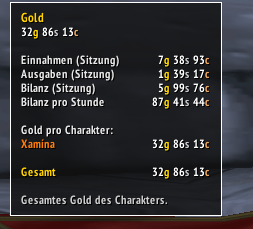
Gold: Gold of the current character as well as an overview of gold across all characters on the realm (with class colors) in the tooltip
Bags: Used / total bag slots
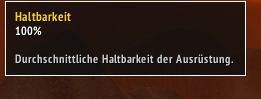
Durability: Average equipment durability in percent
Experience: Current experience progress in %
Specialization: Active talent specialization (dual spec) of the character
Guild: Number of guild members currently online, including a detailed tooltip
Layer: Current layer / instance ID and War Mode status
Performance: FPS and latency (Home/World) with icons
Click Functions on the Bar
The icons in the bar are context-sensitive and clickable:
Bags: Opens all bags
Guild: Opens the guild window (if available)
Location: Opens the world map
Durability: Opens the character window
Specialization: Opens the talent window / talent tab
Settings
The options can be opened via the minimap gear icon or a slash command.
Slash command:
/rlpanelLeft-click on the minimap icon: opens the settings window
Right-click on the minimap icon: toggles the bar on/off
Tabs in the options window:
Settings
Enable top bar
Show minimap gear icon
Language: Automatic, German, English
About
- Addon title, logo, contact and donation information
Modules
Bar position (top or bottom below the action bar)
Distance from the screen edge (offset)
Module list with individual on/off checkboxes, e.g. Location, Gold, Bags, Durability, Experience, Specialization, Guild, Layer, Performance
Installation
Copy the folder
RLWoWPanelinto the World of Warcraft AddOns directory, e.g.
World of Warcraft\_retail_\Interface\AddOns\RLWoWPanel
or
World of Warcraft\_classic_\Interface\AddOns\RLWoWPanelOn the character selection screen, make sure RL WoW Panel is enabled in the addon list.
Enter the game or reload the UI with
/reload.
Compatibility
The addon is designed for modern WoW versions as well as classic clients.
Where API differences exist (e.g. bag API, talent system, guild window), appropriate variants are used automatically so that no Lua errors should occur.
Known Notes
The total gold overview uses
RLWoWPanelGlobalDBand stores gold and class per character per realm.The specialization is determined on Retail via the specialization system, and on Classic via the talents of the active talent group.
Support / Contact
Contact and donation information correspond to those shown in the addon’s About tab:
Email:
robin@rl-dev.deDonations (PayPal):
robin@rl-dev.de
The RL WoW Panel Team


Owner