


RiottLFGFilter
- By
A simple LFG filter with dungeon filtering, group leader scoring visibility, and sorting by Blizzard Default Sorting and M+ score descending
RiottUI LFG Filter
A lightweight Mythic+ and Premade Groups filter for World of Warcraft.
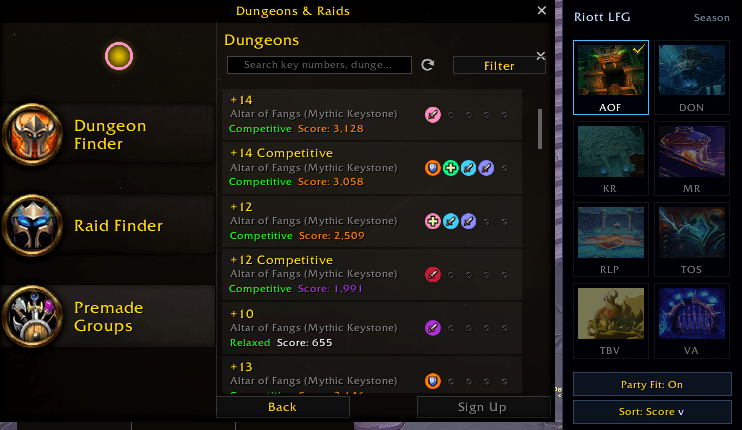
RiottUI LFG Filter adds a compact panel beside the Blizzard dungeon group finder, making it easier to find the groups you want without replacing the default Blizzard interface.
Features
- Filter Premade Groups by the current season’s Mythic+ dungeons.
- Select multiple dungeons at the same time.
- Left-click a dungeon to toggle it on or off.
- Right-click a dungeon to select it exclusively.
- Sort groups by group leader Mythic+ score in descending order.
- Optional Party Fit filtering based on your current party’s roles.
- Dungeon buttons use the relevant dungeon artwork where available.
- The filter panel is hidden from the Raid tab.
- Automatically disables itself after a Mythic Keystone is slotted or a Mythic+ dungeon begins.
- Designed to remain lightweight and avoid unnecessary background processing.
Usage
Open the Blizzard Premade Groups finder and select the Dungeons category.
Use the dungeon buttons in the panel beside the group list:
- Left-click to include or exclude a dungeon.
- Right-click to select only that dungeon.
- Use
Party Fitto filter groups based on your party’s available roles. - Use
Sortto sort results by the leader’s overall Mythic+ score.
RiottUI LFG Filter works alongside the Blizzard Group Finder and does not replace the default UI.
RiottLFGFilter Team
