


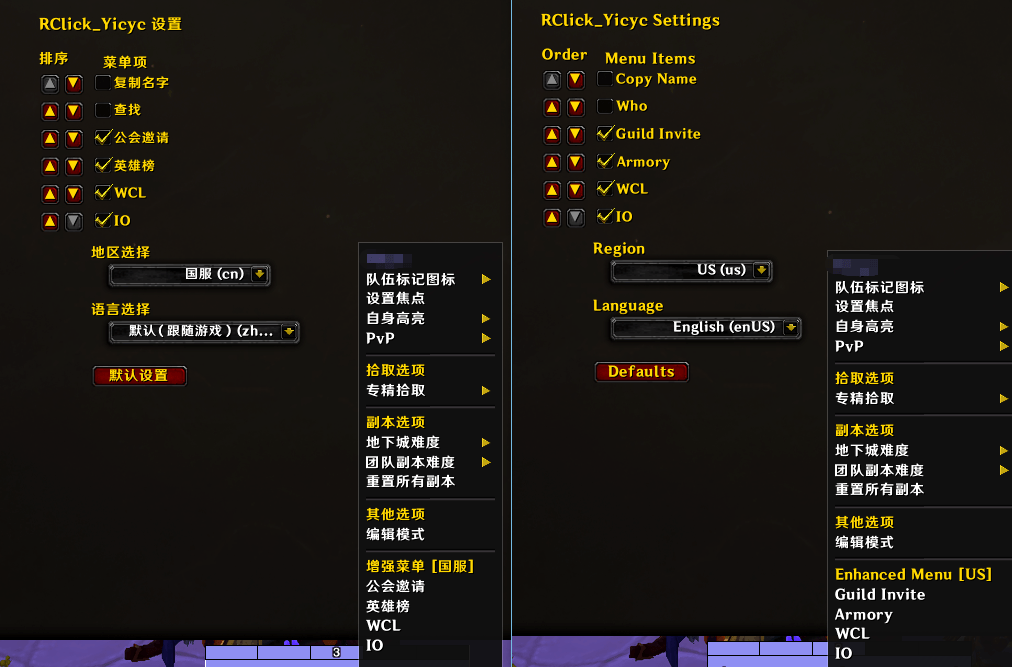
Description
RClick_Yicyc — Right-Click Menu Enhancer
RClick_Yicyc is a lightweight World of Warcraft addon that enhances the right-click context menu for player units. It adds a variety of convenient shortcuts to the dropdown menus of friends, party members, raid members, and guildmates — making common tasks faster and easier than ever.
✨ Features
- Guild Invite — Invite a target player to your guild with a single click. No more typing names manually.
- Armory Link — Automatically generates and copies the target player's Armory profile link, supporting CN, TW, US, EU, and KR regions.
- Warcraft Logs (WCL) — Instantly copy a Warcraft Logs search URL for the target player.
- Raider.IO — Instantly copy the target player's Raider.IO profile link.
- Copy Name — Quickly copy the "Name-Realm" formatted name to your clipboard.
- Find Player (/who) — Perform a
/whoquery on the target player with one click. - Region Switching — Supports five regions: CN, TW, US, EU, and KR. Armory, WCL, and Raider.IO links automatically adapt to your selected region.
- Customizable Menu Order — Freely drag and drop menu items in the settings panel to reorder them to your liking. Each menu item can also be toggled on or off individually.
- One-Click Reset — Restore all settings to their default values at any time.
⚙️ How to Use
Once installed, right-click on any player unit — whether in the chat frame, friends list, party/raid frames, or guild panel — and look for the 「Enhanced Menu」 group at the bottom of the context menu. Click any option to trigger its function.
Access the settings panel via ESC → Options → AddOns → RClick_Yicyc (or ESC → Interface → AddOns → RClick_Yicyc) to customize menu item order, toggle individual items, and select your game region.
RClick_Yicyc — 右键增强菜单
RClick_Yicyc 是一款轻量级的魔兽世界右键菜单增强插件。它在玩家、好友、队伍、团队、公会成员等单位的右键菜单中添加了一系列快捷功能,让你无需繁琐操作即可快速完成常见任务。
✨ 功能特色
- 公会邀请 — 一键邀请目标玩家加入公会,无需手动输入角色名。
- 英雄榜直达 — 自动生成并复制目标玩家的英雄榜链接,覆盖国服、台服、美服、欧服、韩服。
- Warcraft Logs (WCL) — 一键复制目标玩家的 WCL 战斗日志查询链接。
- Raider.IO — 一键复制目标玩家的 Raider.IO 角色页面链接。
- 复制名字 — 快速复制"角色名-服务器"格式的名称到剪贴板。
- 查找玩家 (/who) — 一键对目标玩家执行
/who查询。 - 地区切换 — 支持国服 (CN)、台服 (TW)、美服 (US)、欧服 (EU)、韩服 (KR) 五地区,自动匹配对应的英雄榜、WCL 和 IO 链接。
- 菜单自定义排序 — 在设置面板中自由拖拽调整菜单项的显示顺序,也可按需启用/禁用任意菜单项。
- 一键重置 — 支持恢复默认设置。
⚙️ 使用方式
安装插件后,右键点击任意玩家单位(包括聊天框、好友列表、队伍/团队框架、公会面板等),即可在右键菜单底部看到 「增强菜单」 分组,点击对应选项即可触发功能。
通过游戏内的 「ESC → 选项 → 插件 → RClick_Yicyc」 或 「ESC → 界面 → 插件 → RClick_Yicyc」 进入设置面板,自定义菜单项排序与启用状态,以及选择所在的游戏地区。
RClick_Yicyc Team
