


RhezyBar
- By

RB.png
RB_01.png
RB_02.png
RB_03.png
Description
RhezyBar
A subtle, modular info bar for WoW Forever. Everything important at a glance in one slim bar: gold, XP, bags, hearthstone, durability, guild, friends and much more. Every module can be switched on or off, reordered and shown with icon, text or both. Hover a module for a detailed tooltip, click it for a shortcut.
Deutsche Beschreibung weiter unten.
Modules
Character & economy
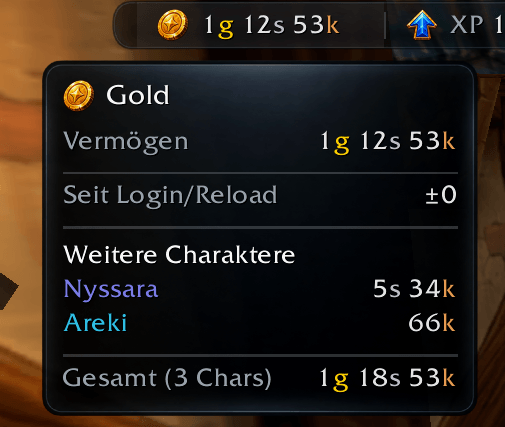
- Gold: gold, silver and copper. Tooltip shows the change since login (survives
/reload), gold per hour, time online and the gold of all your other characters with a total. - Experience: XP progress with a small bar, rested XP and an estimate of kills to the next level. Separate bars for player and hunter pet.
- Bags: free (or used) bag slots and the value of your grey junk items. Click opens your bags.
- Durability: lowest durability of your equipment, all items listed in the tooltip.
- Professions: your two primary professions with skill bars; tooltip lists all professions including Cooking, First Aid and Fishing.
- Reputation: your watched faction.
World & travel
- Hearthstone: cooldown and bind location. Click uses it.
- Location & coordinates: zone name coloured by PvP status plus x/y coordinates.
- Clock: local and realm time.
- Instance lockouts: saved instances with reset time and boss progress, optionally only shown while you are saved.
Social
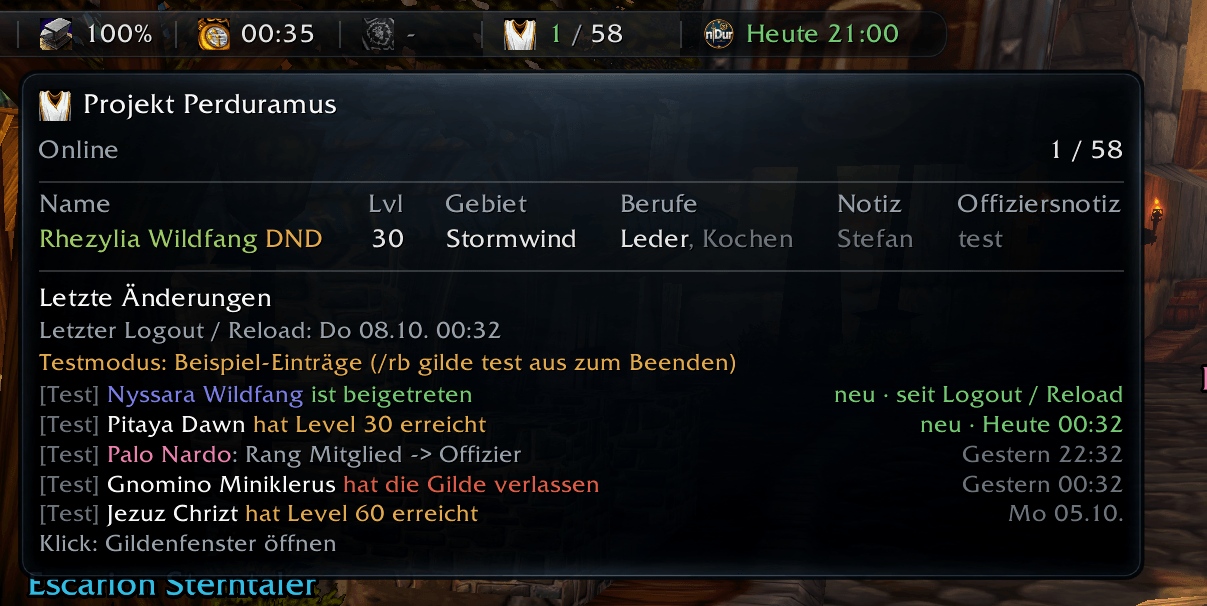
- Guild: members online / total. Tooltip with a table of online members (class colours, level, zone, notes, officer notes) and a guild chronicle of the last 10 changes: joins, leaves, level milestones and rank changes.
- Friends: WoW friends and Battle.net friends (in Battle.net blue), with class colours, level and zone. Zones matching yours are highlighted green.
- Group: group or raid size, loot method and threshold, member list with leader, offline and dead members.
- Mail: a small envelope while you have new mail.
Buffs & quests
- Well Fed: countdown of your food buff, red shortly before it runs out, a red "MISSING" when it is gone. Tooltip lists the active bonuses.
- Camp Perks: countdown of your camp buffs with all active camp bonuses (works in every client language).
- Quest log: quests in log / maximum, tooltip with all quests by zone, objectives and turn-in-ready quests.
- Pet (hunter): pet happiness, damage, loyalty and diet.
System
- FPS & latency: frame rate and ping, colour-coded, plus the 10 most memory-hungry addons in the tooltip.
Settings
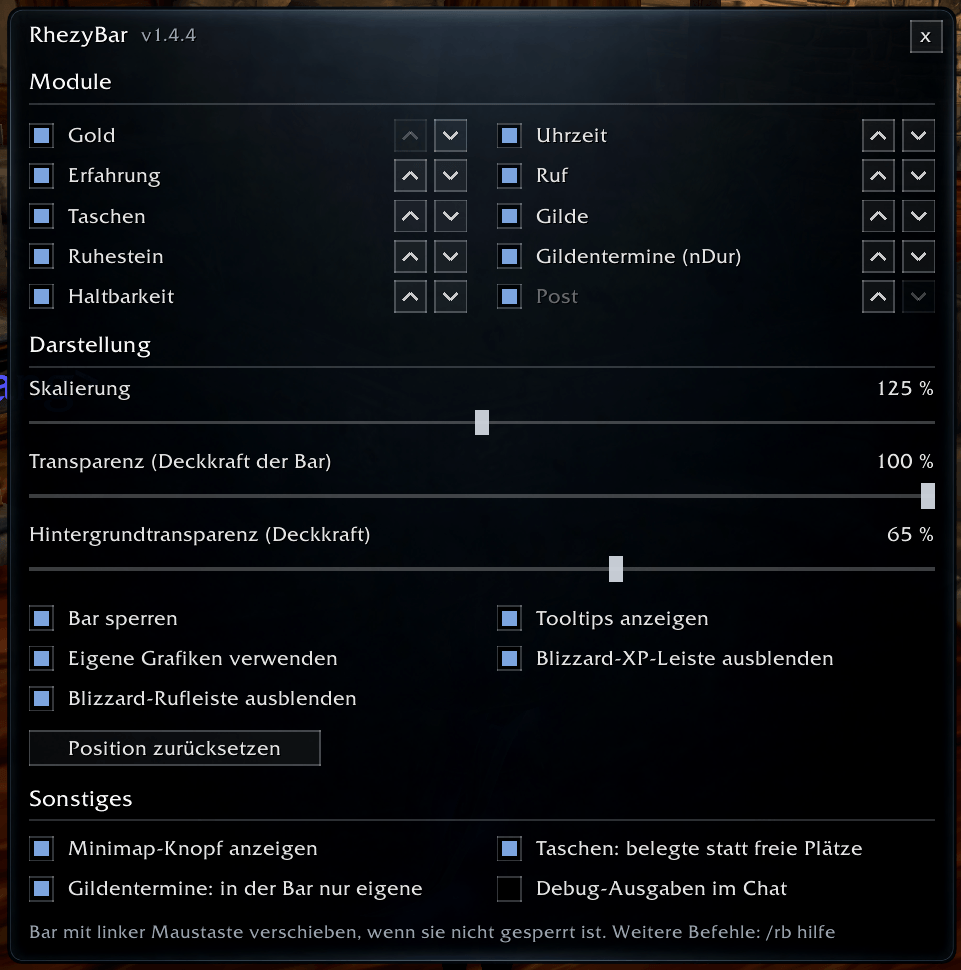
Open the settings with /rb or the minimap button:
- Drag modules with the mouse to reorder them.
- Click a module to see its own options; hide icon or text per module.
- Scale, transparency, lock and position of the bar.
Commands
/rbopen or close the settings/rb lock//rb unlocklock or unlock the bar/rb resetreset the position/rb minimapshow or hide the minimap button/rb gold list//rb gold remove <name>manage saved gold of other characters/rb guild test//rb guild test offpreview the guild chronicle with sample entries
Languages
German and English, follows your client language.
Optional
If the guild addon nDur_Gildentool is installed, the guild tooltip also shows the crafting professions of your guild members. RhezyBar works fully without it.
---
RhezyBar (Deutsch)
Eine dezente, modulare Informationsleiste für WoW Forever. Alles Wichtige auf einen Blick in einer schmalen Leiste: Gold, Erfahrung, Taschen, Ruhestein, Haltbarkeit, Gilde, Freunde und vieles mehr. Jedes Modul lässt sich ein- und ausschalten, umsortieren und mit Symbol, Text oder beidem anzeigen. Mit der Maus drüberfahren zeigt einen ausführlichen Tooltip, ein Klick führt direkt zur passenden Funktion.
Module
Charakter & Wirtschaft
- Gold: Gold, Silber und Kupfer. Im Tooltip die Veränderung seit Login (übersteht
/reload), Gold pro Stunde, Online-Zeit und das Gold all deiner anderen Charaktere mit Gesamtsumme. - Erfahrung: Fortschritt mit kleinem Balken, Erholung und geschätzte Kills bis zum Levelaufstieg. Getrennte Balken für Spieler und Jäger-Begleiter.
- Taschen: freie (oder belegte) Plätze und der Wert deiner grauen Gegenstände. Klick öffnet die Taschen.
- Haltbarkeit: niedrigste Haltbarkeit der Ausrüstung, alle Teile im Tooltip.
- Berufe: die zwei Hauptberufe mit Skill-Balken, im Tooltip alle Berufe inklusive Kochen, Erste Hilfe und Angeln.
- Ruf: die beobachtete Fraktion.
Welt & Reisen
- Ruhestein: Abklingzeit und Bindungsort. Klick benutzt ihn.
- Ort & Koordinaten: Ortsname farbig nach PvP-Status und x/y-Koordinaten.
- Uhrzeit: lokale Zeit und Realmzeit.
- Instanzsperren: gespeicherte Instanzen mit Reset-Zeit und Bossfortschritt, auf Wunsch nur sichtbar, solange eine Sperre besteht.
Soziales
- Gilde: Mitglieder online / gesamt. Tooltip mit Tabelle der Mitglieder, die online sind (Klassenfarbe, Level, Gebiet, Notiz, Offiziersnotiz), und einer Gildenchronik der letzten 10 Änderungen: Beitritte, Austritte, Level-Meilensteine und Rangwechsel.
- Freunde: WoW- und Battle.net-Freunde (in Battle.net-Blau) mit Klassenfarbe, Level und Gebiet. Gebiete, in denen du gerade bist, stehen grün.
- Gruppe: Gruppen- oder Raidgröße, Plündermethode und -schwelle, Mitgliederliste mit Anführer, offline und tot.
- Post: ein kleiner Briefumschlag, solange neue Post da ist.
Buffs & Quests
- Satt: Countdown des Essensbuffs, rot kurz vor Ablauf, rot „FEHLT“ ohne Buff. Tooltip mit den aktiven Boni.
- Lagervorteile: Countdown der Lagerbuffs mit allen aktiven Lagerboni (funktioniert in jeder Spielsprache).
- Questlog: Quests im Log / Höchstzahl, Tooltip mit allen Quests nach Gebiet, Zielen und abgabebereiten Quests.
- Begleiter (Jäger): Glück, Schaden, Treue und Futter des Pets.
System
- FPS & Latenz: Bildrate und Ping farbig, dazu die 10 speicherhungrigsten Addons im Tooltip.
Einstellungen
Öffnen mit /rb oder über den Minimap-Knopf:
- Module mit der Maus in die gewünschte Reihenfolge ziehen.
- Klick auf ein Modul zeigt seine eigenen Optionen; Symbol oder Text je Modul ausblendbar.
- Skalierung, Transparenz, Sperren und Position der Leiste.
Befehle
/rbEinstellungen öffnen oder schließen/rb lock//rb unlockLeiste sperren oder entsperren/rb resetPosition zurücksetzen/rb minimapMinimap-Knopf ein- oder ausblenden/rb gold liste//rb gold entfernen <Name>gespeichertes Gold anderer Charaktere verwalten/rb gilde test//rb gilde test ausGildenchronik mit Beispiel-Einträgen ansehen
Sprachen
Deutsch und Englisch, richtet sich nach der Spielsprache.
Optional
Ist das Gilden-Addon nDur_Gildentool installiert, zeigt der Gilden-Tooltip zusätzlich die Handwerksberufe der Gildenmitglieder. RhezyBar funktioniert auch ohne vollständig.
RhezyBar Team
