Screenshot 2026-08-20 131337.png
Screenshot 2026-08-20 131217.png
Screenshot 2026-08-20 130007.png
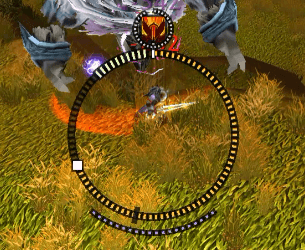
Screenshot 2026-08-20 131217.png
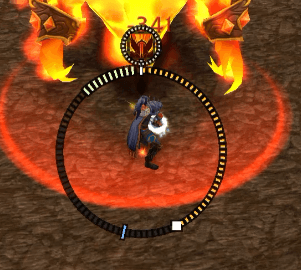
Screenshot 2026-08-20 130007.png
Description
RetTwistHUD
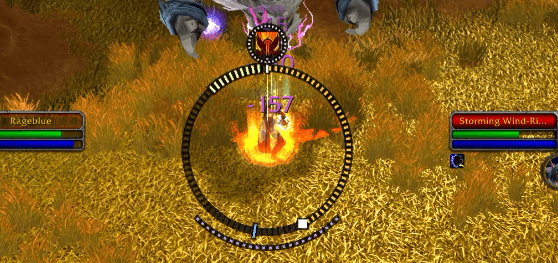
A swing timer for TBC Retribution Paladins that keeps your eyes on the fight.
Seal twisting is a major part of Retribution Paladin damage, but traditional swing timers put the information at the bottom of your screen. That means spending the fight watching a few pixels under your character instead of watching mechanics, movement, adds, and the ground.
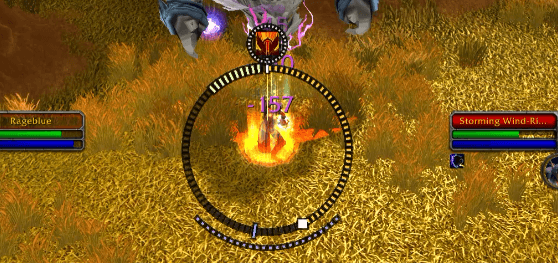
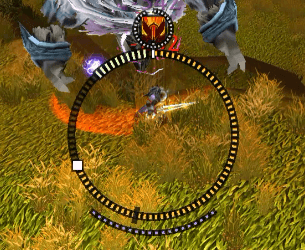
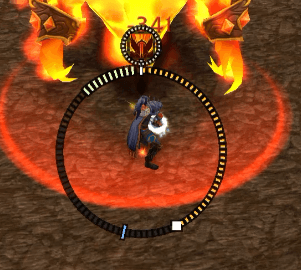
RetTwistHUD puts the swing timer around your character instead.
The ring stays outside your character model, keeping both your character and the ground visible.
What It Shows
- Swing timer: A pip travels around the ring and reaches the top when your swing lands.
- Active seal: The ring's colour shows your current seal, and an icon above your head shows which seal it is, with a thin ring counting down its remaining duration.
- Twist window: A bright section marks when you can cast the next seal to twist. The window is automatically shifted by your latency.
- GCD: Your global cooldown appears as a dark segment on the ring. If it overlaps the twist window, the window greys out so you know the twist isn't available.
- Next GCD: An optional white line marks exactly where the running global cooldown ends and your next spell comes back.
- Last safe cast: A marker shows the latest point you can start a GCD spell and still make the twist. Bright means cast; dim means wait.
- Judgement: A cooldown arc shrinks as the cooldown runs and disappears when ready, so an empty bottom means Judgement is up.
Designed for Peripheral Vision
The twist window is only about 0.4 seconds wide—too short to reliably react to. RetTwistHUD is designed around anticipation rather than reaction.
The ring moves continuously and predictably, giving you a visual rhythm to follow instead of an alert you have to catch.
- Brightness = urgency
- Colour = information
- Dark grooves = readability
Important information stays bright while states that require no action fade into the background. The ring also sits on a dark groove so it remains readable over fire, grass, and other bright environments.
The goal is simple: know when to twist without staring at your swing timer.
Did I Twist In Time?
After a swing you twisted in time for, a ring pulses outward and fades. It fires after the swing has landed, so it costs you nothing during the window itself.
To be clear about what it knows: no combat log event reports that a twist paid out. What this detects is that the finisher seal replaced the carrier inside the window before the swing resolved—which is to say your press was correctly timed. That is the part you control, and it is what makes the window and latency settings worth tuning.
Getting Started
Type /rth or left-click the minimap button to open the options.
Every setting also has a slash command. Use /rth help to see them all.
Use /rth test to simulate swings while out of combat and position the HUD.
Right-click the minimap button to unlock the ring and drag it wherever you want.
The two settings most worth tuning are:
- Twist window width
- Latency offset
If your twists consistently land late, try increasing the latency offset by 20–40 ms.
By default the ring only appears in Retribution spec, and only in combat or while a seal is up. Both are configurable—/rth ret off and /rth show respectively.
Requirements
- Burning Crusade Classic
- Retribution Paladin
- No dependencies
RetTwistHUD Team