


Resto4Life
- By
A modern, lightweight healer & group frame addon for WoW Forever (Build 1.60.1 / Interface 16001) with click-casting, modifier support, smart battle-rez, and HoT tracking.
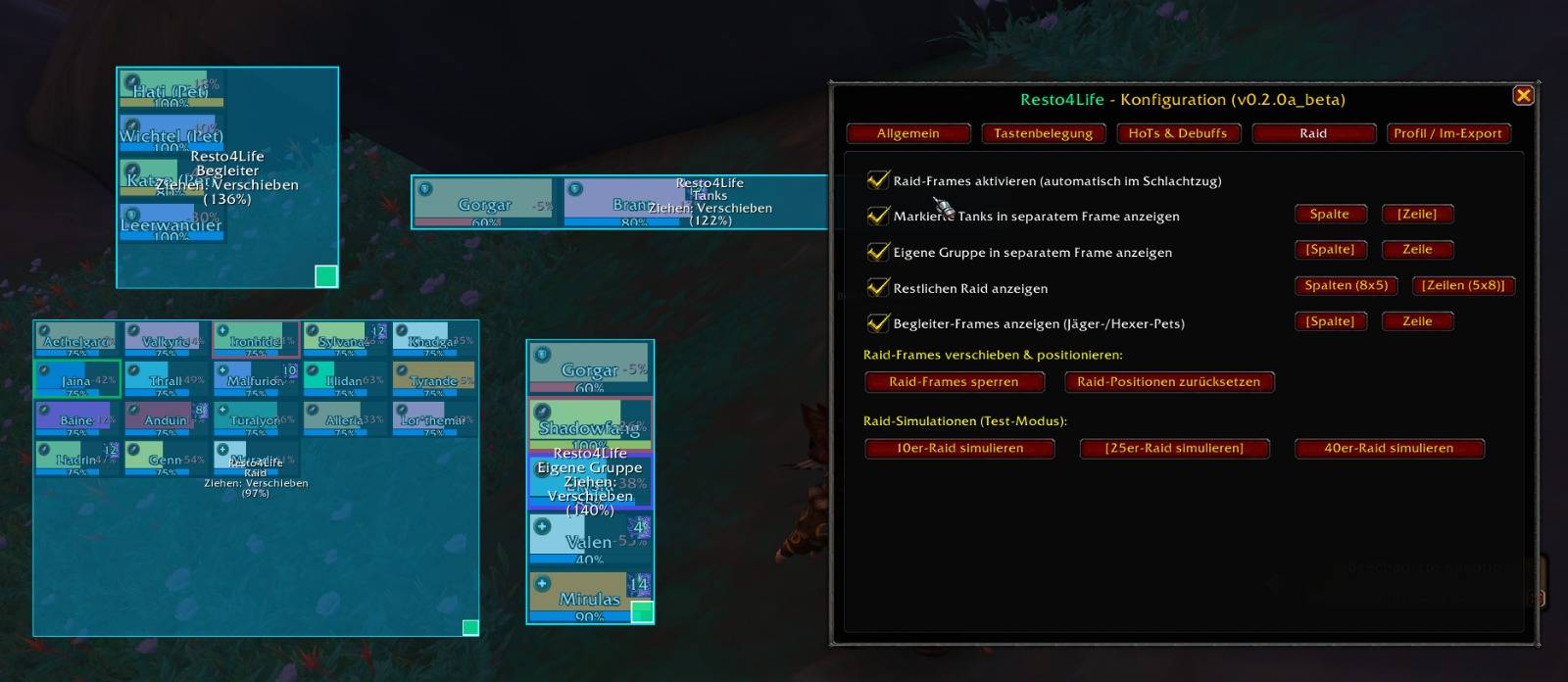
Interface-01.jpeg
Description
Resto4Life is a modern, lightweight, and highly customizable healer, party, and raid frame addon. Built specifically for WoW Forever (Interface 16001 / Build 1.60.1) and compatible with Retail.
Designed from the ground up for healers who want crystal-clear visibility, zero frame lag, and powerful healing utilities without the bloat of oversized suites.
- Class Buff Monitoring: Continuously monitors essential buffs across all classes (Mark of the Wild, Thorns, Power Word: Fortitude, Divine Spirit, Arcane Intellect, Blessings, Shouts, etc.).
- Clear Visual Alerts: Highlights missing buffs with a distinct red glowing border and numerical counter for missing targets; unobtrusive black border when fully buffed.
- Smart Priority Click-to-Cast: Left-clicking directly casts the spell onto the highest-priority target missing the buff (Main Tank > Self/Healer > Melee > Ranged/Others).
- Custom Target Group Filtering: Filter recipients per spell (All, Tank Only, Self Only, Mana Classes, Melee, or Off) in the dedicated
[Buff Bar]settings tab. - Automatic Talent & Spellbook Detection: Only displays spells and talents your character has actually learned.
- Separate Modular Containers: Independent, movable, and scalable containers for Main Tanks, Own Group, Rest of Raid, and Pets.
- Smart Deduplication: Players are never displayed twice (Main Tanks and your own group members are automatically filtered out of the Rest of Raid grid).
- Grid Fallback Mode: Seamlessly falls back into a unified compact raid grid if specialized containers are disabled.
- Built-in Simulation Engine: Test and configure 5-player, 10-player, 25-player, and 40-player raid layouts anytime via the settings menu (
/r4l).
- Separated HoT Positioning:
- Your Own HoTs are displayed in the top-right corner (up to 4 icons) with remaining time and stack counts.
- Other Healers' HoTs are displayed in the top-left corner (up to 3 icons) with a matching sleek 1px black border.
- Smart Duration Sorting: HoTs with the shortest remaining duration are prioritized first. As HoTs expire, longer-duration HoTs immediately slide in.
- Official Blizzard role icons (Shield for Tanks, Cross for Healers, Swords for Damage Dealers) horizontally aligned on the same baseline as the character name to avoid any overlap.
- Standard Mode: Health bar drains down as damage is taken.
- Reverse / Deficit Mode (VuhDo-Style): Health bar fills with red as health is lost, giving immediate visual feedback on missing HP.
- Coloring Modes: Dynamic Class Colors or a Smooth Gradient (Green → Yellow → Red based on current HP percentage).
- Toggleable Name Tags: Show or hide character names with custom font outlines.
- Power Bars: Tracks Mana, Rage, Energy, Runic Power, and Fury right beneath the health bar.
- Automated Role Ordering: Automatically sorts party members by role: Tank → Melee DPS → Ranged DPS → Healer.
- Clicking a fallen ally while in combat automatically casts your class's Battle Resurrection (e.g., Rebirth).
- Out of combat, it automatically casts your standard resurrection spell.
- Dispel Highlight Borders: Frame borders light up in high-visibility colors according to dispellable debuff types (Purple for Curse, Green for Poison, Brown for Disease, Blue for Magic).
- Aggro Warning: Vibrant red border when a party member pulls aggro (dispellable debuffs always take visual priority).
- Comprehensive binding options for:
- Left Click, Right Click, Middle Click (Mouse 3), Mouse 4, Mouse 5
- Mouse Wheel Up and Mouse Wheel Down
- Hover Keys 1 through 6
- Full support for CTRL and ALT modifier combinations for every button.
- Character-specific profiles saved independently (
Resto4LifeCharDB). - Easy Import & Export string functionality to share setups across alts or with friends.
| Command | Action |
|---|---|
/r4l or /resto |
Opens the configuration menu |
/r4l unlock / /r4l move |
Unlocks all frames for repositioning and scaling |
/r4l lock |
Locks frames in place |
/r4l reset / /r4l center |
Centers frames and resets dimensions |
/r4l resetall |
Restores default class configuration |
/r4l lang [en | de | auto] |
Switches interface language |
- Left-Click & Drag: Move frame container anywhere on your screen.
- Mouse Wheel: Scale container dynamically between 50% and 200%.
- Right-Click on Frame: Instantly toggle between Column (Vertical) and Row (Horizontal) layout.
- English (
enUS) - German (
deDE)
- Licensed under the GNU General Public License v3.0 (GPL-3.0).
- Copyright (C) 2026 it-fanatic.
Resto4Life Team
