Rested XP - Alt Rested Management Tool
- By
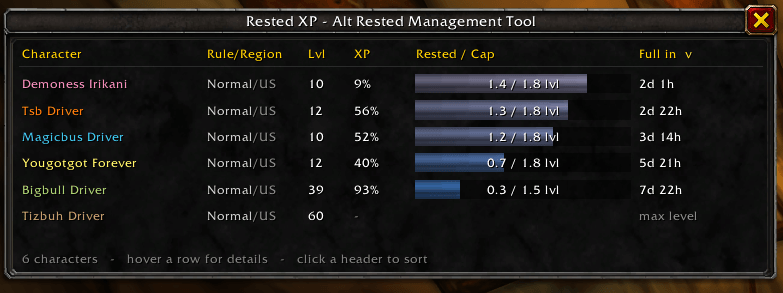
Rested is a WoW Forever addon that tracks rested XP across all your alts. Type /rested or click its minimap button to show or hide the table.
Screenshot_20261127_094446.png
Screenshot_20261127_094458.png
Description
Rested XP - Alt Rested Management Tool
See every alt's rested XP in one table, from any of your characters! Built for WoW Forever.
Type /rested or click the minimap button to show or hide the window.
Features
- All your alts at a glance: name, ruleset and region, level, current XP, rested XP, rested cap and time until full
- Updates while offline: log in to each alt once, and its rested XP keeps counting up from then on
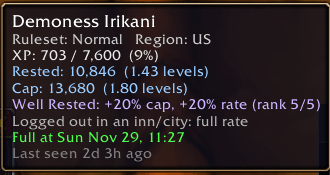
- Well Rested support: reads each character's legacy talent rank automatically and applies +4% rested cap and +4% build-up rate per rank, up to +20% each
- Rulesets and regions: tracks Normal, PvP, RP, RP-PvP and Hardcore alts, with US and EU alts kept apart, even when two characters share a name. You can only see different regions together using the export/import functions, otherwise regions are normally separated.
- All Regions in one: WoW saves each region separately, so copy your alts across with
/rested exportand/rested import. Newer data always wins, so you can repeat it any time to bring them up to date. - Knows where you logged out/are: full rate in an inn or city, quarter rate anywhere else, updated live as you move
- Detailed tooltips: hover an alt for XP, rested levels, talent bonus, build-up rate, exact full-at time and last seen
- Simple window: click a column to sort, drag to move, press Escape to close
- Minimap button: click to show or hide, drag to move, hover for a quick list of every alt
- LibDataBroker support: shows in Titan Panel, ChocolateBar, Bazooka and other broker bars, for example "2 full, next 5d 20h"
Commands
| Command | Effect |
|---|---|
/rested |
Show or hide the window |
/rested minimap |
Show or hide the minimap button |
/rested export |
Show a code of this region's alts to copy (Ctrl+C) |
/rested import |
Paste a code from your other region (Ctrl+V) |
/rested talent |
Show this character's Well Rested bonus |
/rested talent cap <n> |
Set the cap bonus by hand (percent) |
/rested talent rate <n> |
Set the rate bonus by hand (percent) |
/rested talent auto |
Go back to reading the talent |
/rested clear <name> [region] |
Forget a stored alt, for example /rested clear Bigbull Driver US |
/rested help |
Shows all of the slash commands in your main chat window |
/rested hide <name> [region] |
hides an alt from the table and export |
/rested show |
prints a list of alts that are hidden |
/rested show <name> [region] |
shows an alt that was previously hidden |
/rested clear imported |
wipes all imported alts from other regions |
Moving alts between regions
- In one region, type
/rested exportand press Ctrl+C. - Log in to your other region, type
/rested import, press Ctrl+V and click Import. - To see both lists in both regions, do the same in the other direction.
**Imported alts count rested XP like the auto-detected alts for the region you're logged in currently but you have to do the import/export if you earn exp on them before you change regions to keep them up to date. Manually syncing the data between regions is the only way that you can see multiple regions together.
Good to know
- Offline values are estimates and are replaced with real values each time you log in to that alt.
- Alts from earlier versions show ? for ruleset and region until you log in to each one once.
- Max-level characters (60) are listed but don't build rested XP.
- hiding alts are kept per region, so if you hide one in one region, you'll have to hide it in the other region too
Rested XP - Alt Rested Management Tool Team