


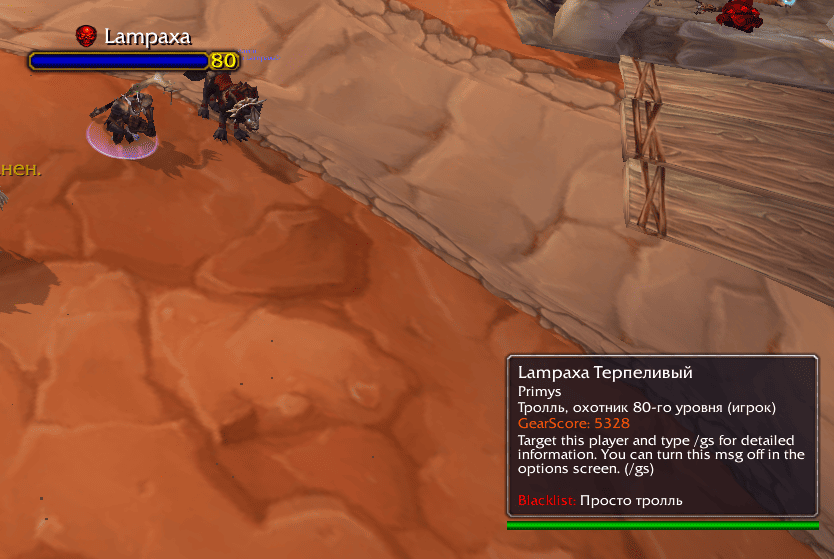
Nameplate+tooltip.png
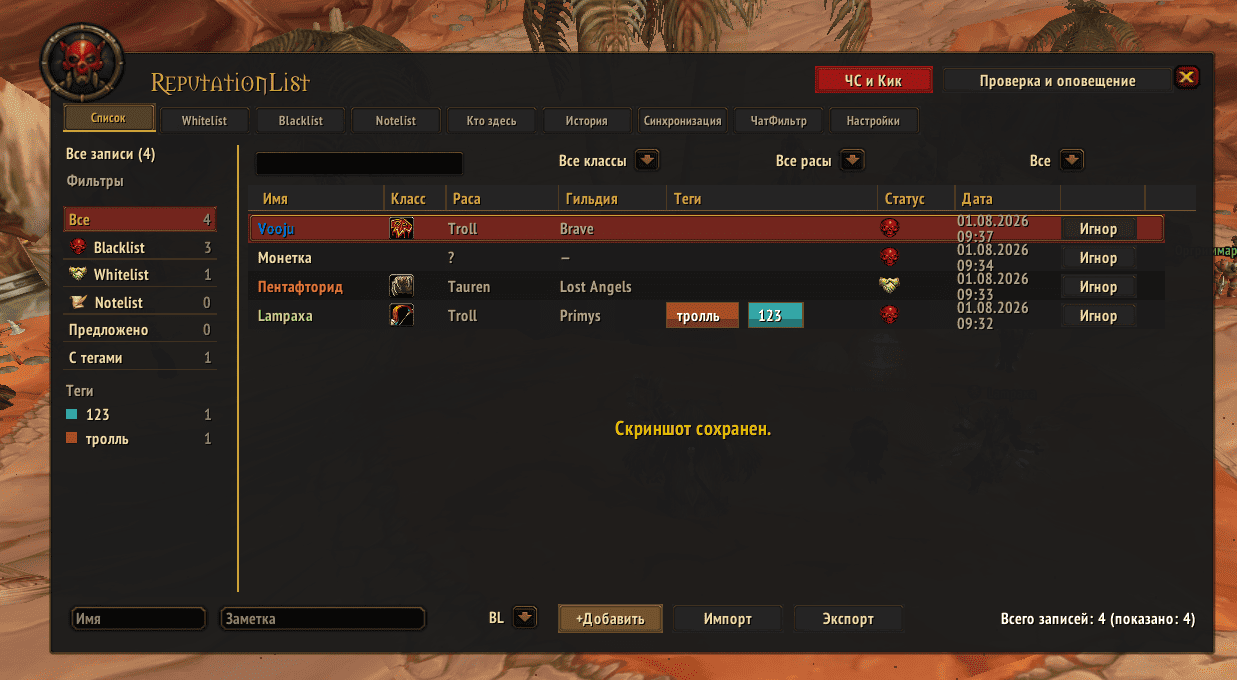
UI2.0_elvui.png
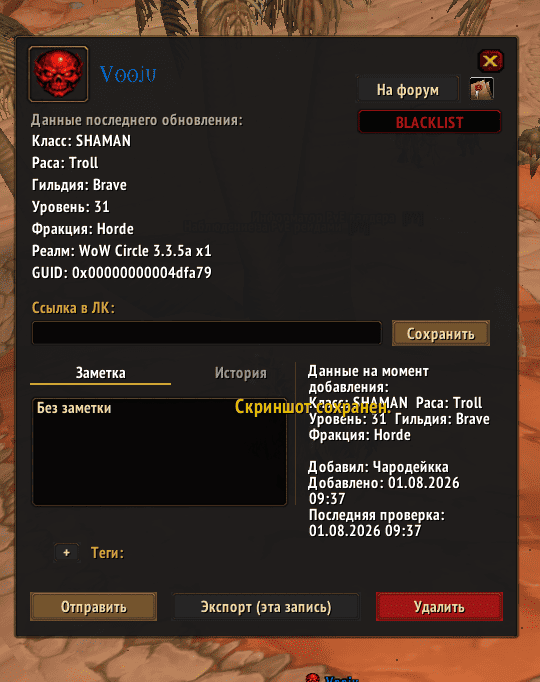
card_elvui.png
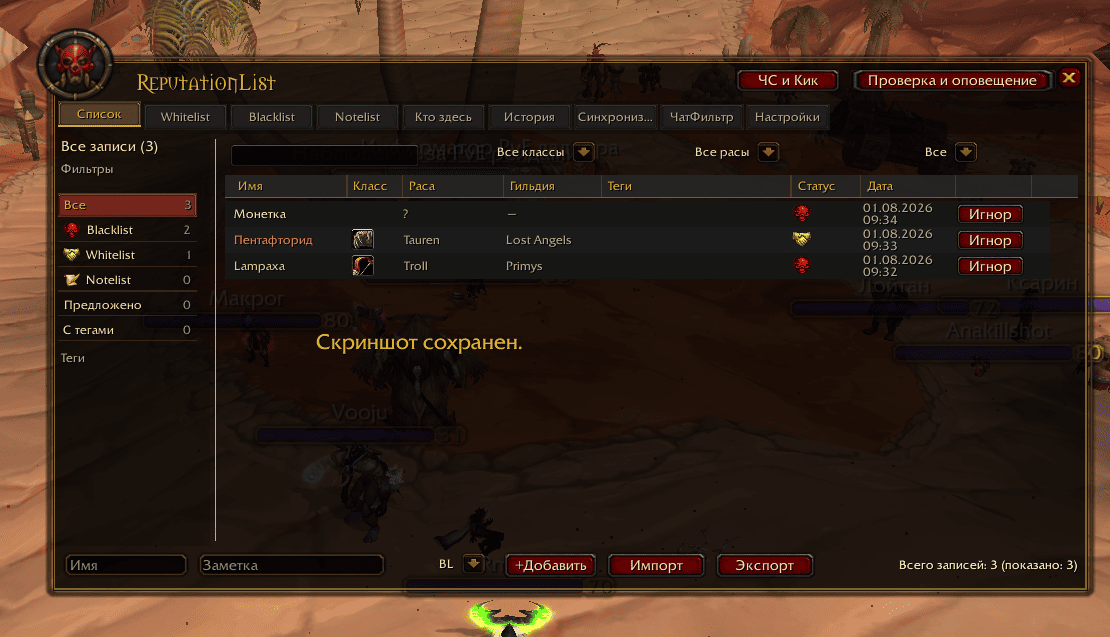
UI2.0.png
card.png
Description
Reputation List 2.0
A complete player reputation management system for World of Warcraft 3.3.5a.
Reputation List allows you to maintain personal Blacklist, Whitelist, and Notelist databases, store detailed player information, track characters by GUID, organize records with tags, inspect groups and raids, exchange lists with other users, and receive automatic warnings when tracked players are encountered.
List Types
- Blacklist — problematic, toxic, or unwanted players.
- Whitelist — reliable players such as tanks, healers, friends, and raid leaders.
- Notelist — neutral observations and personal notes.
Player information is shared across the account and separated by realm.
Redesigned Interface 2.0
Version 2.0 introduces a completely redesigned unified interface.
- Separate Blacklist, Whitelist, and Notelist tabs.
- Search by player name and tags.
- Sorting by name and entry date.
- Filters by class, race, tag, and ignore status.
- Player counters and quick filters.
- Dedicated History, Who's Here?, Synchronization, Incoming Suggestions, Chat Filter, and Settings tabs.
- Integrated player lists and settings in the Blizzard Social frame.
- Automatic styling for the default Blizzard UI and ElvUI.
- Full Russian and English localization.
The obsolete separate Classic and ElvUI interface files are no longer required.
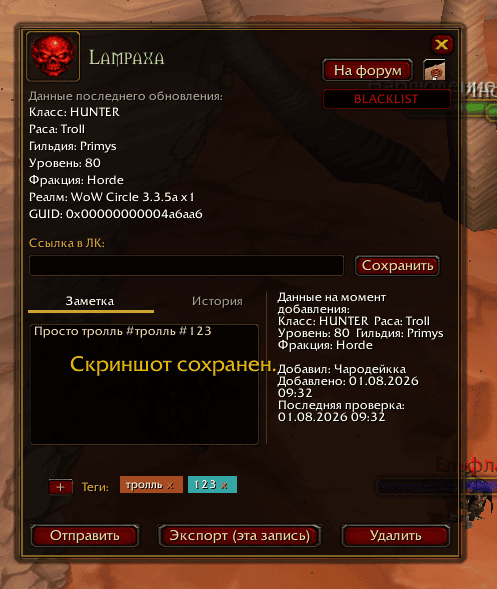
Player Cards
Player cards display detailed information:
- GUID.
- Name, race, class, level, and faction.
- Guild and realm.
- Custom notes and tags.
- Entry date and author.
- Armory or profile link.
- Character data change history.
- Blizzard ignore status.
Player cards can also be edited, exported, synchronized with another user, or converted into a forum-ready report.
GUID Tracking
GUID tracking helps identify characters after name, race, or faction changes.
Checks occur:
- In groups and raids.
- On target selection.
- On mouseover.
- During trade initiation.
- While inspecting players through the Who's Here? tab.
Name changes and other detected character updates are recorded in history. GUID conflicts are reported and handled without silently overwriting existing records.
Tags and Advanced Search
Add custom tags directly to player notes:
#ninja #goodtank #raidleader #afk
Tags are detected automatically and can be used to:
- Organize player records.
- Search for related players.
- Filter the main list.
- Quickly access frequently used categories.
Who's Here?
The Who's Here? tab displays members of the current or most recently tracked group or raid.
It allows you to:
-
Identify players already present in your lists.
- View player class, race, level, and guild.
- Open detailed player cards.
- Add players directly to Blacklist, Whitelist, or Notelist.
History
Reputation List maintains a history of important events:
- Player addition date and author.
- Data available when the player was added.
- Name changes.
- Class, race, level, and guild updates.
- GUID linking.
- Recent encounters and other recorded changes.
History is available both globally and inside individual player cards.
Synchronization
Exchange Reputation List data directly with other addon users.
- Send all lists.
- Send selected list types.
- Send an individual player card.
- Review incoming data before importing it.
- Accept all entries or only selected players.
- Skip or reject incoming suggestions.
- Prefer newer records when merging matching entries.
Incoming data appears in the Suggestions tab and is never required to be imported automatically.
Export and Import
- Export all lists or selected list types.
- Export individual player cards.
- Text and Base64 formats.
- Merge imported records with the existing database.
- Import legacy Reputation List data.
- Transfer data between accounts or WoW installations.
Import from Other Addons
Import is supported from:
- BlackList.
- ElitistGroup.
- IgnoreMore.
The source addon must be installed and enabled during import.
Chat Phrase Filter
Create custom phrase filters directly from the interface.
Two filtering modes are available:
- Hide messages containing configured phrases.
- Show only messages containing configured phrases.
The filter can be configured separately for:
- Say and Yell.
- Public channels.
- Whispers.
- Party and raid.
- Guild.
- Emotes.
Tracking and Notifications
- Automatic warnings when tracked players join a group or raid.
- Alerts for whispers and trade requests.
- Online notifications for Blacklist and Whitelist players.
- Real-time party and raid inspection.
- Pop-up player cards.
- Tooltip integration.
- Optional sound notifications.
- Color highlighting in chat and LFG channels.
- Interactive markers in Guild and Raid tabs.
- Reputation markers for incoming mail.
- Warnings when purchasing an auction from a Blacklist player.
- Anti-spam protection against repeated notifications.
Nameplate Icons
Display reputation markers directly on player nameplates.
- Blacklist, Whitelist, and Notelist indicators.
- Standard or custom icons.
- Can be enabled or disabled from the addon settings.
Blizzard Ignore List Integration
- Add players directly to the in-game ignore list.
- Display their current ignore status.
- Remove ignore with one click.
- View the number of occupied ignore slots.
Blacklist Protection
Optionally block Blacklist players from:
- Sending group invitations.
- Starting trade requests.
- Sending private or configured chat messages.
- Interacting through supported protected actions.
Group and raid leaders can also use the quick Add to Blacklist & Kick action.
All protection features can be enabled or disabled independently.
Performance and Large Databases
Version 2.0 contains extensive memory and performance improvements:
- Virtualized player, history, and synchronization lists.
- Reusable visible interface rows.
- Bounded caches for filters, counters, and tags.
- Reduced temporary memory allocations.
- Optimized scrolling and tab switching.
- Improved support for databases containing hundreds or thousands of players.
- No periodic forced full garbage collection.
Compatibility
- World of Warcraft 3.3.5a.
- Default Blizzard interface.
- ElvUI.
- Russian and English clients.
Opening the Addon
Use the minimap button or enter:
/rlistui
Additional commands include:
/rlui/rlexport/rlimport/rlsync/rlfilter/rlplates/rltoast
Most features and settings are also available directly from the main interface.
Reputation List 2.0 — remember the players worth keeping, and those worth avoiding.
The ReputationList Team
