
Remember My Rare
- By
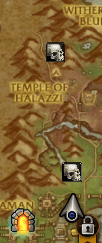
Screenshot 2026-04-22 214536.png
Description
RememberMyRare
A World of Warcraft (Retail) addon that automatically marks both your minimap and world map with skull pins wherever you have killed a rare mob — persisting across sessions, days, and all characters on your account.
Never forget where you found that rare again.
| Command | Description |
|---|---|
/rmr |
Show how many rare kills are tracked |
/rmr list |
List all kills with name, date, map, and kill count |
/rmr toggle |
Hide or show all pins on minimap and world map |
/rmr clear |
Begin wipe of all saved kills (requires confirmation) |
/rmr confirm |
Confirm a pending /rmr clear |
Features
- Automatically detects rare and rare-elite kills — no manual interaction needed
- Pins appear on both the minimap and the world map
- Pins persist indefinitely across sessions (5 minutes ago or 5 days ago — it remembers)
- Account-wide — kills on any character are visible to all your alts
- Hover a pin to see the mob name, kill date, and kill count
/rmr listto review all tracked kills in chat
Map Pins
World map — pins appear on the zone map where you killed the rare, and also on the continent map so you can see at a glance which zones you've cleared. Open with M.
Minimap — pins appear when you are in the same zone as the kill. When the location is off-screen the pin floats to the nearest edge of the minimap so you always know which direction to head. When you are within roughly 150 yards of a kill location the pin fades to 20% opacity, making it easy to see when you've arrived.
Tooltip — hover any pin to see:
- Mob name (in rare gold)
- Date and time of kill
- Kill count (if killed more than once)
Quick Start
- Find and kill any rare mob
- A chat message confirms:
RememberMyRare: Recorded <name> kill. - Open the world map (
M) — a skull pin marks the kill location - Check your minimap — the pin appears there too, floating to the edge when out of range
- Hover a pin to see details
Remember My Rare Team
