Refined Totems
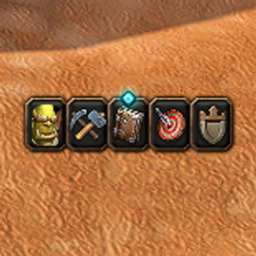
Improves the shaman totem bar: weapon enchant button with flyout, Totemic Call button, bar scale and padding, and tooltip placement.
Refined Totems
Improves the shaman totem bar in WoW Forever with a weapon enchant button, a Totemic Call button, and settings for scale, padding and tooltips. It builds on Blizzard's own totem bar instead of replacing it.
Features
- Weapon enchant button next to the totem bar. Click it to apply the selected enchant (Rockbiter, Flametongue, Frostbrand or Windfury Weapon). Hover it and click the arrow to open a flyout and switch enchant. This works in combat, like the totem flyouts, and the choice is remembered per character.
- Totemic Call button on the bar.
- Spell feedback: cooldowns, a blue icon when you are low on mana and a grey icon when a spell cannot be cast (for example while mounted).
- Bar scale from 50% to 200%.
- Bar padding: space between every button of the totem bar, from 0 to 20 px.
- Tooltip placement for the flyouts: next to the mouse or in the screen corner.
- Native settings page with Blizzard's search and a Defaults button.
- Available in 10 languages.
Usage
Open Game Menu > Options > AddOns > Refined Totems, or type /shamanic.
| Section | Option | What it does |
|---|---|---|
| Weapon enchant button | Show the button | Shows or hides the button and its flyout |
| Totemic Call button | Show the button | Shows or hides the button |
| Totem bar and tooltips | Flyout tooltip placement | Next to the mouse, or in the screen corner |
| Totem bar and tooltips | Bar scale | Size of the whole totem bar |
| Totem bar and tooltips | Bar padding | Space between the buttons of the bar |
| Command | Result |
|---|---|
/shamanic |
Opens the settings |
/shamanic version |
Prints the addon version |
Changes you make during combat to protected parts of the bar are applied as soon as combat ends.
Refined Totems Team