Recipe Vault
- By
RecipeVault manages a crafting business from Tradechat. It monitors chat for crafting requests and routes them to the right alt based on profession and armor type. It tracks completed crafts, Resourcefulness reagent returns, and gold earned from crafts..
Options Windows.png
Order Window.png
Description
RecipeVault helps crafters manage their profession business from Tradechat.
Core features:
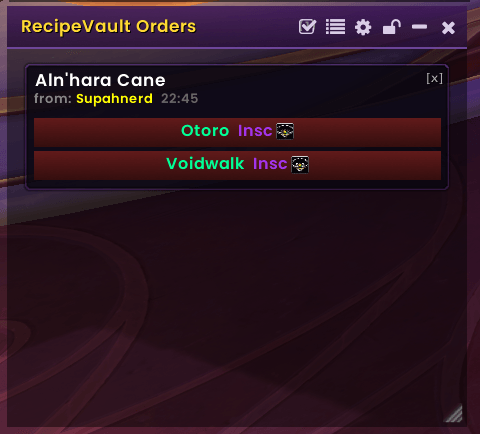
- Monitors Trade/General chat for crafting requests and displays matching orders in a floating window, routing them to the right character based on armor type and profession
- Tracks every craft completed across all characters with quality and gear-type filtering
- Tracks Resourcefulness procs and reagents returned — unique data no other addon captures
- Tracks commission income per profession with time-period filtering (Today/Week/Month/All Time)
- Exports all tracked data as CSV for external analysis
Why RecipeVault?
RecipeVault automatically scans all your know recipes. No manual adding (and forgetting to add recipes).
RecipeVault shows you all the crafters you have that can meet a request, and allows you to select the crafter you want to send the craft to.
RecipeVault also provides metrics that the other similar addons don't offer.
Getting Started
RecipeVault is a crafting business management addon. It monitors Trade and General chat for players requesting crafted items, matches those requests against the recipes your characters know, and surfaces them in a floating order window so you never miss a customer. It also tracks everything you craft over time, records commission income by profession, and measures how much value your Resourcefulness gear stat is actually returning.
Before your first order appears, you need to let the addon learn what each of your crafting characters can make. Open your profession window on each character and RecipeVault will scan it automatically. Do this for every character who crafts — the addon tracks recipes account-wide, so a request for a Leatherworking piece can be routed to the right alt even if you're logged into your Blacksmith. Once scanned, your characters and their recipes persist in the saved data until you learn something new, at which point a rescan triggers automatically.
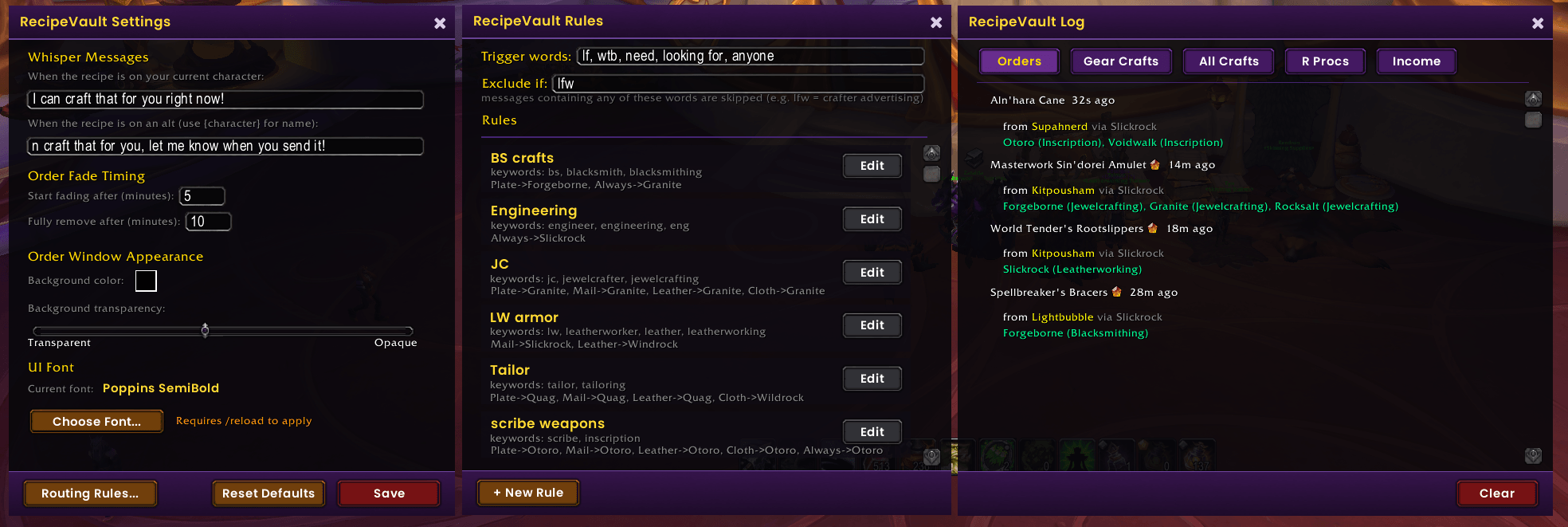
The Settings window (accessible via /rv settings or the gear icon on the order window) is worth visiting before you go live. Set your whisper templates — the messages sent to customers when you claim an order — and configure your Routing Rules to assign armor types to specific characters. You can also choose a UI font from whatever font addons you have installed, and pick a bar color to match your UI theme. Sound alerts are on by default so you'll hear a ping when a new order arrives even if the window is tucked away.
Setup steps:
- Type
/rv ordersto open the main order window and position it somewhere convenient on your screen - Log into each crafting character and open their profession window to trigger an automatic recipe scan
- Type
/rv settingsto open Settings and fill in your whisper message templates - Click Routing Rules... to create rules that route Plate requests to your Blacksmith, Leather to your Leatherworker, and so on
- In Routing Rules, check the Exclude if field —
lfw(Looking For Work) is already there to prevent crafters advertising their own services from triggering your alerts - Set your Trigger words (default: lf, wtb, need, looking for, anyone) to match how customers ask in Trade chat on your realm
- Open the Log window (
/rv log) and explore the tabs — Orders, Gear Crafts, All Crafts, R Procs, and Income all populate automatically as you play - When an order appears, click the character button to send your whisper and claim the job — the order fades and disappears automatically after the time window you set in Settings
- After a crafting session, check the Income tab to see net commissions broken down by profession, and R Procs to see how many reagents Resourcefulness returned
- Use the Copy Data button on any tab to export your data as CSV for pasting into a spreadsheet
Recipe Vault Team