


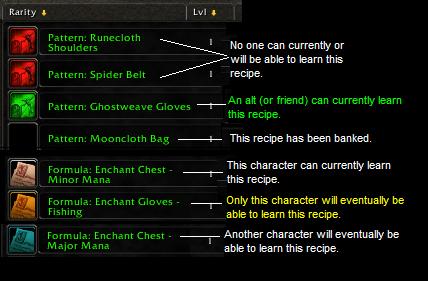
Color-coded auctions
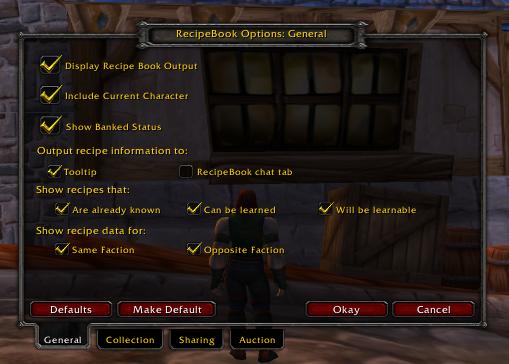
Options Frame
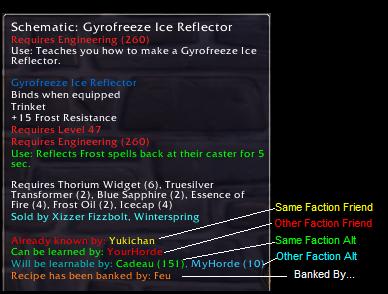
Tooltip output for friends and alts!
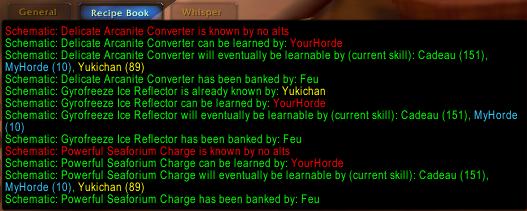
Alternative output to the RecipeBook Chat frame
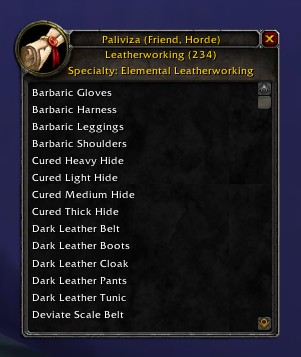
Output from the /rb skill command
Description
Note:
I'm sorry folks, but with our second baby due Any Day Now (TM) and the rearrangements in lifestyle and cost that have taken place as a result of that, in addition to my declining interest in WoW, I'm going to have to put RecipeBook on indefinite hold. I've been trying to dredge out a 4.0 release but I just can't find the time or energy. If there is someone out there who wants to take over the project, please let me know.
- RecipeBook: Ayradyss's Addon
- Last Update: 11 March 2010
- Contact: recipebook (at) mistwalker.org
- Install: Unzip into the World of Warcraft/Interface/AddOns directory.
RecipeBook Version 3.3.2 beta 2
Note: interim builds are available at http://home.comcast.net/~recipebook - but be aware, these builds may be buggy and may or may not be compatible with formal release versions.
A RL Note: I work full-time plus and have a toddler. Real Life always comes first. Please do keep me up to date on bugs and requests, but there may be blocks of 4-6 weeks where I don't do anything but work and sleep, no time for code.
Brief description:
Adds information to recipes on which alts know or can learn them. Color codes recipes in the auction house. Allows sharing of recipe data between accounts.
For example:
I have character BetsyRoss, who is a tailor by nature. She knows Pattern: American Flag, but for some reason, I can never remember this when UncleScrooge goes to the auction house to buy patterns.
- Previously, would have to keep a written or mental list of BetsyRoss's known patterns so that UncleScrooge didn't buy her a second copy of Pattern: American Flag on accident.
- Now, with RecipeBook, UncleScrooge can mouse over Pattern: American Flag and see "Already known by: BetsyRoss" right there on the tooltip - or, if he chooses, in a special chat tab just for RecipeBook information.
It's fun! It's helpful! It's easy to use! It's also still in development, so there are a few known issues and some miscellaneous housework to be done.
Usage
/rbk or /recipebook will all work for slash commands. PLEASE NOTE: /rbk no longer works for RecipeBook. RecipeBook has a minimap icon that allows you to access most RecipeBook commands as well.
General:
- - /rbk help : Displays a help message
Sharing:
- - /rbk send <alt> to <player> : Sends your RecipeBook data for a given alt to another player. Use 'all' as your alt to send all alts you know. Use 'me' to send just your character. Use 'guild' to send to your guild.
- - Right-click on the minimap icon and select "Shared Data" for sharing options. If a character is targeted, RecipeBook will use that character. Otherwise, you will be prompted for a name.
Banking:
- - /rbk bank : Displays your banked items and options for banked items.
Skill Display
- - /rbk skill : Use /rbk skill to open a window which allows you to browse recipes known by alt and tradeskill. So, just in case UncleScrooge were curious, he could type "/rbk skill", select BetsyRoss via the dopdown menu accessed by clicking on the "[click to change]" next to his name, and view all her Tailoring recipes.
Searching
- - /rbk search : Opens the RecipeBook Search Window. (You can also bind this to a key)
- - /rbk search <item> : Searches for items containing the given string.
- - /rbk searchmats <item> : Searches for items using materials which match the given string.
Configuration:
- All configuration options can be accessed through the RecipeBook GUI: use /rbk config to open this, use the minimap icon to open the configuration, or bind a key to it using the "keybindings" button in your main menu.
Color Configuration:
- Use the minimap icon to change colors for items or open the RecipeBook UI window with /rbk config and select the "Colors" tab.
Known issues:
- RecipeBook only updates its recipe list when your tradeskill window is open. So, if BetsyRoss just learned Pattern: Giant American Flag, she'll have to open her Tailoring window before RecipeBook (or UncleScrooge) knows about it.
Compatibilities:
For mod authors:
- The easiest way to add RecipeBook compatibility to *your* mod is to call the following in your tooltip output:
RecipeBook_DoHookedFunction(tooltip, [link]);
- - Where tooltip is the tooltip (or tooltip name) you're using and (now optional) link is the item link itself. That will add RecipeBook's data lines.
Special thanks:
Curse Gaming's Pentarion and Ghandi, for some hard work helping me debug the German client version. Particularly to Pentarion for ongoing translation work.
The Recipe Book Team
