


RealLifeReminder
RealLifeReminder
A comprehensive real-life management tool for WoW players. Never lose track of time, forget important tasks, or neglect your health while gaming again.
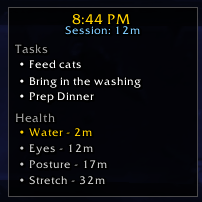
RealLifeReminder provides a sleek, draggable widget that displays the current time, session tracking, tasks, alarms, and health reminders - all in one place. Compatible with WoW Retail, Classic Era, and Cataclysm Classic.
Features
Time Management
- Real-time clock - Always visible 12-hour clock display
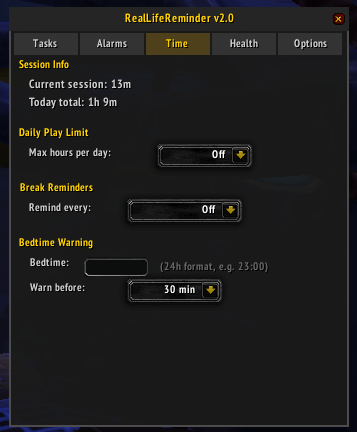
- Session tracker - See how long you've been playing this session
- Daily play time - Tracks total play time per day (persisted across sessions)
- Play limit warnings - Set a daily hour limit and get alerts when approaching/exceeding it
- Break reminders - Automatic reminders to take breaks at configurable intervals
- Bedtime warnings - Get notified when it's approaching your configured bedtime
Task System
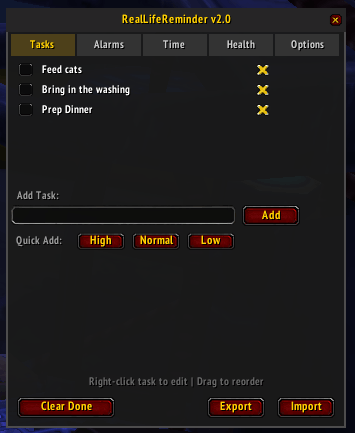
- Priority levels - Color-coded High (red), Normal (white), and Low (gray) priorities
- Due dates - Set optional due times; tasks turn red when overdue
- Recurring tasks - Daily or weekly tasks that automatically reset
- Right-click to edit - Modify task text, priority, due date, or recurrence
- Drag to reorder - Organize tasks by dragging them in the list
- Export/Import - Save and share task lists as encoded strings
Alarm System
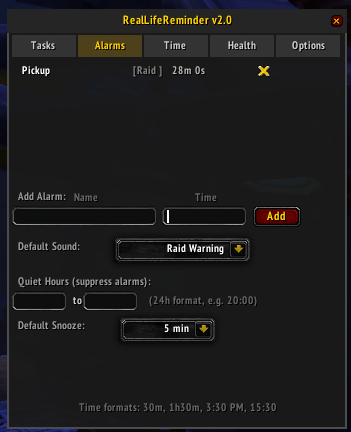
- Flexible time input - Set alarms using countdown (30m, 1h30m) or clock time (3:30 PM, 15:30)
- Multiple sounds - Choose from 6 different alert sounds
- Snooze function - Snooze triggered alarms for 5, 10, 15, 30, or 60 minutes
- Quiet hours - Suppress alarms during specified times (great for raid time)
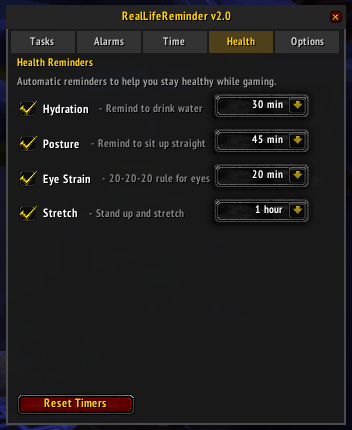
Health Reminders
- Hydration - Reminders to drink water
- Posture - Reminders to sit up straight
- Eye strain - 20-20-20 rule reminders (look away every 20 minutes)
- Stretch - Reminders to stand up and stretch
- Each reminder has configurable intervals and can be shown on the widget
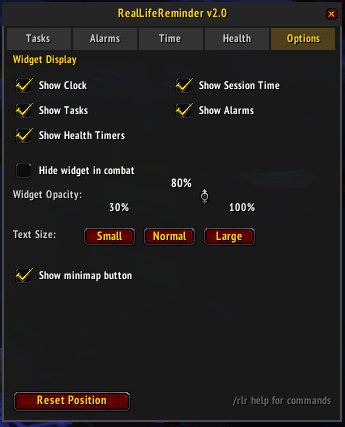
Widget Customization
- Draggable - Position anywhere on screen
- Hide in combat - Automatically hides during combat
- Opacity slider - Adjust transparency (30-100%)
- Section toggles - Show/hide clock, session, tasks, alarms, and health timers independently
- Text size - Small, Normal, or Large display options
- Minimap button - Quick access to toggle panel and widget
Slash Commands
/rlr Toggle the main settings panel
/rlr add <task> Quickly add a new task
/rlr alarm <name> <time> Set an alarm (e.g., /rlr alarm Raid 8:30 PM or /rlr alarm Break 30m)
/rlr tasks List all tasks in chat
/rlr alarms List all active alarms in chat
/rlr session Display current session and daily play time
/rlr size <small|normal|large> Change widget text size
/rlr clear Remove all completed tasks
/rlr export Export tasks to a shareable string
/rlr import <string> Import tasks from an export string
/rlr help Show all available commands
You can also use /reallife instead of /rlr.
Usage Tips
- Left-click the widget to open the settings panel
- Drag the widget to reposition it
- Right-click a task in the panel to edit it
- Drag tasks in the panel to reorder them
- Left-click the minimap button to toggle the panel
- Right-click the minimap button to toggle the widget
Panel Tabs
- Tasks - Add, manage, and organize your tasks
- Alarms - Set alarms and configure sound/quiet hours
- Time - Session stats, play limits, break reminders, bedtime settings
- Health - Enable and configure health reminder intervals
- Options - Widget display settings, opacity, text size, minimap button
Stay healthy, stay organized, and never miss raid time again!
RealLifeReminder Team
