


ReagentSkillTips

preview.webp
tooltip_normal.png
tooltip_expanded.png
tooltip_compact.png
settings_professions.png
Description
Reagent Skill Tips
See what a crafting reagent is used for, right in the item tooltip
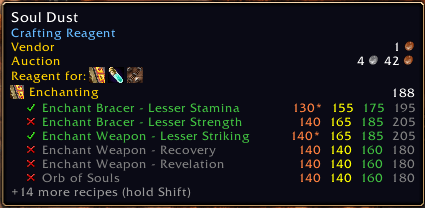
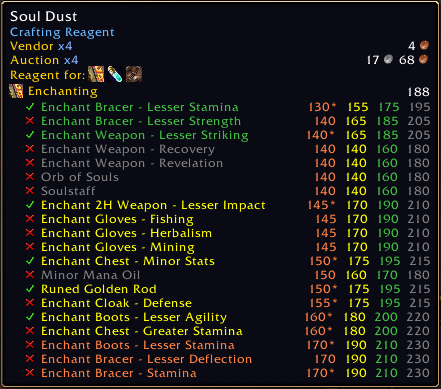
Reagent Skill Tips adds a short overview to the tooltip of every crafting material in World of Warcraft: Forever - which professions use it, which recipes, and at which skill levels. The recipes are coloured for your character's current skill, so you can see at a glance whether a material is worth keeping for levelling a profession.
It shows skill levels where the recipe turns orange, yellow, green and grey.
✓ means your character knows the recipe, ✗ that it does not.
Class spell reagents, for example Light Feather for Slow Fall (Mage) and Levitate (Priest), Shiny Fish Scales for Water Breathing, Soul Shards and Rogue poisons – each class in its class colour with the level the spell is learned at.
Features
- Every recipe in the game, not only the ones your character knows.
- Profession, class and event icons in the "Reagent for" line for everything that uses the item, also the ones you have filtered out.
- Known recipes are marked with a ✓ and unknown ones with a ✗. Open each profession window once so the addon can see your recipes.
- Class spell reagents, for example Light Feather for Slow Fall (Mage) and Levitate (Priest), Shiny Fish Scales for Water Breathing, Soul Shards and Rogue poisons. Each class is shown in its class colour with the level the spell is learned at. Spells your own class is not high enough level for are red.
- Darkmoon Faire quests: items such as Small Furry Paw, Copper Modulator and the decks show the Darkmoon Faire icon and the quests with how many items they need.
- x2 shows when a recipe, spell or quest uses more than one of the item.
- Hold Shift to see all recipes. Without Shift, the list starts at the first recipe that is not grey for you.
- Works in normal item tooltips and in chat links.
- No dependencies: the data for every recipe in the game is built in.
Settings
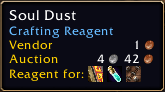
- Tooltip: show info in tooltips, compact view (only icons until you hold Shift), how many recipes are shown without Shift (1–30), reagent counts, skill numbers, grey recipes and known recipes.
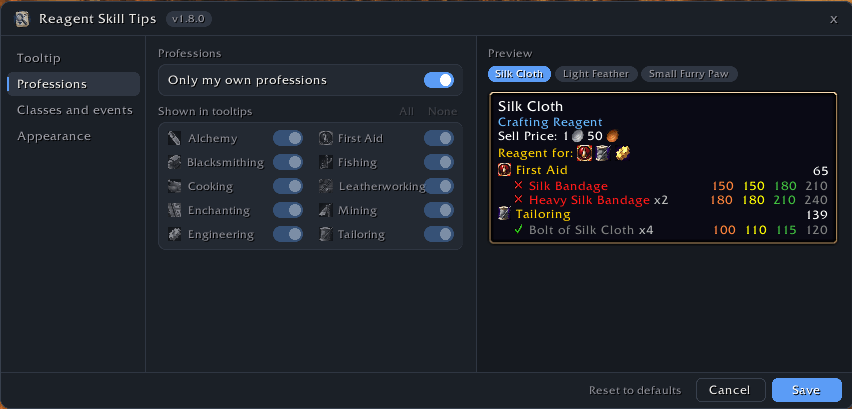
- Professions: only your own professions, or turn each profession on or off.
- Classes and events: class spells (Off, All classes or My class) and Darkmoon Faire quests.
- Appearance: background transparency of tooltips with reagent info (0% is fully solid; text, icons and the border stay visible), and the minimap icon.
- Changes are saved when you click Save.
- Reset to defaults sets everything back.
- Settings are saved per character.
Commands
- /rst – list all commands
- /rst config – open the settings window
- /rst item <itemID or link> – print the info for an item in chat
- /rst classes [all | mine | off] – class spells in tooltips (no word: on/off)
- /rst events – Darkmoon Faire quests on or off
- /rst transparency <0-100> – background transparency of tooltips with reagent info
- /rst known – turn the check/cross marks on or off
- /rst status – check the data, your skills and known recipes
About the skill levels
The yellow and grey levels come from WoW: Forever's own game data, and the green level is halfway between them. The orange level (the skill requirement) comes from LibProfessionDB.
*: the skill requirement is borrowed from Vanilla and not yet confirmed for Forever.
?: that level is not known for Forever yet, or the recipe is never orange.
Feedback
Please feel free to shoot any feedback in the comments - it is much appreciated
Found a recipe with wrong skill levels, or a bug? Open an issue on GitHub with the recipe name and the levels your trainer or profession window shows. Or write to me in the comments.
Source code: github.com/megasejfar/ReagentSkillTips · License: MIT
Recipe data from LibProfessionDB by Pimptasty (MIT License).
ReagentSkillTips Team
