


ReadyCheckSim!
- By
rcs.png
rcsite.png
Description
ReadyCheck Sim
Your sim results, inside the game. ReadyCheck Sim exports your character for simming on readychecksim.com, then brings the results back into World of Warcraft: saved beside your character sheet, and on the tooltip of every item a sim covered.
Most sim tools stop at the website: you sim, read a list, then try to remember it when a drop shows up. ReadyCheck Sim keeps that answer where you need it, on the item itself.
What it does
Upgrade values on item tooltips
Every item one of your sims covered gets a ReadyCheck line on its tooltip, in your bags, the Great Vault, a loot roll and the Dungeon Journal:
- +1.8% DPS in green when it's an upgrade, about the same when it barely matters
- Which sim said so, and how old that sim is (
Top Gear, 2d) - Set and tie notes: when an item only gains as part of a pair, it says so
- The same item at another item level says which one the sim used, so a lower-level copy isn't mistaken for the upgrade
These come from full SimulationCraft runs of your own gear, not from stat weights, so trinkets, set bonuses and on-use effects count properly.
A library of saved sims, per character
- Keep up to 40 sims for each character, alts included, until you delete them
- Rename them (
Raid night,Mythic+ week 3), reorder them, delete them - Top Gear, Droptimizer and Stat Weights, each shown as you'd read it on the site: the best upgrades first, every bar starting from zero
- Droptimizer sims remember where the drops come from (
Mythic raid,+10 dungeons) - A ReadyCheck tab on the character sheet opens the list right beside your gear
Character export, no extra addon needed
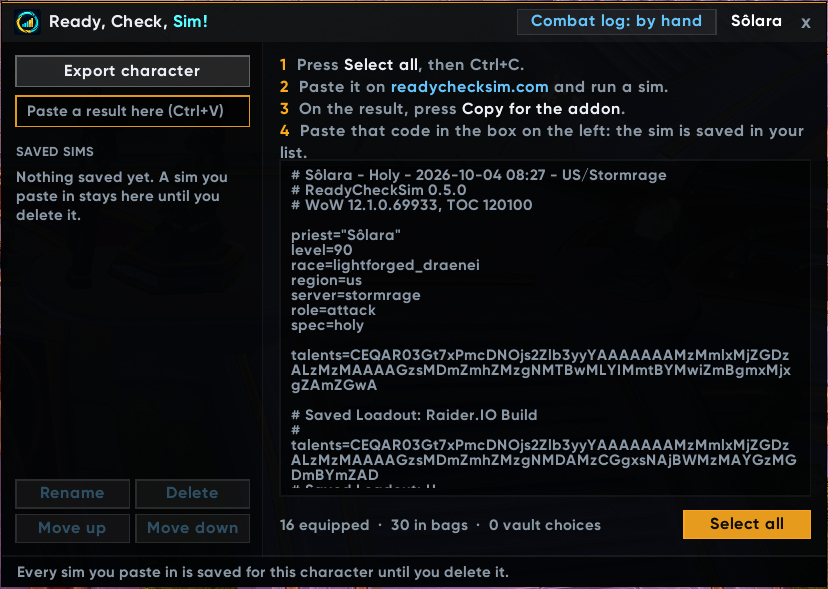
/rcs send writes the same export the SimulationCraft addon does: gear, bags, Great Vault, talents and your saved talent loadouts. Paste it on the site. If you already use the SimulationCraft addon, its export works too.
Combat logging that turns itself on (optional)
Forgot /combatlog again? Switch on automatic logging and the addon turns combat logging on as you enter a raid or a Mythic+ dungeon, and off when you leave. It's off until you ask for it: /rcs log on, or the button in the window.
No copy and paste with the ReadyCheck app (optional)
With the free ReadyCheck app for Windows, press Send to the addon on a result, give it a name, and /reload: it's in your saved sims. The addon never goes online; the app writes the sim into the addon's folder, where the game reads it on login or reload.
How to use it
- In game, type
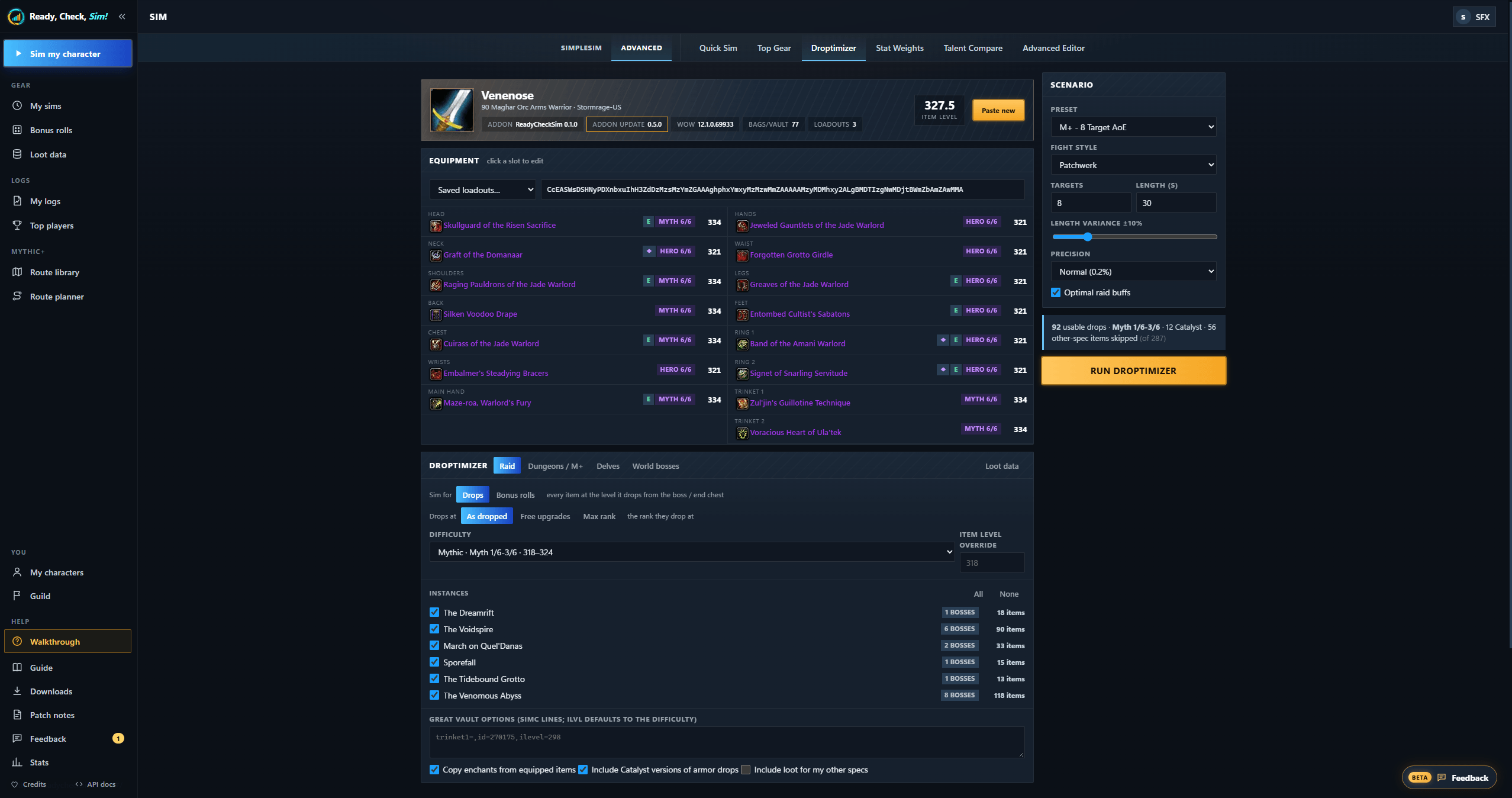
/rcsand press Export character, then copy it. - On readychecksim.com, paste it and run a Top Gear, Droptimizer or Stat Weights.
- On the result, press Copy for the addon.
- Back in game, paste it into the box above your saved sims. Done: your tooltips know it.
Commands
| Command | What it does |
|---|---|
/rcs |
Open or close the window |
/rcs send |
Your character, ready to copy |
/rcs results |
Your saved sims; paste a result code to add one |
/rcs log on / off |
Automatic combat logging in raids and Mythic+ |
/rcs scale 1.1 |
Window size (0.7 to 1.5) |
/rcs clear |
Delete this character's saved sims |
/rcsim works too. It's also in the addon list button by the minimap.
Good to know
- Light and quiet: no minimap button, no sounds, nothing running in combat beyond your tooltips.
- Fits your UI: beside EllesmereUI it uses that UI's font and draws its tab the way EllesmereUI draws its own.
- Private: the addon never connects to anything (WoW doesn't allow it). Nothing leaves your game unless you copy it out yourself.
- Free, no ads.
Credits
- Export format by the SimulationCraft addon. Sims are run by SimulationCraft. Thank you!
- LibStub (public domain) and LibDeflate by Haoqian He (zlib licence) are included.
ReadyCheck Sim is a fan project, not affiliated with or endorsed by Blizzard Entertainment, SimulationCraft or Raidbots.
The website
readychecksim.com: free, no ads.
- Sims for every spec: Top Gear, Droptimizer, Stat Weights, run by SimulationCraft; healer gear scored by QE Live's engine
- My logs: your own pulls graded against the top players of your spec, and every death explained (what killed you, what you still had ready)
- Mythic+: a route library and a route planner that checks your group's kicks and dispels
- The ReadyCheck app for Windows (beta): records your boss pulls and keys, adds them to My logs as they end, replays any death with its log on the timeline, and sends sims to this addon
Support
ReadyCheck Sim and readychecksim.com are free, with no ads. If they helped you:

or ko-fi.com/sfwxre ☕
The ReadyCheckSim! Team
