
Ready Check Reminder
- By
Ready Check Reminder is an addon that shows your personal raid note assignments when a ready check starts
Description
Ready Check Reminder is open source, and development is done on GitHub. You can contribute code and report issues there.
Introduction
Ready Check Reminder shows you your own assignments for the boss you are about to pull. When a ready check goes out, it reads the raid note (MRT, and NSRT if you use it), finds the lines with your name and puts a short reminder on screen, like "Soak 2" or "Interrupt order 3".
You set up the reminders for a boss once (which keyword to look for and what to show), and after that your raid leader only has to keep the note up to date.
Usage
/rcr- opens the settings/rcr reset- moves the settings window back to the middle of the screen, in case you dragged it off- Minimap button - opens the settings
Key Features
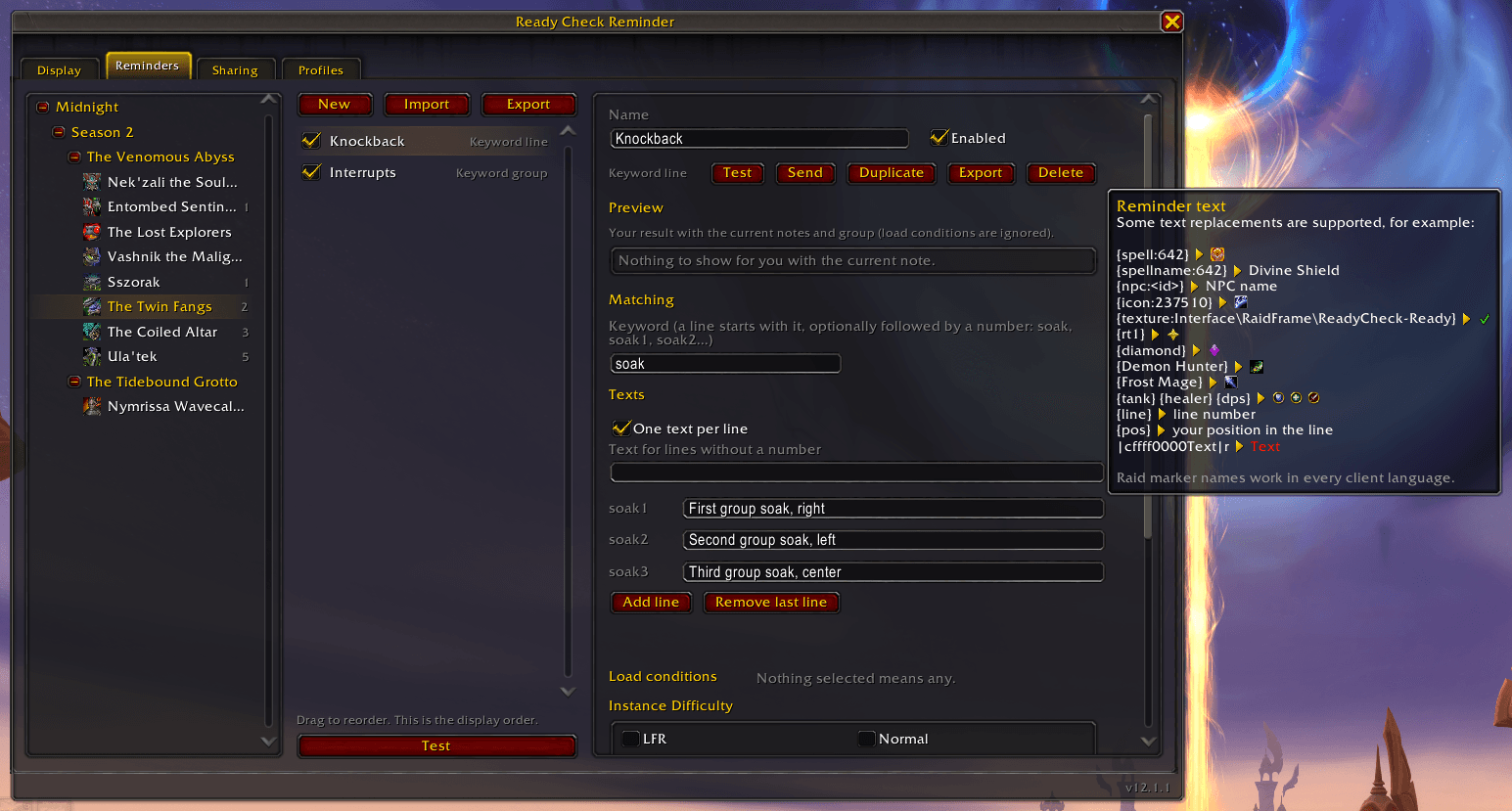
- Three reminder types:
- Keyword line - a line that starts with the keyword, optionally followed by a number (
soak,soak1,soak2). One text for every line, or a separate text for each number.soakwill not matchgrimsoak1. - Keyword group - everything between a start and an end keyword. Each line inside counts as line 1, 2, 3 and so on. One text for the whole block or one per line.
- Raid group - a text for raid groups 1-8, any grouping you like. Does not read the note at all.
- Keyword line - a line that starts with the keyword, optionally followed by a number (
- Text replacements (hover the text box in the editor for examples):
{spell:<id>}- spell icon{spellname:<id>}- spell name in your game language{npc:<id>}- NPC name in your game language{icon:<id or path>}/{texture:<id or path>}- any icon or texture{rt1}…{rt8},{star},{skull}and so on - raid markers, the marker names work in every client language{Mage},{Demon Hunter}- class icons (English names){Arms},{Frost Mage}- spec icons (English names, add the class when two classes share the spec name){tank},{healer},{dps}- role icons{line}- line number (keyword reminders only){pos}- your place in the line, counting only players who are actually in the raid
- Colour codes work in reminder texts too, e.g.
||cffff0000Text||r. - Load conditions: instance difficulty, class, specialisation, spec role and spec position (melee/ranged). Leave everything unticked to load for anyone.
- Live preview while you edit a reminder, and a Test button that shows it on screen (it fakes a note with your name if the current one doesn't have you).
- Movable display with font, size, outline, alignment, spacing, growth direction and duration settings.
- Profiles, with export and import of the whole profile or only some bosses.
Notes
- MRT shared and personal notes are read, as well as the NSRT note and your NSRT personal note for that boss. If a reminder finds you in the MRT note, NSRT is not checked for that reminder.
- Names match with or without the realm.
- NSRT nicknames work as long as nicknames are turned on in NSRT.
- Raid marks, plain words and players who are not in your group are skipped.
- Colour codes, icons and links in the note are cleaned up before matching.
Sharing reminders
You can share reminders with an export string, or send them straight to your group from the export window or the reminder editor. To share a whole raid, season or expansion at once, right-click it in the boss list and pick Send to group or Export.
Received reminders are filtered by the settings in the Sharing tab (Only trusted and Only guild are on by default):
- Only trusted - only accept reminders from the raid leader or assistants
- Only guild - only accept reminders from guild members
- Overwrite by default - replace your reminders without asking. With this off you get a popup for every share that would change something you already have.
If someone has a newer version of the addon, you get a heads up, but their reminders are still imported.
Localisation
I will be glad if you could help with the addon localisation through the Curseforge localisation feature.
Issues & Feedback
Found a bug or have a suggestion? Open an Issue on GitHub or reach out on Discord!
💬 Discord: Nikyou ☕ Support: buymeacoffee.com/nikyou
Credits
Thanks to the authors of Method Raid Tools and Northern Sky Raid Tools - their notes are what this addon reads.
Ready Check Reminder Team

Owner


