Ready Check Quiet
- By
A World of Warcraft addon that replaces the ready check and LFG queue pop sounds with a quieter version.
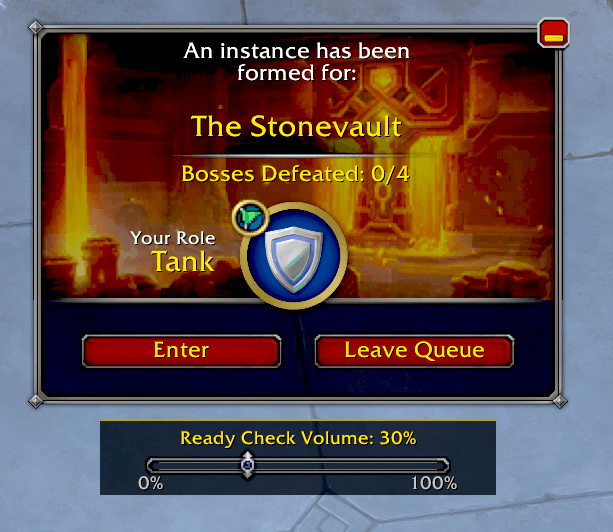
RCQ panel.png
Description
ReadyCheckQuiet
Tired of the ready check sound blasting your ears mid-raid or at LFG queue pop?
ReadyCheckQuiet silences the default ready check and Dungeon Finder queue pop sounds and replaces them with the same sound at a much lower volume — so you stay aware without getting startled.
Features
- Mutes the default ready check and LFG queue pop sounds
- Replaces them with the same sound at your chosen volume (10% through 100%, or fully silent at 0%)
- Volume slider displayed directly below the ready check and Dungeon Finder popups for quick in-the-moment adjustments
- Persistent settings — your volume preference is saved across sessions
- Slash commands for controlling everything from chat
- Compatible with WoW Retail 12.0+
How to Use
Install the addon and you're done — it works automatically on load. The volume defaults to 30%.
Adjusting volume:
- Drag the slider that appears below the ready check or queue pop window
- Or type
/rcq volume 50to set it from chat (any value 0–100, snaps to nearest 10)
Other slash commands:
| Command | Description |
|---|---|
/rcq volume <0-100> |
Set the replacement volume |
/rcq test |
Play a test sound at the current volume |
/rcq remute |
Re-apply sound mutes after a UI reload |
/rcq status |
Show current settings |
/rcq reset |
Reset all settings to default |
The Ready Check Quiet Team