


RBT - Rogue Bleed Tracker
- By
Screenshot_1.png
Screenshot_2.png
Screenshot_20261001_215410.png
Description
RBT - Rogues Bleed Tracker
Garrote and Rupture coverage at a glance for Assassination Rogues.
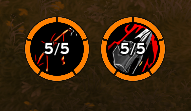
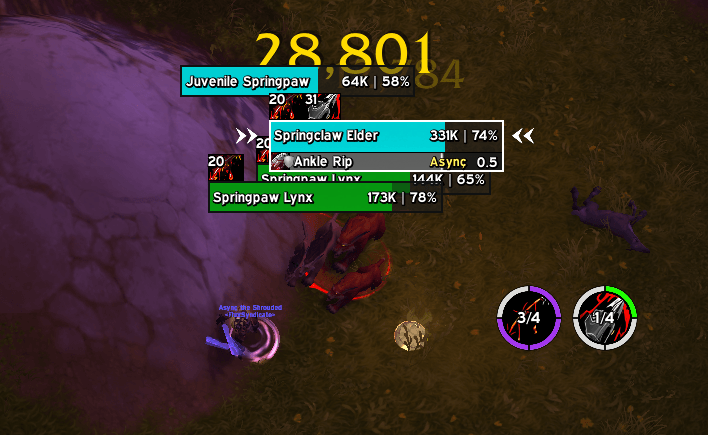
RBT shows two round icons, Garrote and Rupture. Each one has a ring split into one segment per enemy you are fighting. The ring fills clockwise from 12 o'clock as more of those enemies carry your bleed, and the icon shows the count, for example 5/11.
The fill colour tells you how much of the pack is covered, using WoW's item-quality colours:
| Enemies bleeding | Colour |
|---|---|
| under 25% | red |
| 25% or more | green (uncommon) |
| 50% or more | blue (rare) |
| 75% or more | purple (epic) |
| all of them | orange (legendary) |
Works with Midnight's aura restrictions
Since 12.0, addons can no longer read enemy auras in combat. RBT never tries. Blizzard's own aura widgets work out the count, and RBT only arranges what they draw. No secret value is ever read by addon code.
Usage
The display appears automatically in combat while you are in Assassination spec.
A Garrote icon on the minimap gives quick access:
- Left click — open or close the options window.
- Right click — lock / unlock the frame (drag it while unlocked).
- Drag — reposition the minimap icon around the minimap.
Everything in the options window applies live — no /reload required.
Options window
The window uses Blizzard's native PortraitFrameTemplate, so it matches the style of BugSack, WeakAuras and other modern addons. It has three sections:
Behavior
- Show only enemies in combat — toggle between "in combat only" (default) and every hostile nameplate.
- Lock frame — uncheck to drag the display around the screen.
- Hide minimap icon — hides the Garrote icon next to your minimap.
- Debug mode — prints diagnostic messages to chat.
Appearance
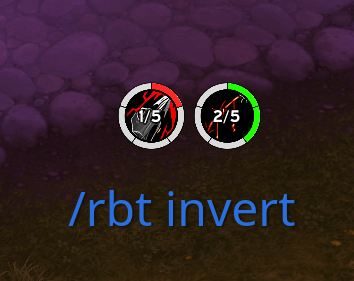
- Invert ring order — show Rupture on the left and Garrote on the right.
- Ring size (px) — 16 to 128.
- Ring width (px) — 1 to 20.
- Spacing between rings (px) — 0 to 40.
- Gap between segments (degrees) — 0 to 20.
- Max enemies shown — 1 to 40.
A Reset frame position button at the bottom restores the display to its default location.
Slash commands
The window covers everything, but power users can still use chat commands:
| Command | Effect |
|---|---|
/rbt |
Open the options window |
/rbt lock / /rbt unlock |
Lock / unlock the frame |
/rbt reset |
Move the frame back to its default position |
/rbt combat |
Toggle between enemies in combat and all hostile nameplates |
/rbt invert |
Swap the two rings: Rupture on the left, Garrote on the right (toggle) |
/rbt size <px> |
Ring diameter, 16-128 |
/rbt width <px> |
Ring thickness, 1-20 |
/rbt gap <deg> |
Gap between segments, 0-20 |
/rbt space <px> |
Spacing between the two rings, 0-40 |
/rbt max <n> |
Most enemies shown, 1-40 |
/rbt debug |
Toggle debug messages |
All numeric commands apply live.
Notes
Enemies count once they are in combat and you have threat on them. Training dummies never enter combat, so use /rbt combat to test on them, and switch it back afterwards.
Enemies need visible nameplates to be counted.
Technical notes
- Performance: the AuraContainer chain (40 links per ring) is built in chunks of 8 per frame using
C_Timer.After(0, ...). This avoids the frame hitch that would otherwise occur when rebuilding the display after a geometry change. During live slider drags, onlyResize()is called (cheapSetSize/SetPointupdates); the full chain is only rebuilt once the user releases the slider. - Combat lockdown: RBT never calls protected functions. The options window opens and closes freely even in combat.
- Event filtering:
UNIT_FLAGSandUNIT_THREAT_LIST_UPDATEonly trigger a rescan fornameplateNunits, not for every unit in the world.
Collaborators
Thank you to everyone who reached out with feedback, bug reports or code. RBT is better because of you.
License
GNU General Public License v2.0, see LICENSE.txt. You are free to use, modify and share RBT, as long as your version stays under the same license.
RBT - Rogue Bleed Tracker Team
