RangeBar (Hunter)
- By
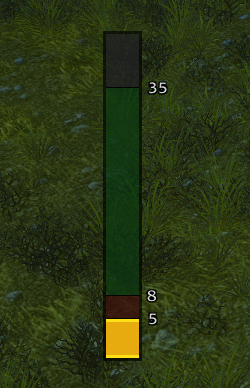
A vertical range bar for Classic Era Hunters. Melee, dead zone, shooting range, out of range — the band you're in lights up.
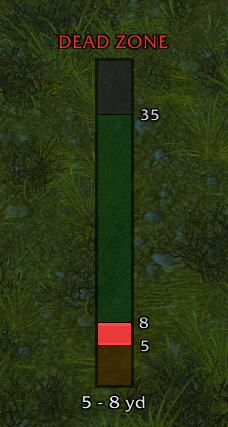
Dead Zone Text.png
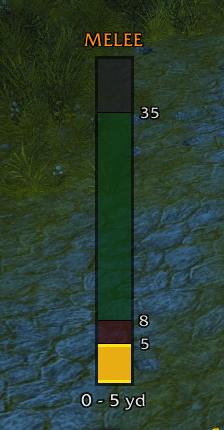
Melee Text.png
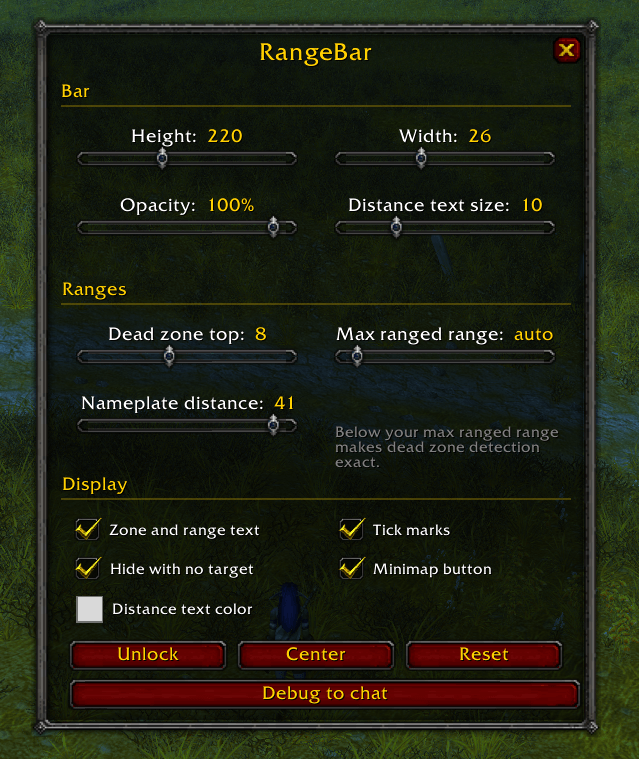
Options.png
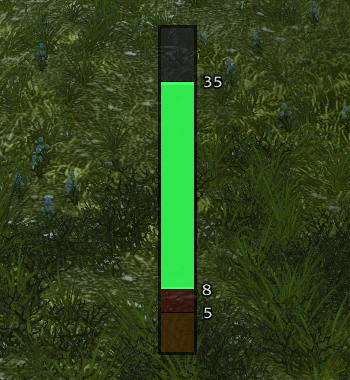
Green.png
Melee.png
Description
RangeBar (Hunter)
A vertical range bar for Classic Era Hunters, built around the one thing you need to know mid-fight: are you in the dead zone right now?
All four zones show as faint bands. The band you're in lights up, so you can read your range without looking away from the mob.
| Colour | Zone | Distance |
|---|---|---|
| Orange | Melee | 0 - 5 yd |
| Red | Dead zone | 5 - 8 yd, can't shoot, can't melee |
| Green | Shooting range | 8 - 35 yd (41 with Hawk Eye) |
| Grey | Out of range | beyond max |
The colour is exact - it comes from the game's own range checks, so it stays right for large mobs and Hawk Eye. The number below the bar is an estimate, shown as a bracket, because the client never gives addons an exact distance.
Dead zone detection works on hostile NPCs, not just friendly players. Max ranged range is auto-detected from your Hawk Eye rank. The bar only appears for targets you can actually attack.
Hunter only. The dead zone is a Hunter mechanic, so on any other class the addon disables itself rather than draw a band that would be wrong.
Options
Click the minimap button or type /rangebar (also /rb).
Bar - height, width, opacity, and the size of the distance text.
Ranges - dead zone top (default 8; set it to 5 on realms where the dead zone has been removed), max ranged range (auto by default), and nameplate distance. Setting nameplate distance below your max ranged range makes dead zone detection exact.
Display - toggles for the zone/range text, tick marks, hiding the bar when you have no target, and the minimap button. Distance text colour is a picker.
Buttons - Unlock to drag the bar, Centere, Reset for defaults.
Everything is in the options window; nothing is slash-command-only. Settings are saved per account.
/rb debug prints what every range check currently reports - please include it
in bug reports.
The RangeBar (Hunter) Team