
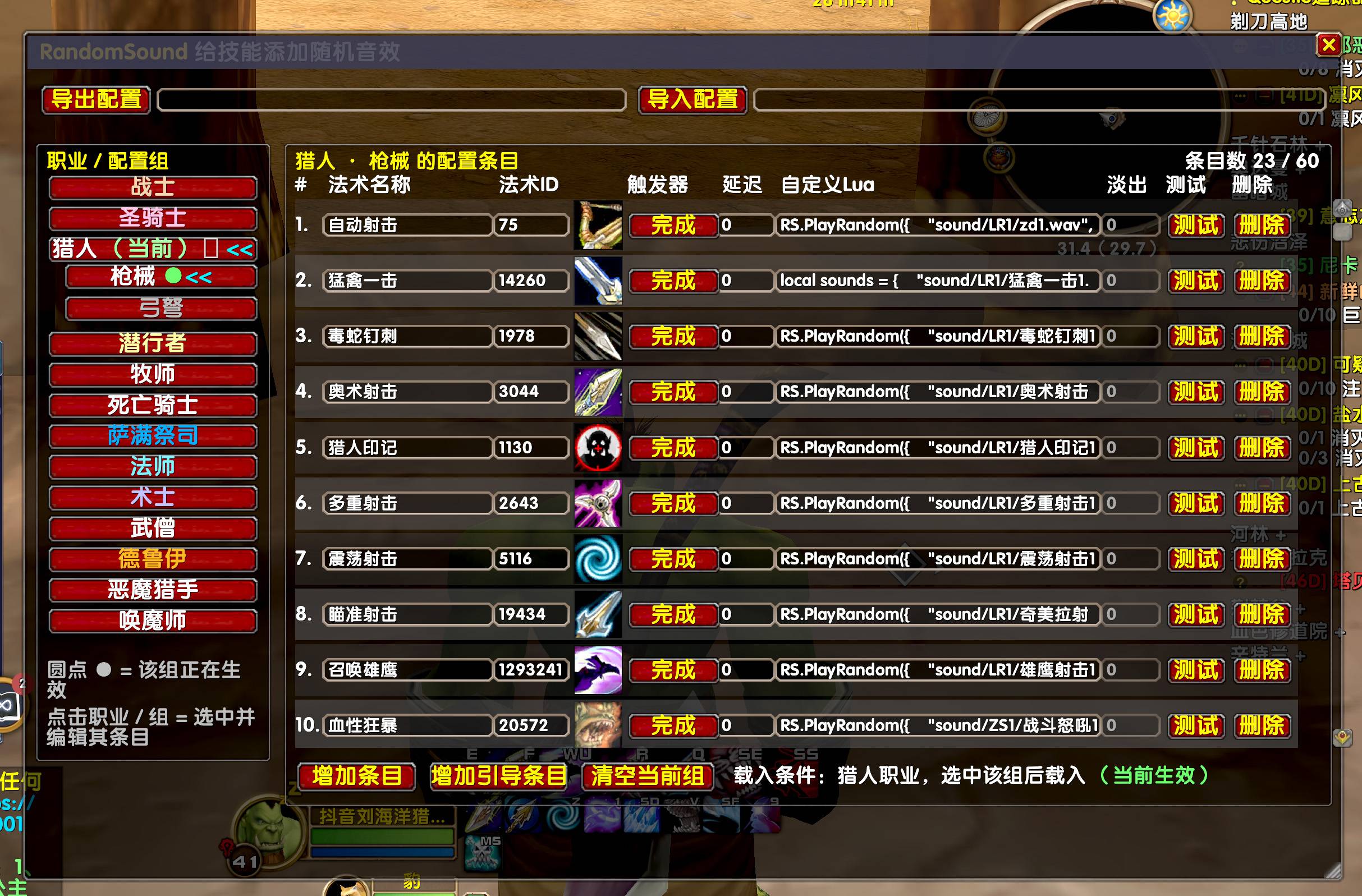
SCREEN v0.5.3.jpg
Description
Add random sound effects to your spells. Type /rs to open the settings.
v0.5.3
Remove the checkmark before Occupation, deselect the radio option before Firearms and Crossbows, and the Firearms button can be activated directly after being clicked.
v0.5.2
Trigger to change to the spell name,No entries with duplicate spell names. the spell ID only applies to the spell icon. The spell ID can be left blank, and the icon will show a question mark, which does not affect the sound effect
v0.3.5
Add a trigger for channeled spells, allowing the setting of the audio fade-out duration when casting is interrupted, Unit: seconds.
RS-specific LUA required
RS.PlayRandom({
"sound/Hunter/Spllname1.wav",
"sound/Hunter/Spllname2.wav"
}, "Dialog")
-------------------------------------------
v 0.3.3
Hunters are divided into guns and bows/crossbows groups, check to switch.
The window can be resized freely.
Compatible with Chinese and English clients.
The Spll icons are displayed, the font size is adjusted, and part of the descriptive text is deleted.
Supported All Versions
-------------------------------------------
Randomsound and WA Custom lua:
local sounds = {
"sound/Hunter/name1.wav",
"sound/Hunter/name2.wav",
"sound/Hunter/name3.wav"
}
PlaySoundFile(sounds[math.random(3)], "Dialog")
-------------------------------------------
only one sound Custom lua:
local sounds = {
"sound/Hunter/name1.wav"
}
PlaySoundFile(sounds[math.random(1)], "Dialog")
-------------------------------------------
Example of a complete path:
X:\World of Warcraft\_forever_\sound\Hunter\name1.wav
The standard channel names are:
"SFX", "Music", "Ambience", "Dialog", "Master"
# RandomSound 插件中文说明(魔兽世界)
给法术添加随机音效,输入 /rs打开设置面板
v0.5.2
触发器以**法术名称**匹配,不要出现重复法术名称的条目,法术 ID 仅用于显示法术图标。法术 ID 可以留空,图标会显示问号,不影响音效播放
v0.3.5
> 新增**引导类法术**触发器,可以设置施法被打断时音频淡出时长,单位:秒
> 插件专用 LUA 函数:
```
RS.PlayRandom({
"sound/Hunter/Spllname1.wav",
"sound/Hunter/Spllname2.wav"
}, "Dialog")
```
---
v0.3.3
>
> 猎人音效分组:枪械组 / 弓 & 弩组,勾选切换
> 设置窗口支持自由缩放
> 简中、英文客户端兼容
> 显示法术图标,调整字体大小,精简部分说明文字
> 全版本通用
---
## 自定义 LUA 脚本,RandomSound和WA通用
随机多条音效:
```
local sounds = {
"sound/Hunter/name1.wav",
"sound/Hunter/name2.wav",
"sound/Hunter/name3.wav"
}
PlaySoundFile(sounds[math.random(#sounds)], "Dialog")
```
单条音效:
```
local sounds = {
"sound/Hunter/name1.wav"
}
PlaySoundFile(sounds[math.random(#sounds)], "Dialog")
```
## 完整路径示例
```
X:\World of Warcraft\_forever_\sound\Hunter\name1.wav
```
## 可用音频通道(对应游戏音量滑块)
- `SFX`:音效
- `Music`:音乐
- `Ambience`:环境音
- `Dialog`:对话 / 语音
- `Master`:主音量