
RaidMaster - ANADOLU Raid Tools
- By
RaidMaster - LIVE Raid Assignments board everyone watches as the lead edits, your own floating assignments, Interrupt HUD, one-click Innervate buttons, Auto-Marking, 3D boss Guides, Compositions, buff/gear/attunement/version checks.
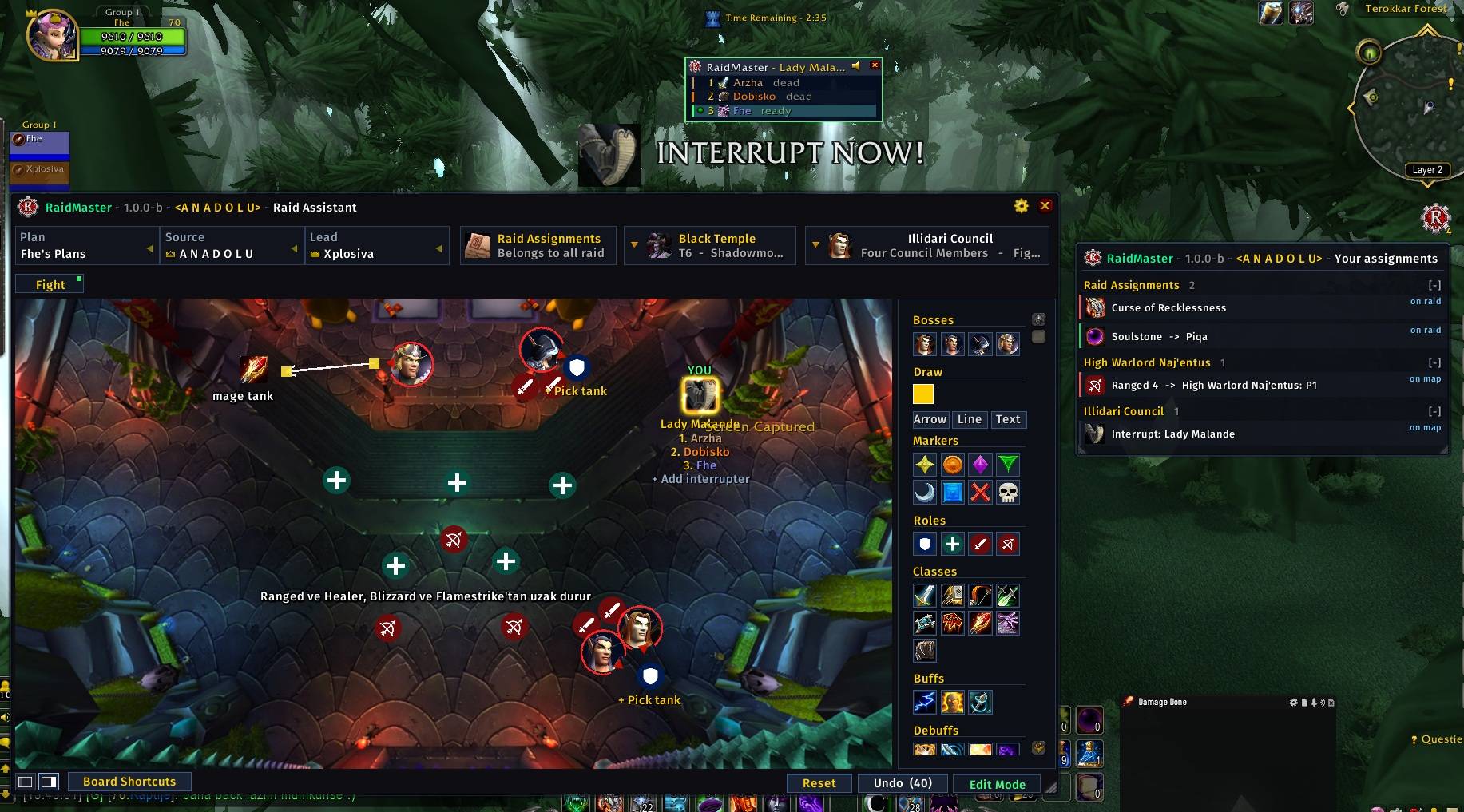
Screenshot 2026-08-30 154349.jpg
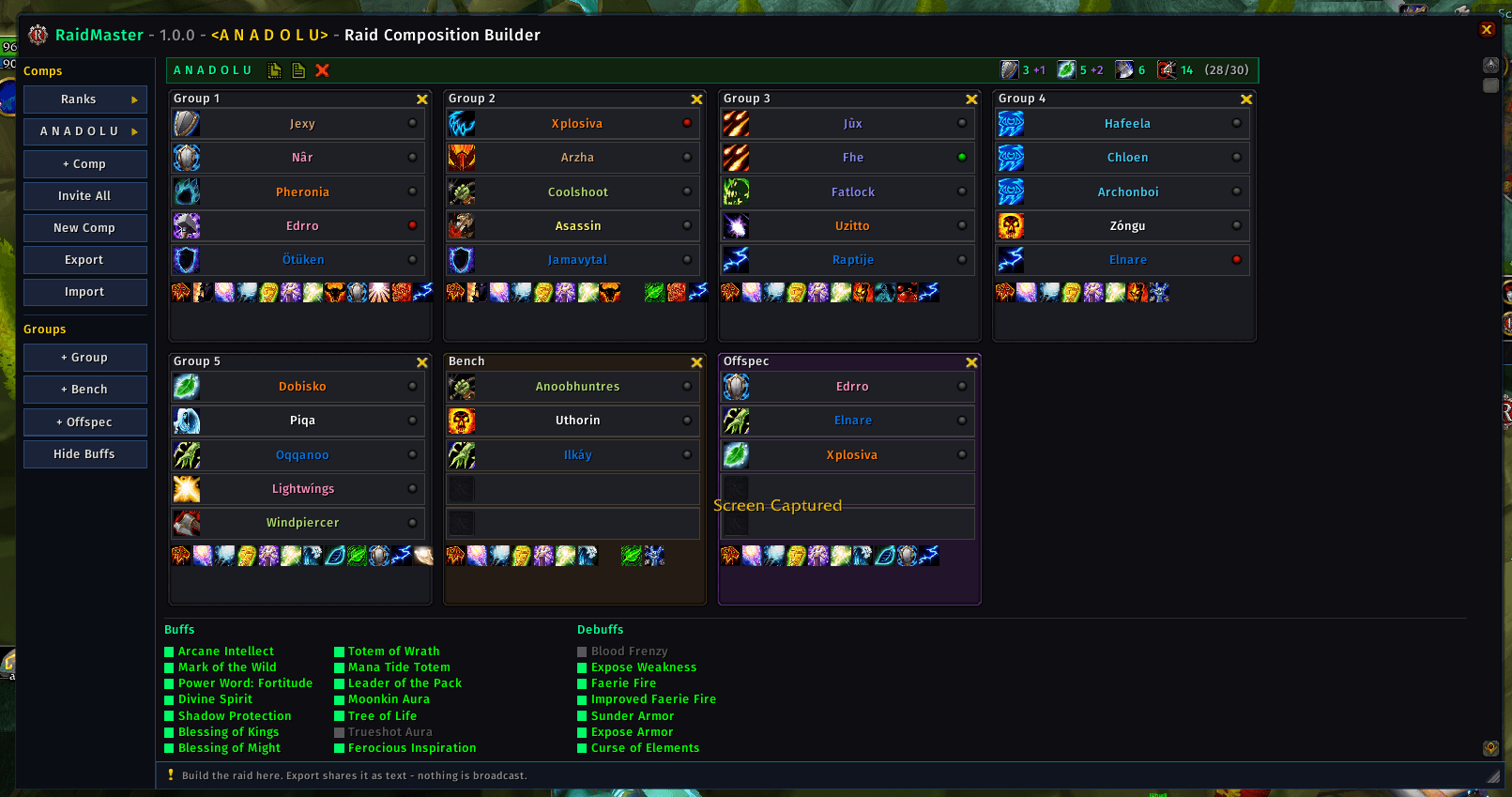
Screenshot 2026-08-18 135216.png
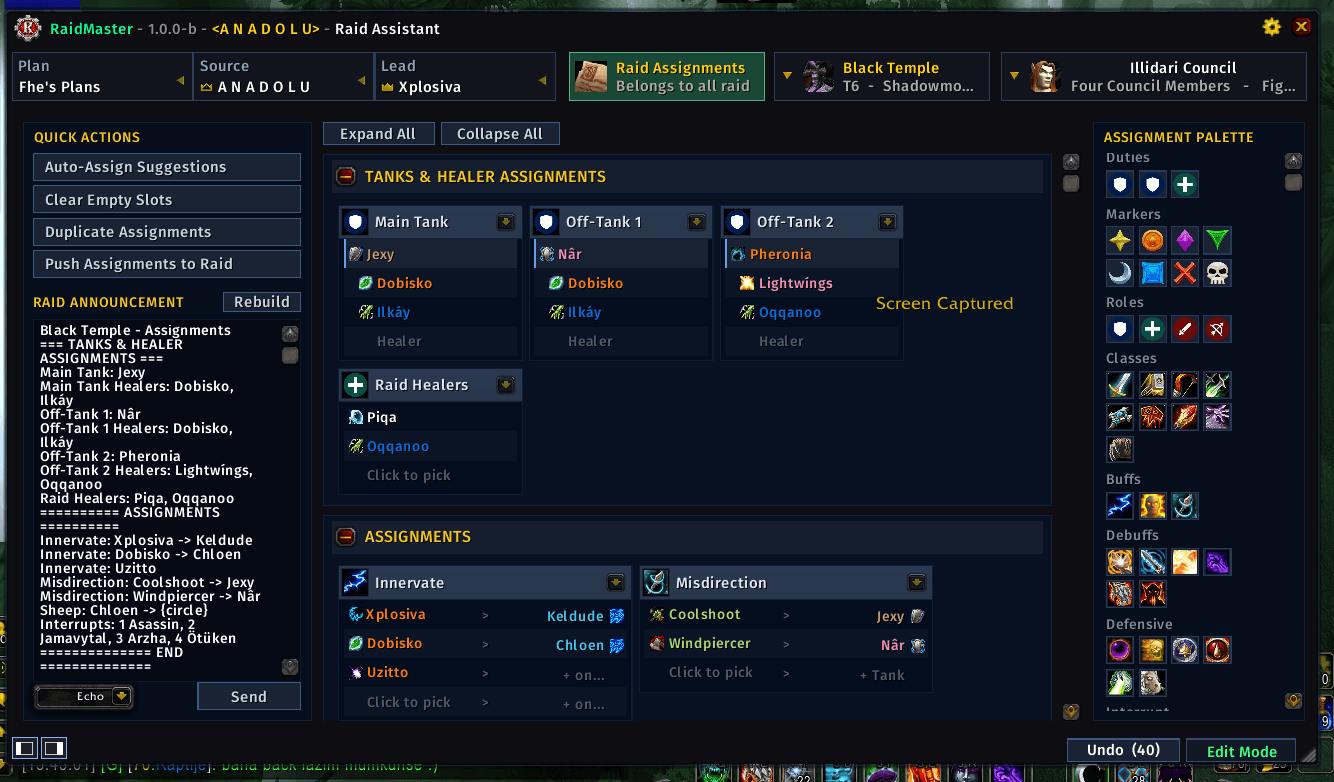
Screenshot 2026-08-30 154406.png
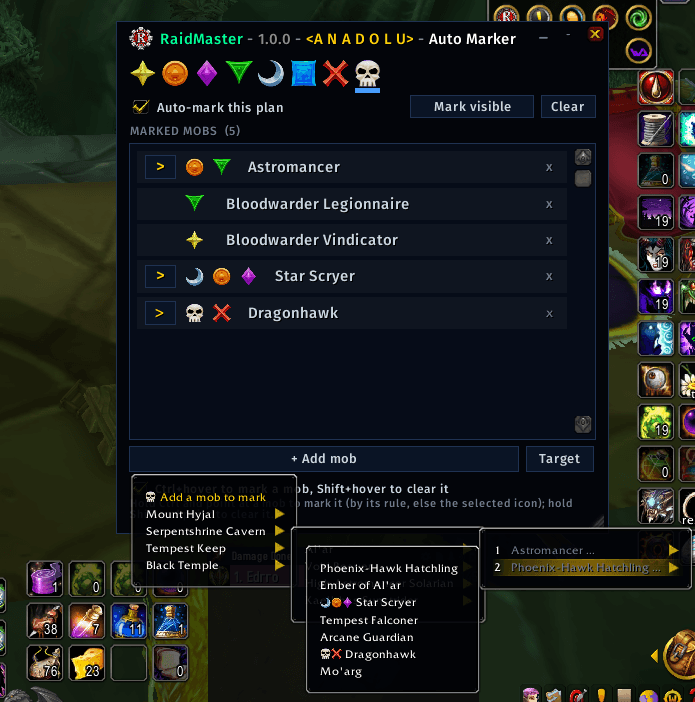
Screenshot 2026-08-29 130416.png
Screenshot 2026-08-18 135304.png
Description
RaidMaster
⚔️ All-in-one raid leading for the WoW Anniversary (TBC 2.5.x) client. 🇬🇧 English · 🇹🇷 Türkçe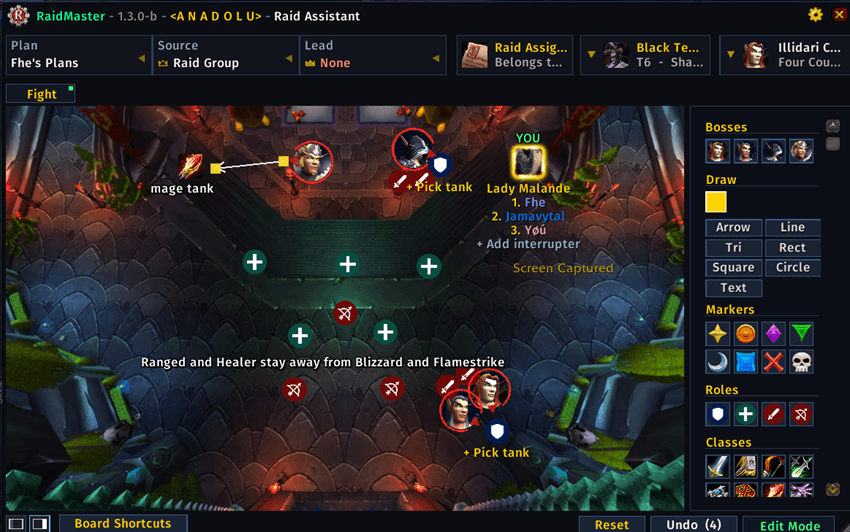
RaidMaster covers the whole raid night in one addon: form the group, plan every pull on a board the whole raid watches update live, hand every raider a floating window with only their own assignments, and check that everyone is geared, buffed, attuned and up to date. One matching window family, one click to share any of it.
🧭 One button, every tool
RaidMaster hangs a single button on your minimap.
- 🖱️ Left-click — opens the module menu (the list below).
- 🖱️ Middle-click — jumps straight to Raid Assignments.
The menu is headed by the addon name and version, and lists every tool in this order:
RaidMaster – v1.1.0-b
- 📖 Raid Guides
- 👥 Raid Compositions
- 📋 Raid Assignments
- ⏳ Raid Cooldowns
- 🧪 Raid Controller
- 🔍 Raid Inspect
- 🎯 Auto Marker
- 🤝 Raid Group Tools
- 🔑 Attunement Check
- 📡 Version Check
- ⚙️ Settings
Here is what each one does, top to bottom — the same order you'll see it on the minimap. 👇
📖 Raid Guides
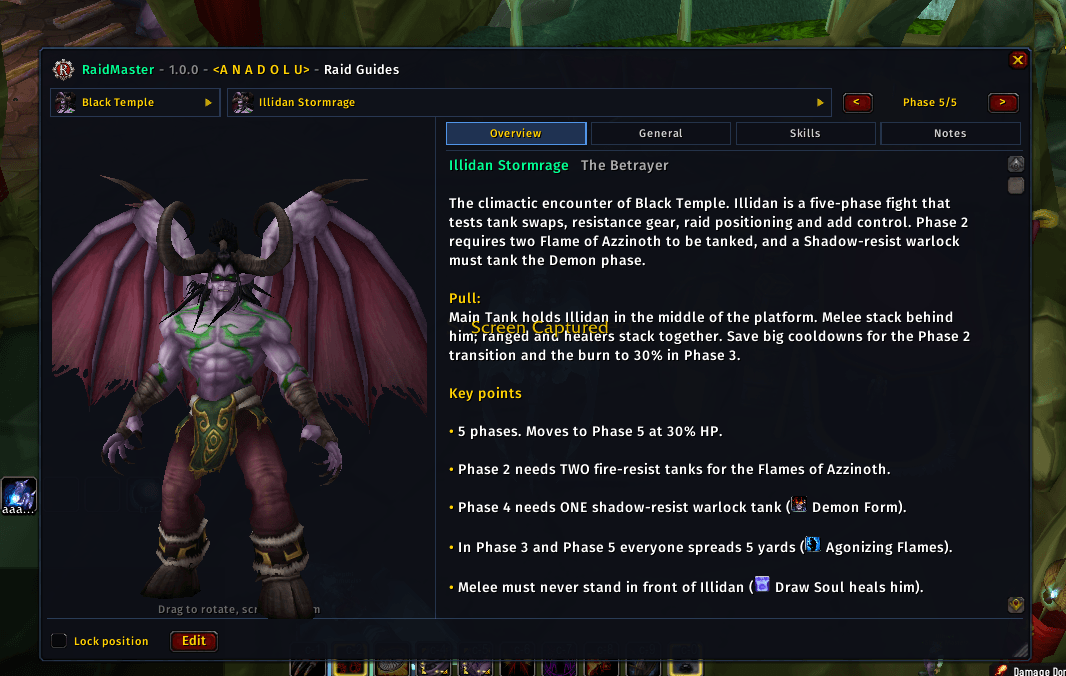
A floating, draggable boss guide with a rotatable 3D boss portrait, a phase-by-phase stepper, and Overview / General / Skills / Notes tabs. It shares its data with the assignment board, so an edit in one shows up in the other.
👥 Raid Compositions
Build, name and save complete raid setups group by group, with a class, role and spec on every slot. Share a whole composition as a single import/export code.
📋 Raid Assignments
The heart of the addon — and it is LIVE.
- 🔴 A live board, not a paste. While the lead assigns, every raider with the board open watches it change in real time. No re-posting walls of text, no screenshots to Discord — the raid is literally looking at the same board the lead is operating.
- 🛡️ Tank & Healer duties spell out who main-tanks, who off-tanks, and which healers cover each tank.
- 📝 Assignments — one section for everything else: interrupts, crowd control, dispels and utility. A raider can take several duties here when they need to (a Banish and a Soulstone), while on the per-boss maps each tank / healer / role slot holds one person — assign them to a new slot and they leave the old one, so a role is never double-filled.
- 🗒️ Raid Notes — an MRT-style notepad, built in. A free-text notepad for the fight plan, reached from Raid Notes in the board's Quick Actions (or
/rmnotes). Per raid, as many notes as you want (tabs along the top). Open it as a page over the cards or pop it out into its own movable, resizable window. Drop in the eight raid markers, class and role icons and roster names, and colour your text — even a single selected word. Share a single note with a guildmate (pick a rank, then a member) — and only when you send it; editing never broadcasts, and a received note arrives as a new tab. Frameless "just the text" mode and a minimized box too, each with its own settings (open as page/popup, scale, opacity, text size, the minimized box, and sharing) under Raid Assistant → Raid Notes. - 🪟 Your own floating board. Every raider gets a small floating Raid Assignments board that shows only their own assignments — it glows when something changes for them, and clicking an entry jumps straight to the boss map or the full board.
- ⚡ Assigned to Interrupt? You get the Interrupt HUD: the live rotation with class colors, a countdown, a green dot on whoever is next, a flashing center-screen "INTERRUPT NOW!" alert with sound when it's you — and your interrupt spell glows on your action bar. Kick targets can carry raid marks so you always know which mob.
- 💚 Assigned to Innervate? Both sides get a live button: the target can request it with one click, the caster's button glows on the request and casts on the assigned player — color-coded for range and cooldown, built combat-safe on secure buttons.
- 📢 One click to announce the whole plan to a channel of your choice, and 📍 per-boss tactical maps to pin assignments onto.
🧪 Raid Controller
A buff, consumable and ready-check engine. It scans the raid for missing raid-wide buffs (class-aware — it only asks for buffs a class in the group can actually provide), missing flasks/elixirs and food, then 💬 whispers the individuals who need topping up, posts a raid summary, and fires a one-click ready check ✅.
🔍 Raid Inspect
Inspect the raid's gear at a glance — item level, enchants and gems, and what's missing on whom.
🎯 Auto Marker
Rule-based raid marks by mob name. Give a mob type a kill-order of icons (☠️ ❌ 🌙 …) and it marks the pack on sight, nearest first — no clicking, and same-name mobs each get a different mark. Hold Ctrl + hover to place a mark by hand, or minimize to a compact bar for mid-pull control.
🤝 Raid Group Tools
The first twenty minutes of the night: keyword invites (matched whole-word, so "inv" never fires on "invisible"), auto-accept, promotion by guild rank, and setting the loot method. It even answers whispers instead of silently refusing them.
⏳ Raid Cooldowns
Who still has the raid's fight-saving buttons, at a glance — its own window, its own settings tab, and /rmcd. Rebirth, Innervate, Soulstone, Misdirection and Mana Tide are watched out of the box, with a couple of dozen more (Tranquility, Bloodlust/Heroism, Divine Intervention, Lay on Hands, Pain Suppression, Power Infusion, Shield Wall, Ice Block, Cloak of Shadows and the rest) you switch on in the settings, grouped by class. Each person is a depleting bar with an m:ss countdown — a full bar means ready, and the last minute actually ticks down instead of rounding to "1m". The bars are measured against the names actually on the board, so the window grows or shrinks to fit your raid.
🔑 Attunement Check
See at a glance who is attuned for SSC, TK, Black Temple and Mount Hyjal — account-wide aware, the way TBC attunement actually works.
📡 Version Check
Ask the guild or the raid who is running RaidMaster and which build they carry. Silence is the answer that matters — it means the addon isn't installed, or isn't loading.
⚙️ Settings
One window to configure the whole suite — layout, fonts, channels and each module's own options.
🔗 Share everything
Compositions, marker rules, assignment boards and guides all move through one import/export engine, and the raid lead can push a live board straight to the raid. Owner-keyed profiles, sharable plan packs and per-raid sessions keep each night's setup its own.
🌍 Languages
🇬🇧 English · 🇹🇷 Türkçe — both shipped and kept in step.
💬 Questions & bug reports
For all other questions and bug reports, join us on Discord: discord.gg/anadolu
RaidMaster - ANADOLU Raid Tools Team

![CEPGP LootMaster - ANADOLU [ML] project image](https://media.forgecdn.net/avatars/thumbnails/1653/486/256/256/639054580613569188.jpg)
![CEPGP LootMaster - ANADOLU [Core] project image](https://media.forgecdn.net/avatars/thumbnails/1653/479/256/256/639054575338689162.jpg)