
RaidLibs
- By
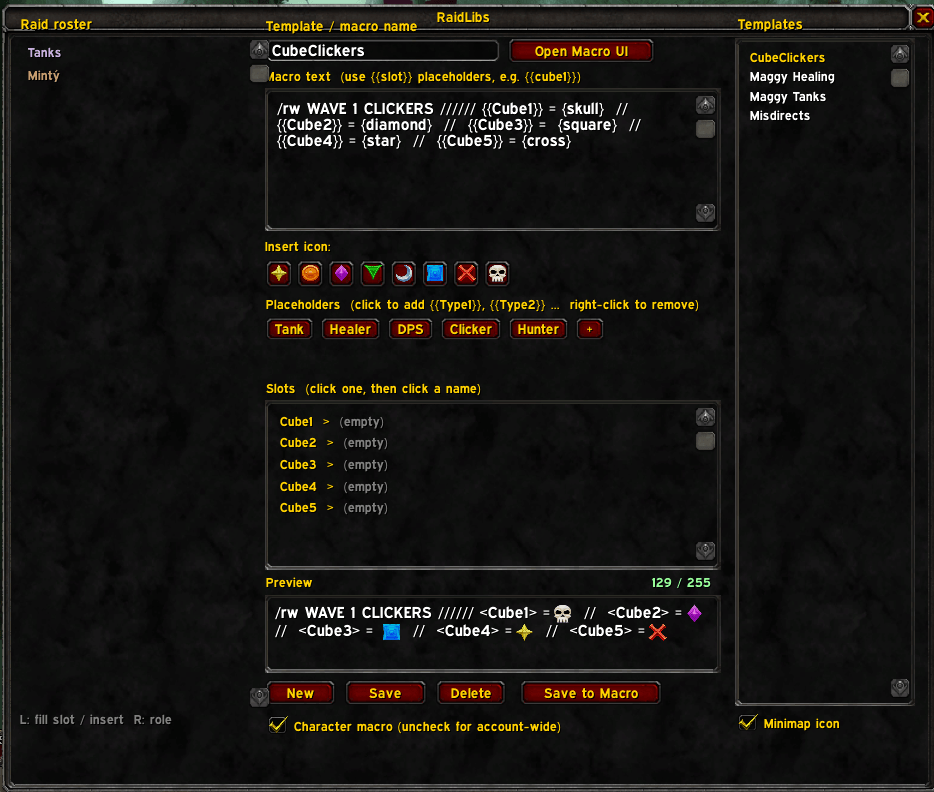
Macro making UI
Description
**RaidLibs** turns your raid assignments into reusable macro templates. Build a `/rw` announcement once with fill-in-the-blank placeholders, then each week just click your raid's names to refill it — no more retyping the cube-clicker macro every reset.
## The idea
Make a template like `{rt8} Cubes: {{Cube1}} {{Cube2}} {{Cube3}}` once. Next week, open RaidLibs, click names from your current raid into the slots, and push it straight to a real macro. Mad Libs for raid leaders.
## Features
- **Templates with placeholders** — write `{{Tank1}}`, `{{Healer2}}`, `{{Cube3}}` anywhere in the text and fill them by clicking.
- **Click-to-fill roster** — your current raid, grouped into Tanks / Healers / DPS and class-coloured. Click a slot, click a name, done. Click a name with no slot selected to drop it in at the cursor.
- **Auto-numbered placeholder buttons** — click "Tank" to insert `{{Tank1}}`, again for `{{Tank2}}`, and so on. Add your own types (Clicker, Hunter, Interrupt, whatever) and remove ones you don't use.
- **Raid target icons** — one-click buttons for star → skull (`{rt1}`–`{rt8}`); named tokens like `{skull}` and `{diamond}` render in the preview too.
- **Live 255-character budget** — the preview shows the assembled result with a running character count that turns red when you'd blow the macro limit.
- **Save to a real macro** — writes (or updates) an actual WoW macro, preserving its existing icon so it stays put on your bars.
- **Remembers people** — slot assignments are saved per template and auto-fill next time if that player is in the raid again. Roles are remembered too (right-click a name to set Tank/Healer/DPS).
- **Bundled examples** — CubeClickers, Maggy Healing, Maggy Tanks and Misdirects included to get you started.
- **Minimap button** (toggleable) and an **Open Macro UI** button.
- Templates, roles and placeholder types are all saved **account-wide**.
## Quick start
1. Type `/raidlibs` (or `/rlibs`), or click the minimap button.
2. Pick a template on the right, or write your own in the macro box.
3. Click a slot in the Slots list, then click a raid member to fill it.
4. Check the preview and character count, then hit **Save to Macro**.
5. Drag the macro to your bars and announce away.
## Notes
- **Announcement-focused** — names go in as plain text for `/rw`, `/raid`, `/say` etc. It's built for assignment callouts, not targeting/casting macros.
- TBC Classic has no role data, so roles start from a sensible class default and the Main Tank flag — set the rest with a right-click, and RaidLibs remembers them.
Bug reports and ideas welcome — leave a comment or open an issue.
RaidLibs Team
