


RaidInviteManager
- By
Fast and easy roster and invite management for guild or PUG raids
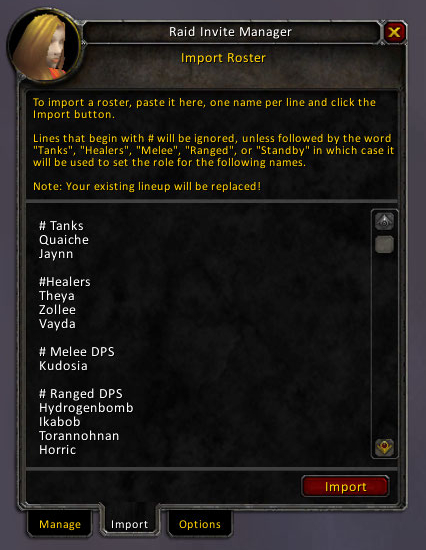
The Import Tab is used to import rosters from forum posts or other sources. Copy and paste, then click Import.
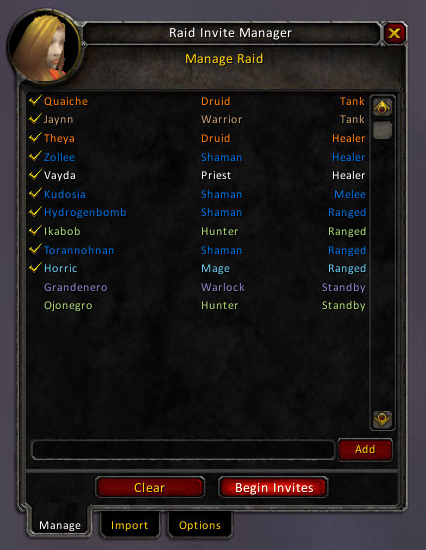
The Manage Tab is where you setup your raid before inviting. Add, remove, set classes and roles, then click Invite.
Description
Overview
RaidInviteManager is a fast and easy tool for managing rosters and invites for guild and PUG raids. See all candidate raid members, select the ones you want and invite them to your raid. Also has an import function for bringing in rosters from forum posts or other systems.
Usage
To open the UI type /rim or /raidinvitemanager. You will see three tabs: Manage, Import and Options
Manage Tab
The Manage Tab is where you actually organize the raid. See everyone you're considering for the raid, their class (automatically determined if in your guild) and role (automatically set when possible).
Assign roles and sort to review what you have. Set the ones you wish to invite to Approved status, click Invite and RaidInviteManager does the rest.
Import Tab
If, like many guilds, you post lineups on your guild forums, you quickly and easily import the approved roster by copying from the forums and pasting into the editbox on this tab. Click Import and the names will be added to the Manage Tab for you to manage and invite when you're ready to go.
To make it even easier, you can organize the content in this tab so the Import will automatically set the roles and status. Lines that begin with a hash (#) are treated specially and will set the role for all subsequent names. Hash marks that appear anywhere other than the beginning of the line are ignored.
Sample import:
# Tanks
Datank
Brownbear

# Healers
Holylight   # May need to leave early
Palladinn
Treeftw

# Melee
Pokeystabby
Slashandburn

# Ranged
Nukernuker
Backoffdude
Dotemup

# Standby
Onthabench
Sittingitout
Options Tab
Various options that help control the addon can be set on this tab.
-
Enable whisper add - when checked lets the user whisper you the message "addraid" and be automatically added to your roster. Optionally can be appended with the roles the person is able or willing to play. Example: "addraid Tank Melee"
-
Hide minimap icon - don't like minimap icons? No problem.
License
Copyright 2010 Quaiche of Dragonblight
Licensed under the Apache License, Version 2.0 (the "License"); you may not use this file except in compliance with the License. You may obtain a copy of the License at
http://www.apache.org/licenses/LICENSE-2.0
Unless required by applicable law or agreed to in writing, software distributed under the License is distributed on an "AS IS" BASIS, WITHOUT WARRANTIES OR CONDITIONS OF ANY KIND, either express or implied. See the License for the specific language governing permissions and limitations under the License.
The RaidInviteManager Team

