


Raider.IO Group Scanner
- By
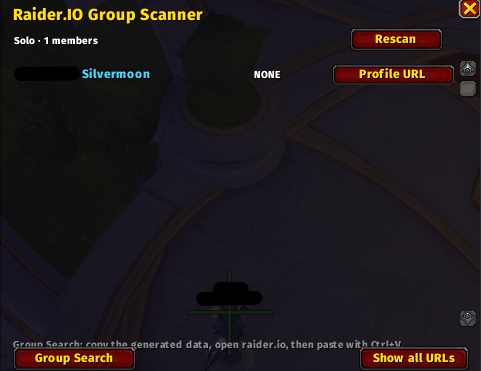
Screenshot 2026-11-03 171749.png
Description
Raider.IO Group Scanner
Raider.IO Group Scanner is a lightweight World of Warcraft Retail addon that scans your current party or raid and makes it easier to look up every member on Raider.IO.
You can open individual character profiles or export your whole group to Raider.IO Advanced Search.
Features
- Party and raid scanning — detects the characters currently in your party or raid.
- Individual Raider.IO profile URLs — creates an EU Raider.IO profile link for each detected character.
- Group Search export — creates the group data format accepted by Raider.IO Advanced Search.
- Readable profile list — character names and Raider.IO URLs are displayed in separate columns.
- Minimap launcher — open or close the scanner using the button near your minimap.
- Slash commands — use
/rioscanor/riogroup. - Rescan — refresh the roster after players join or leave.
Getting Started
- Install Raider.IO Group Scanner using the CurseForge app.
- Log in to World of Warcraft Retail.
- Click the Raider.IO Group Scanner button next to your minimap, or type
/rioscanor/riogroupin chat. - The main window displays the detected party or raid members.
- Click Rescan whenever the group composition changes.
Opening an Individual Raider.IO Profile
- Open Raider.IO Group Scanner.
- Click Show all URLs.
- Find the character in the list.
- Character names are display-only. Click the Raider.IO URL in that character's row.
- A popup appears with that URL selected.
- Press
Ctrl+Cto copy the URL. - Open your browser, paste the URL into the address bar with
Ctrl+V, and pressEnter.
Each URL opens that character's individual Raider.IO profile in the EU region.
Important: WoW addons cannot freely launch external applications or open arbitrary browser tabs. Copying the URL and opening it in your browser is a manual step.
Searching Your Whole Party or Raid on Raider.IO
Use Group Search to look up several group members together on one Raider.IO page.
Step 1 — Generate the group data in WoW
- Join the party or raid you want to check.
- Open Raider.IO Group Scanner.
- Click Rescan to update the roster.
- Click Group Search.
- A popup appears containing a JSON text string similar to this:
{"activity":0,"region":"eu","group":["4-CharacterOne-realmone","2-CharacterTwo-realmtwo","1-CharacterThree-realmthree"]}This is an illustrative example. Your actual export contains the detected characters, role codes, and realm slugs.
Step 2 — Copy the group data
- Click inside the Group Search popup's text box.
- Press
Ctrl+Ato select the entire JSON string. - Press
Ctrl+Cto copy it. - Make sure the copied text includes the opening
{and closing}.
Step 3 — Paste it into Raider.IO
- Open https://raider.io/ in your browser.
- Go to Advanced Search.
- Select the Characters tab.
- Click the Raider.IO page itself so that the page has focus.
- Press
Ctrl+V.
Do not paste the JSON into the browser address bar or into an individual Character Lookup field. Paste it while the Raider.IO Advanced Search page is active. Raider.IO reads the group data and adds Character Lookup filters for the imported group members.
Step 4 — Review the results
- Check the Character Lookup filters to see which characters were imported.
- Review the results table for matching Raider.IO profiles.
- Click a character's result to open that character's Raider.IO profile.
- The result count may be lower than the group size if a character cannot be matched or has no available Raider.IO profile.
The addon prepares the data; Raider.IO performs the actual search. The transfer happens only when you copy the generated text in WoW and paste it into Raider.IO.
What Is Included in the Group Search Data?
The exported data contains:
region— the Raider.IO region (euin this release).group— the list of eligible group characters.- A role code for each character.
- The character name and Raider.IO realm slug.
The addon exports eligible max-level characters. The addon does not upload your group to Raider.IO in the background.
Troubleshooting
A character is missing from the Raider.IO results
- Check that the character name and realm are correct.
- Check whether the character has a Raider.IO profile and available data.
- Make sure the character is eligible for export (max level).
- Click Rescan, then copy and paste the Group Search data again.
Pasting the JSON does not create filters
- Make sure you are on Raider.IO Advanced Search.
- Select the Characters tab.
- Click the page itself before pressing
Ctrl+V. - Do not paste into the browser address bar or a single Character Lookup field.
- Copy the complete JSON again from the WoW popup.
The profile URL does not open automatically This is expected. WoW restricts addons from launching arbitrary external applications and browser tabs. Copy the individual URL and paste it into your browser instead.
A realm name is localized in WoW
Raider.IO uses its own realm slugs. This release includes the verified mapping Ревущий фьорд → howlingfjord. Other localized realm aliases may be added in future updates.
Commands
/rioscan— open or close the scanner./riogroup— open or close the scanner.
Compatibility
- World of Warcraft Retail.
- EU region.
- The addon TOC declares Interface
120100. Select the matching Retail game version in CurseForge when uploading the release.
Disclaimer
Raider.IO Group Scanner is an independent community addon and is not affiliated with or endorsed by Raider.IO or Blizzard Entertainment. Raider.IO is a third-party service; its website, search behavior, and available character data are controlled by Raider.IO.
Feedback
Please report bugs and request features through the CurseForge project page. Include your WoW version, addon version, group composition, and (if possible) screenshots of the scanner and Raider.IO search results.
Raider.IO Group Scanner Team
