Radio Free Razorwind
- By
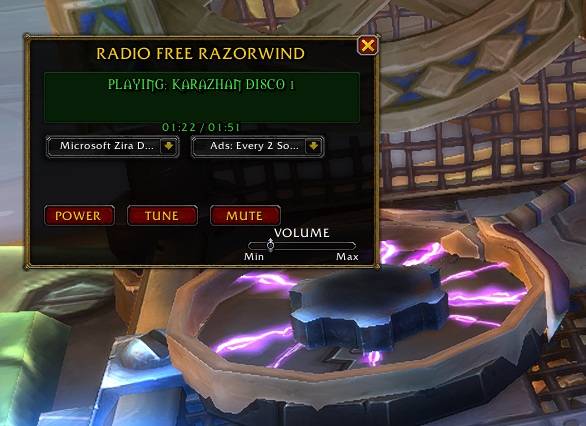
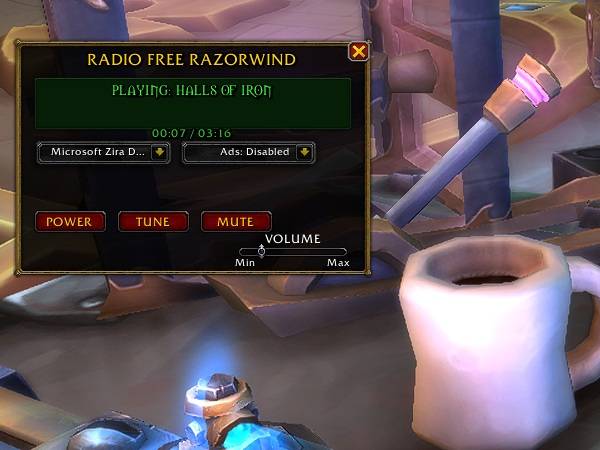
Tired of hearing the same song on loop during raids or dungeons? Radio Free Razorwind adds an in-game radio, allowing you to tune in to random songs picked by our DJs!
rfr-ui.jpg
rfr-ui.jpg
rfr-ui.jpg
Description
📻 Radio Free Razorwind
Bring standard-issue Goblin engineering and classic radio vibes directly to your World of Warcraft UI! Radio Free Razorwind is a lightweight, immersive ambient music player and simulated radio station that plays back-to-back track selections from World of Warcraft's iconic soundtrack—complete with voiceover station announcements and customizable sponsor commercials.
Features
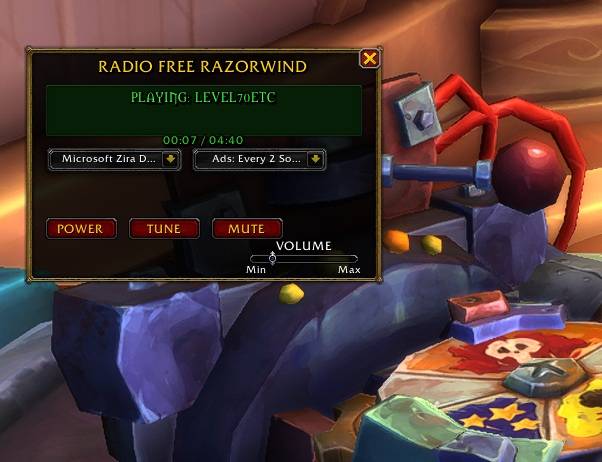
Retro LCD Display Interface: Features a custom, draggable retro-style chassis complete with a dynamic green LCD screen showing track titles and precise elapsed playback timers.
Continuous Playback Engine: Seamlessly cycles through built-in music tracks, automatically starting new songs as current ones end.
TTS Station DJs & Commercial Breakdown: Integrated Text-to-Speech brings your station to life with station IDs and fictional sponsor advertisements (featuring Kaja'Cola, Smokywood Pastures, and Crown Chemical Co.).
Customizable Commercial Frequency: Tailor your listening experience! Set sponsor ads to play every 1 to 5 songs, or disable them entirely for non-stop music.
System Voice Selector: Easily pick your preferred TTS voice for station announcements right from the UI using the built-in dropdown menu.
Full Audio Control: Adjust background music volume directly on the radio chassis using the integrated volume slider.
How to Use
-
Load into the game with the addon enabled.
-
Open the radio interface by typing
/rfror/razorwindinto your chat box. -
Click POWER to start the broadcast, or use TUNE to instantly skip to a random track.
-
Use the dropdown menus on the control panel to customize your TTS Voice and Commercial Frequency on the fly!
Slash Commands
/rfr — Toggle the Radio Free Razorwind interface.
/razorwind — Alternate command to toggle the radio interface.
IMPORTANT NOTICE
In-Game Roleplay Disclaimer: All station announcements, sponsor commercials, and product references (such as Kaja'Cola, Smokywood Pastures, and Crown Chemical Co.) generated by this addon are entirely fictional, fan-made roleplay elements intended solely for immersion and flavor within World of Warcraft.
This addon does not contain real-world commercial advertisements, paid promotions, affiliate links, or donation solicitations, strictly adhering to Blizzard Entertainment's AddOn Development Policy.
Radio Free Razorwind Team