Radialz
- By
A radial action menu for WoW: Forever: press a mouse button and pick spells, items and macros from a wheel, with pages inside pages.
radialz1.PNG
Wow_vrwIJTBLP7 (1).gif
Description
Radialz gives World of Warcraft: Forever a radial action menu: an extra action bar that pops up as a wheel right where your mouse is.
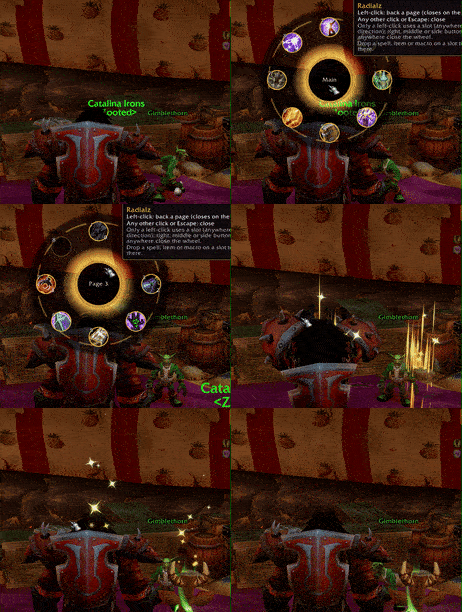
Press a mouse button (button 5 by default), flick toward a spell, item or macro, and click. It's built for keeping your bars clean while keeping everything one flick away.
The wheel
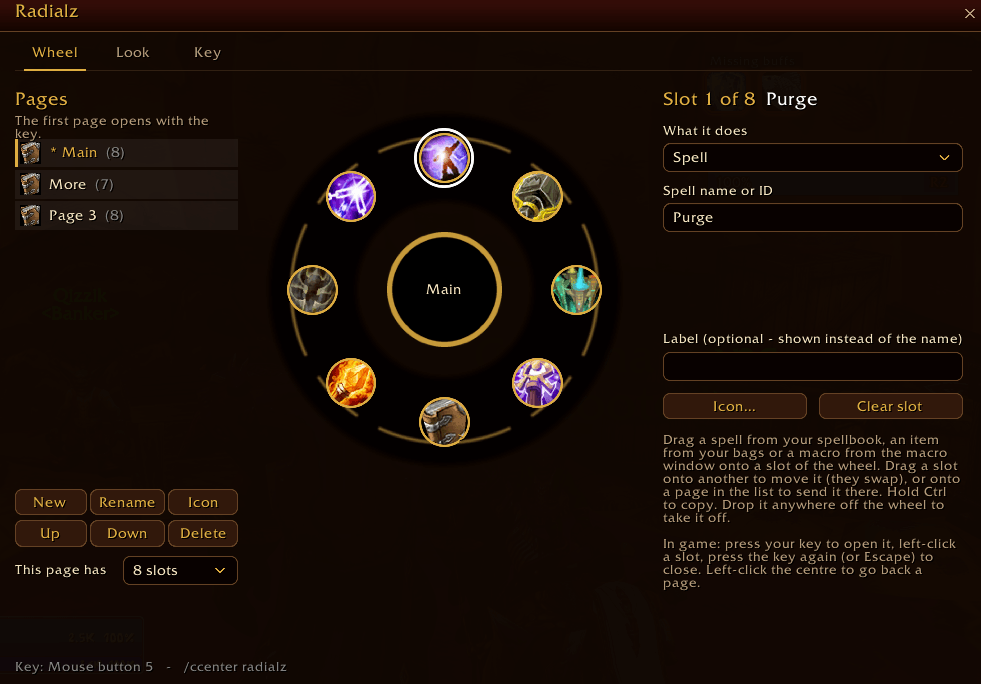
- An extra action bar that's separate from the game's bars. It holds spells, items, macros, mounts, equipment sets and macro text.
- Opens at your mouse or in the middle of the screen, on the key of your choice (any mouse button or key, with modifiers).
- Pages: a slot can open another wheel, so you can nest as many as you want. Click the centre to go back a page.
- Click anywhere in a slot's direction: you don't have to hit the icon. The slot you're aiming at glows, and its name shows in the centre.
- Number keys 1-9 pick a slot while the wheel is open. Escape closes it.
- Only left-click casts. Any other click closes the wheel, so you never cast by accident.
- Closes after use, or stays open if you prefer.
- Works in combat. Changes made during a fight apply as soon as it ends.
Make it yours
- 2 to 12 slots per page, each with its own label and icon if you like.
- Look: size, slot size, roundness from square to circle, the wheel band and its opacity, a spinning ring, colours, labels in the centre or under each slot, tooltips, cooldown swipes, item counts, dimmed unusable slots, a fade-in animation.
- Themes: Horde, Classic and Fel.
- A live preview in the settings, and a "Try it" button.
Easy setup
- Drag and drop: drop spells, items, macros, mounts and equipment sets straight onto the preview wheel, or onto the live wheel.
- Drag slots around to move or swap them. Hold Ctrl to copy. Drop a slot on a page in the list to send it there.
- Drag a slot off the wheel to remove it.
- Right-click a slot to clear it.
- It starts you off with a "Main" page (with your Hearthstone) and a "More" page.
Works with Command Center
Radialz works on its own, and it's also built into Command Center. If you run both, Radialz steps aside so you get one wheel and one key binding. It opens from Command Center's dock, Tools window or home page.
Commands
/radialzor/radial: settings/radialz open: open the wheel/radialz minimap: show or hide the minimap button (left-click = settings, right-click = open the wheel)/radialz theme horde | classic | fel: pick a theme/radialz help: all commands
In Command Center: /ccenter radialz.
Notes
- Made for WoW: Forever only.
- The wheel's slots are secure buttons, so the game only lets them be rebuilt out of combat.
- Settings are separate between the standalone and Command Center versions.
- This is a beta. Please report anything odd.
Support
Found a bug or have an idea? Leave a comment.
Radialz Team