RadialHub
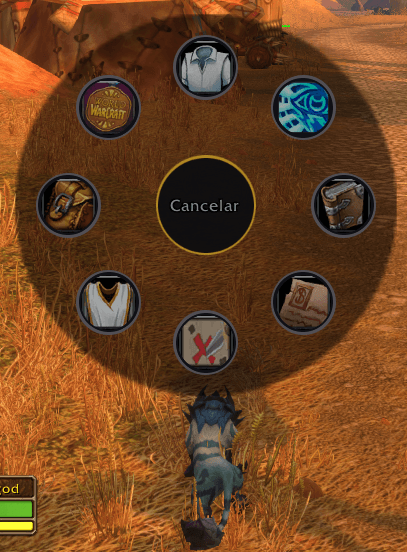
Radial menu for WoW Forever: hold a key, point with the mouse and release to open Character, Talents, Map, Bags and more. Up to 4 wheels with their own keys, plus emotes and custom commands.
Captura de pantalla 2026-11-15 165444.png
Captura de pantalla 2026-11-15 165655.png
Description
RadialHub
A quick radial menu for WoW Forever. Open game windows without hunting for buttons or memorizing hotkeys.
How it works
- Hold the key: the wheel appears centered on your cursor.
- Point with the mouse: the option grows, lights up, and its name shows in the center.
- Release the key (or click): that window opens. Releasing in the center, pressing Escape or right-clicking cancels.
Features
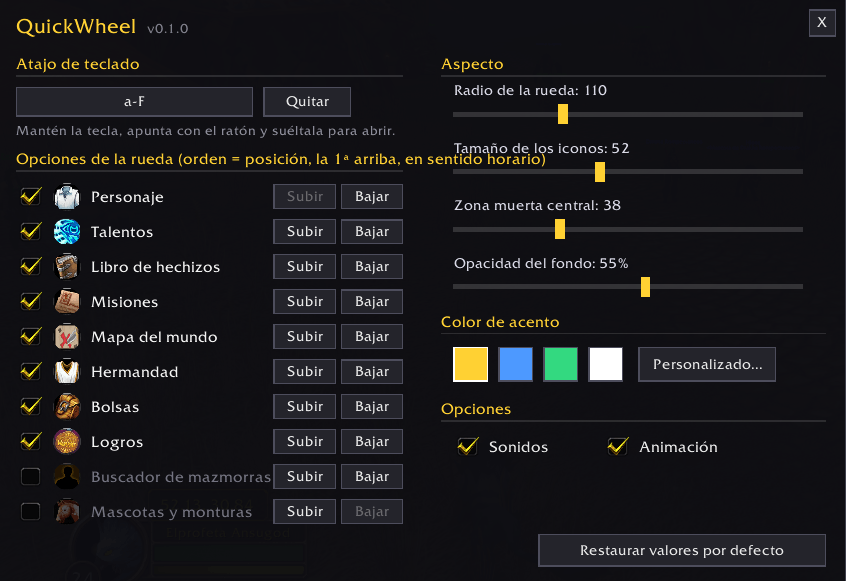
- Up to 4 wheels, each with its own name, options and key. While a wheel is open, arrows (or the mouse wheel) switch to another wheel without closing it.
- Game panels: Character, Talents, Spellbook, Quest Log, World Map, Guild, Friends, Bags, and Pets and Mounts.
- Custom emotes and commands: add preset emotes or your own entries running
/runor other addons' commands, with your own name and icon. - Config window (
/rh): resizable, with a list filtered by category (Menu, Emotes, Commands), option ordering and direct key capture. - Look: radius, icon size, dead zone, background opacity, accent color (4 presets or a free picker), sounds and animation.
Getting started
On first login it binds ALT-Q to wheel 1 if that key is free. Type /rh to change it, create more wheels and customize everything.
Commands
/rhor/radialhub: open the settings./rh check: show how each panel opens on your client./rh debug: print diagnostics when you release.
Limitations
- Made for WoW Forever (Interface 16001). Not tested on other clients.
- Spells, items and macros can't be cast: Blizzard blocks
/cast,/useand macros for addons. - Up to 16 active options per wheel.
Open source, MIT license: https://github.com/Andressance/RadialHub
RadialHub Team