
Quiver
2026-06-01_19-28-25.png
2026-06-01_19-30-02.png
2026-06-01_19-27-29.png
Description
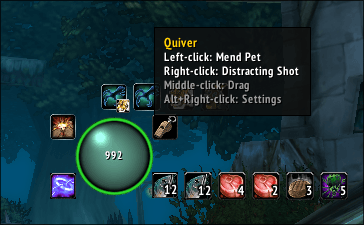
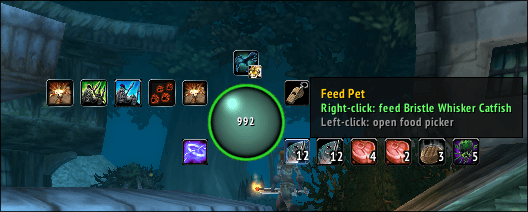
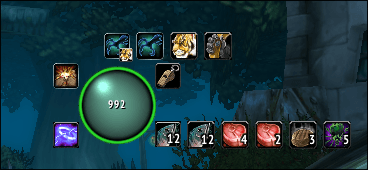
Quiver is a hunter class mod for TBC Classic Anniversary, inspired by the Necrosis warlock addon. Everything you need as a hunter lives in a single draggable orb on your screen.
Early access, expect rough edges. Bug reports and feedback welcome.
The Sphere
A circular orb whose color reflects your active Aspect at a glance. Green for Hawk, blue for Viper, gold for Cheetah, and so on. No aspect active? It pulses maroon. Mana low while off Viper? It pulses blue. The orb is your passive status readout without ever opening a menu.
Orbit Buttons
Six small buttons orbit the sphere, each opening a quick-cast menu on left-click:
- Aspects — switch aspects instantly. Select two and right-click the button to swap between them with one click. A corner badge shows your swap target at a glance.
- Stings — select your active sting and right-click to cast it. Quiver automatically keeps a Quiver: Sting macro in your macro book synced to your selection — drag it to your bar once and it follows your choice forever.
- Pet — call, dismiss, revive, and feed your pet from one place. The ring around the sphere reflects pet happiness (green/yellow/red), pulses red when your pet is dead, and pulses amber when you have no active pet.
- Traps — quick-cast any trap with a cooldown timer shown on the button.
- Tracking — switch tracking types without opening your spellbook.
- Food — opens a food picker showing suitable pet food from your bags, sorted by item level.
All menus expand away from the nearest screen edge automatically — move the spenus follow.
Smart Right-Click
Right-clicking the sphere always does the right thing for your pet:
- Pet dead → Revive Pet
- No pet → Call Pet
- Pet alive → your configured right-click action
This works even mid-combat. When your pet dies you'll also get a chat notificat-click — toggleable in settings.
Auto-Shot Bar
A thin bar below the sphere tracks your auto-shot timer.
Macro Generator (experimental — feedback welcome)
The Macros tab in settings can generate a starter set of hunter macros with co
- Quiver: Open — pet attack + opening shot. Handles the /petattack toggle so yhe first press.
- Quiver: FD Trap — Feign Death into your chosen trap.
- Quiver: BW — Bestial Wrath + Intimidation + shot.
- Quiver: MD — Misdirection on your focus target.
All macros include #showtooltip so cooldown sweeps and range indicators show on your bars. This is an early feature — if the templates don't suit your spec or playstyle, please share feedback.
Configuration
Alt+Right-click the sphere to open settings. Bind any spell or macro to left ato drag the sphere anywhere on screen. /quiver reset moves it back to thedefault position.
Quiver Team
