QuietValeera
- By
An efficient, lightweight, high-performance World of Warcraft addon that silences Valeera.
2026-04-09 this addon is no longer being developed, please feel free to fork the repo and resurrect.
QuietValeera
Fed up with hearing and seeing the same emotes from Valeera?
An efficient, lightweight, high-performance World of Warcraft addon that silences Valeera.
Why use this?
TL;DR reduced audio and chat distraction while Delving in Midnight.
Key features
- Sound muting: Mutes all of Valeera's voice lines and emote sound effects on login
- Chat filtering: Removes all of Valeera's say, yell, and emote messages from chat channels
- Debug mode: Optional debug channel to view Valeera's messages when needed
- Ultra-fast: Single-pass string comparison filter with minimal overhead
- Efficient: ~2KB RAM usage, runs once on login for sound mutes
- Respects settings: Works seamlessly with your WoW chat channel preferences
Installation
- Move/copy the
QuietValeerafolder to your_retail_/Interface/AddOns/directory - Restart World of Warcraft or logout and login
On load/login, the addon mutes a set of Valeera voice/sound effect IDs so the emotes are silent for the session.
Configuration
The addon requires no setup. All silencing happens automatically on login.
Debug mode
To view Valeera's messages while debugging or testing:
/quietvaleera debug onThis creates or reuses a chat window called Debug and routes all of Valeera's messages there. Other chat windows remain unaffected.
To disable debug mode:
/quietvaleera debug offIs this addon really necessary?
In a recent Twilight Crypts Delve, I had 109 lines of Valeer's chat that I didn't see (as recorded instead in the debug log while testing). That's a lot of lines of text scrolling your other chat mesages away into oblivion. Sure, you can use a separate window for her and other creature messages but the authour's feeling is that her chat doesn't add to the game experience.
I use a couple of different chat windows to separate out message sources: General, Guild, Instance, 1-5 (1. General, 2. Trade, 3. LocalDefense, 4. Services, 5. WorldDefense), Debug, and Loot.
Note
Valeera does emote "system" type messages in chat, I decided to leave these enabled as in a complete Delve she only said a few lines eg.
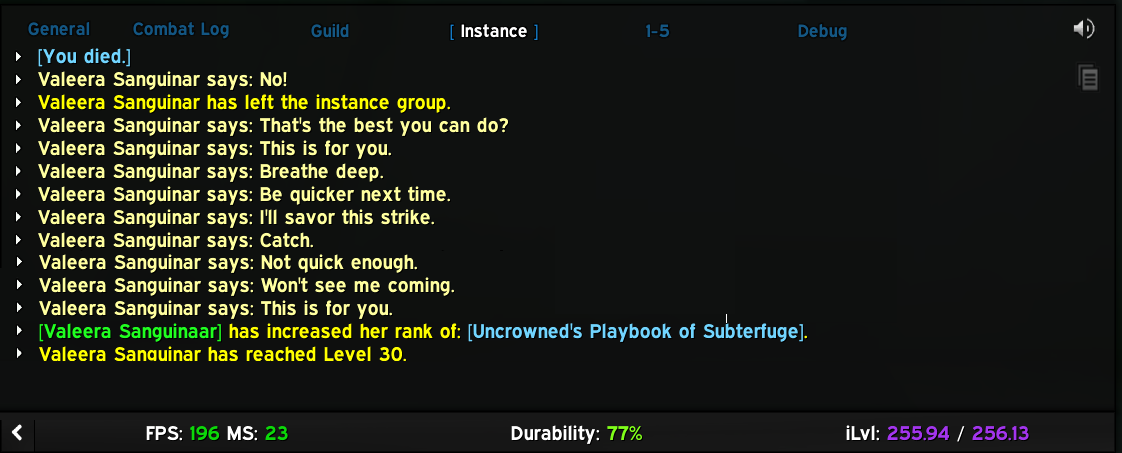
If there's interest, I could disable the "Valeers Sanguinar says: xyz" messages via a slash command.
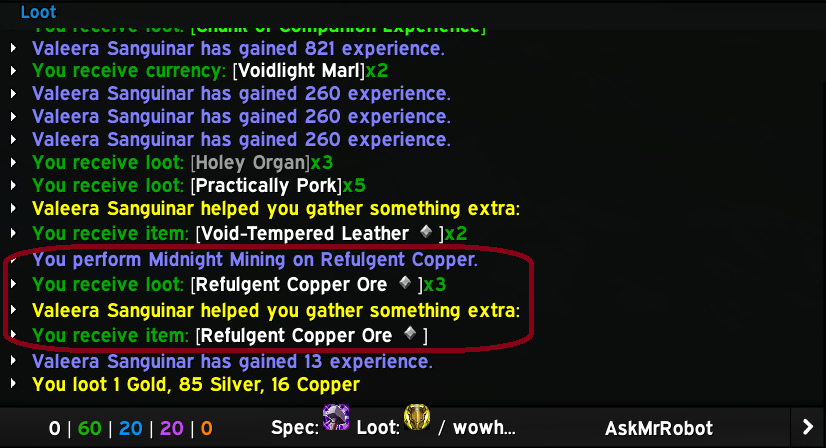
Also, if I'd disabled these "system" messages from her that'd make my "Loot" window look odd: in the below example I'd not have been able to see what Valeera contributed to my ore mining:
Technical details
Sound muting
- Event-based mute: uses a frame listening for
PLAYER_LOGINand runs once per login - MuteSoundFile loop: iterates through 160+ Valeera sound IDs and mutes each via
MuteSoundFile(id) - One-time execution:
mutedflag prevents repeated re-muting if the event fires more than once - Memory efficient: sound ID table is set to
nilafter muting to release memory
Chat message filtering
- Ultra-fast filter: Single string comparison per message
- Respects chat settings: Only called by WoW for enabled chat channel types
- Supported events:
CHAT_MSG_MONSTER_SAY(creature say messages)CHAT_MSG_MONSTER_YELL(creature yell messages)CHAT_MSG_MONSTER_EMOTE(creature emotes like casting)CHAT_MSG_TEXT_EMOTE(text-based emotes)CHAT_MSG_SAY(player say)CHAT_MSG_EMOTE(player emote)
Debug mode
- Duplicate prevention: Tracks last message to avoid duplicate entries
- Smart frame handling:
- Searches case-insensitively for existing
debugchat window - Creates one if it doesn't exist (once per session)
- Configures it to receive only creature say/emote messages
- Searches case-insensitively for existing
- Proper formatting:
- Say/yell:
[QuietValeera Debug] Valeera Sanguinar: <message> - Emotes:
[QuietValeera Debug] Valeera Sanguinar <emote text>
- Say/yell:
Performance
- Tiny footprint: ~2KB RAM during gameplay
- Minimal CPU: filters run only on Valeera messages, single string comparison
- One-time cost: 160+ mutes executed once on login, then discarded
Credit
Inspired by NAESSAH's addon ShutUpValeera.
Contributing
Contributions to improve this tool are welcome! To contribute:
- Fork the repository
- Create a feature branch
- Make your changes to the source code or documentation
- Test with various class configurations and buff scenarios
- Submit a pull request with a clear description of the improvements
Please ensure your changes maintain compatibility with existing functionality and follows Lua best practices.
Bugs and new features
Found a bug or want to submit a feature request? open an issue here
Support
This tool is unsupported and may cause objects in mirrors to be closer than they appear etc. Batteries not included.
License
This program is free software: you can redistribute it and/or modify it under the terms of the GNU General Public License as published by the Free Software Foundation, either version 3 of the License, or (at your option) any later version.
This program is distributed in the hope that it will be useful, but WITHOUT ANY WARRANTY; without even the implied warranty of MERCHANTABILITY or FITNESS FOR A PARTICULAR PURPOSE. See the GNU General Public License for more details.
You should have received a copy of the GNU General Public License along with this program. If not, see https://www.gnu.org/licenses/.
Copyright (C) 2026 ArcNineOhNine
QuietValeera Team