


QuickTools
ui1.jpg
ui2.jpg
Description
**QuickTools** is a small, clean window for two jobs that take far too many clicks: **disenchanting** a bag full of gear and **crafting** the same recipe over and over.
Bind one key. Press it, and the next item in your bags is disenchanted. Press it again, and the next one goes. No hunting through bags, no casting Disenchant and clicking item after item. Crafting works the same way: pick a recipe once, then make one or all of them with a single key.
It's built for the classic Enchanting and Tailoring gold loop: craft cheap items, disenchant them, sell the materials. It's just as handy for clearing quest and dungeon greens.
### Disenchant tab
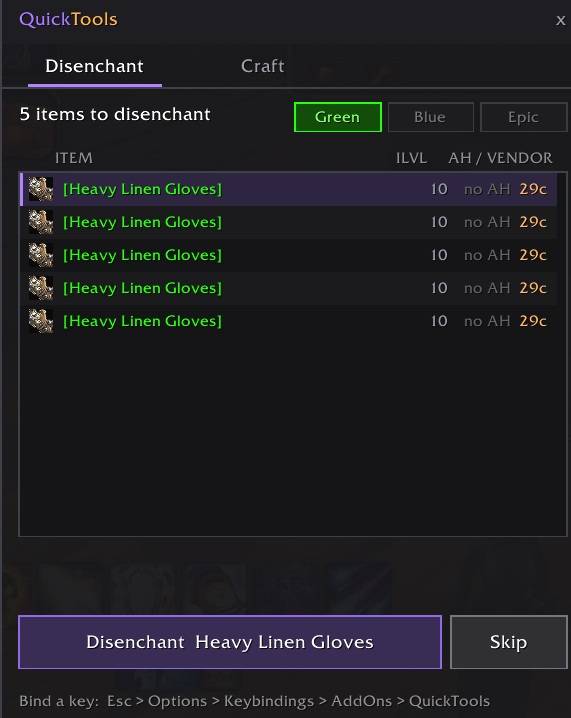
- Lists every weapon and armor piece in your bags that can be disenchanted
- Choose which qualities to include: **Green**, **Blue** and **Epic** (only Green is on by default)
- One big button (or your own key) disenchants the next item in the list
- **Skip** an item for this session, or **right-click** it to never disenchant it
- Items in an equipment set, shirts, tabards, bags, cosmetic gear and fishing poles are never included
- Shows item level and vendor price, so you can see what you're about to break. With the optional **FlipFinder** add-on it also shows the auction value
- The next item is highlighted, and the button shows its name, so you always know what the next press does
- Pressing too early is safe: presses during a cast are ignored, so you can't cancel a cast or hit the wrong item
- Pauses in combat and picks up again after
### Craft tab
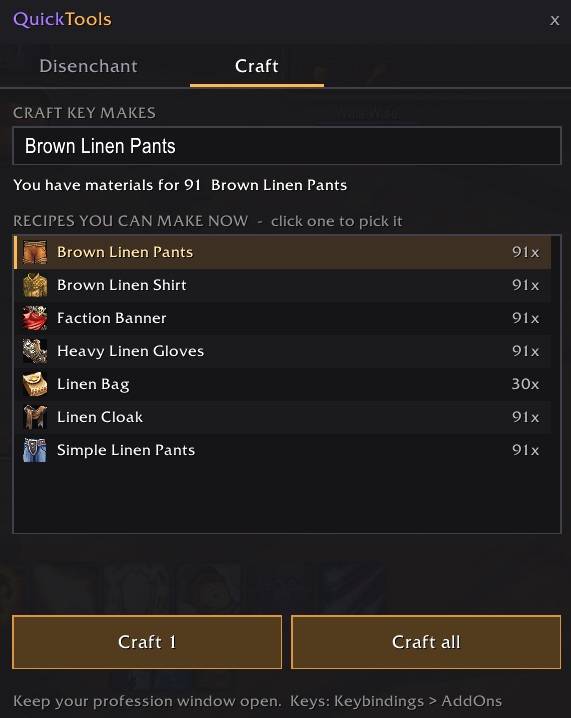
- Pick a recipe once, then craft it with **Craft 1** or **Craft all**, or with a key
- Lists every recipe you have the materials for right now. Click one to pick it
- Shows how many you can make with what's in your bags
- If QuickTools is open, it switches to this tab when you open a profession window
### Getting started
1. Type `/qt` to open QuickTools.
2. **Disenchant:** set your key under Keybindings > AddOns > QuickTools, then press it once per item.
3. **Craft:** open your profession window, go to the Craft tab and click the recipe you want. Then press **Craft all**, or use your key.
### Key bindings
**Esc → Options → Keybindings → AddOns → QuickTools**
- Disenchant next item
- Craft 1 of saved recipe
- Craft all of saved recipe
- Open / close QuickTools
### Slash commands
| Command | What it does |
|---|---|
| `/qt` | Open or close the window |
| `/qt de` · `/qde` | Open the Disenchant tab |
| `/qde clear` | Forget all ignored and skipped items |
| `/qt craft` · `/craft` | Open the Craft tab |
| `/craft Heavy Linen Gloves` | Craft one of a recipe |
| `/craft 5 Heavy Linen Gloves` | Craft five |
| `/craft set Heavy Linen Gloves` | Make it the recipe for the craft key |
| `/craft ?` | Show what the add-on can see (for bug reports) |
### Why one press per item?
Blizzard only lets add-ons disenchant or craft from a real click or key press. QuickTools never automates that. It lines up the next item so that each press does exactly one thing, which keeps it fully within the rules.
### Bugs and ideas
Please use the **Issues** or **Comments** tab. Include the output of `/craft ?` for crafting problems.
QuickTools Team
