Banner.png
Screenshot-1-Menue.png
Screenshot-2-Vendor.png
Description
🪙 QuickStack
Restock in seconds, not minutes. · Nachkaufen in Sekunden statt Minuten.
Alt + Left-click at any vendor buys exactly the amount you set for that item. Alt + Linksklick beim Händler kauft genau die Menge, die du für das Item eingestellt hast.
🇬🇧 English
Water for the raid. Bread for the grind. Vials, thread and powders for your next craft. You buy the same things again and again, and every time it's the same dance with the quantity popup.
QuickStack ends that. Tell it once how many of each item you want, then just hold Alt and click. Every time.
🚀 Up and running in 30 seconds
- Open the menu with the coin icon on your minimap, or type
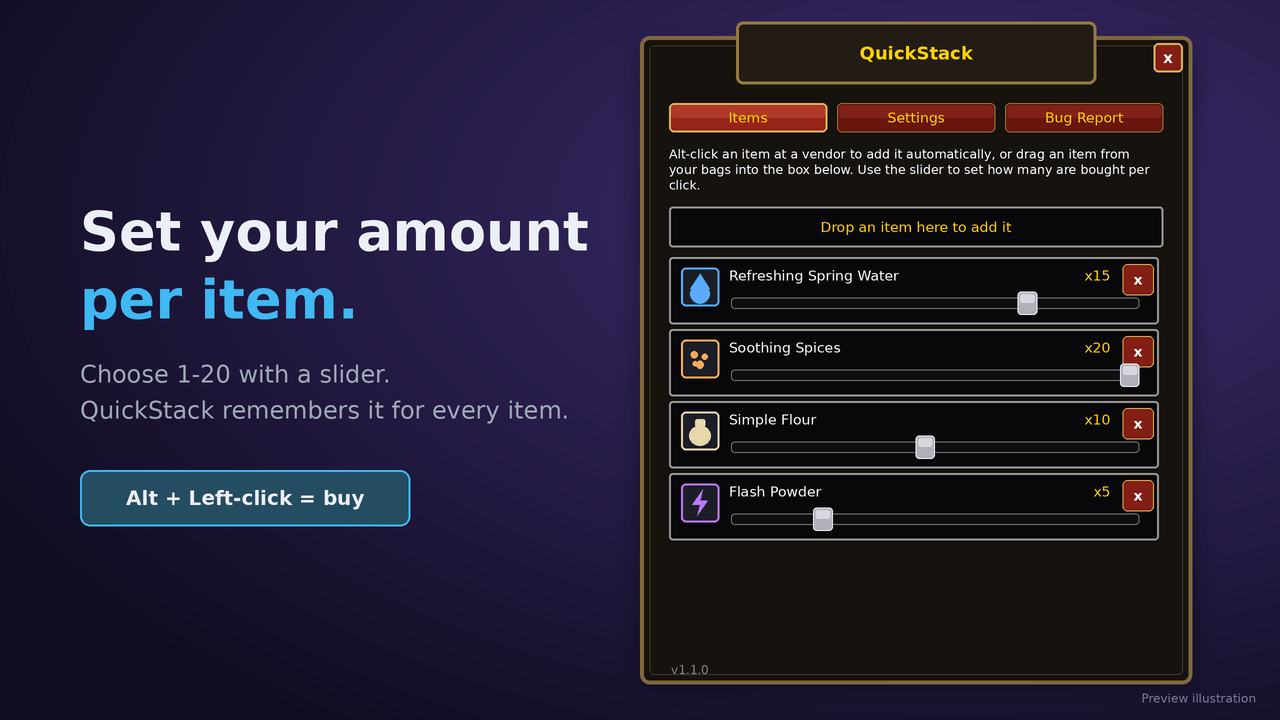
/qs - Set your amount per item with a slider from 1 to 20
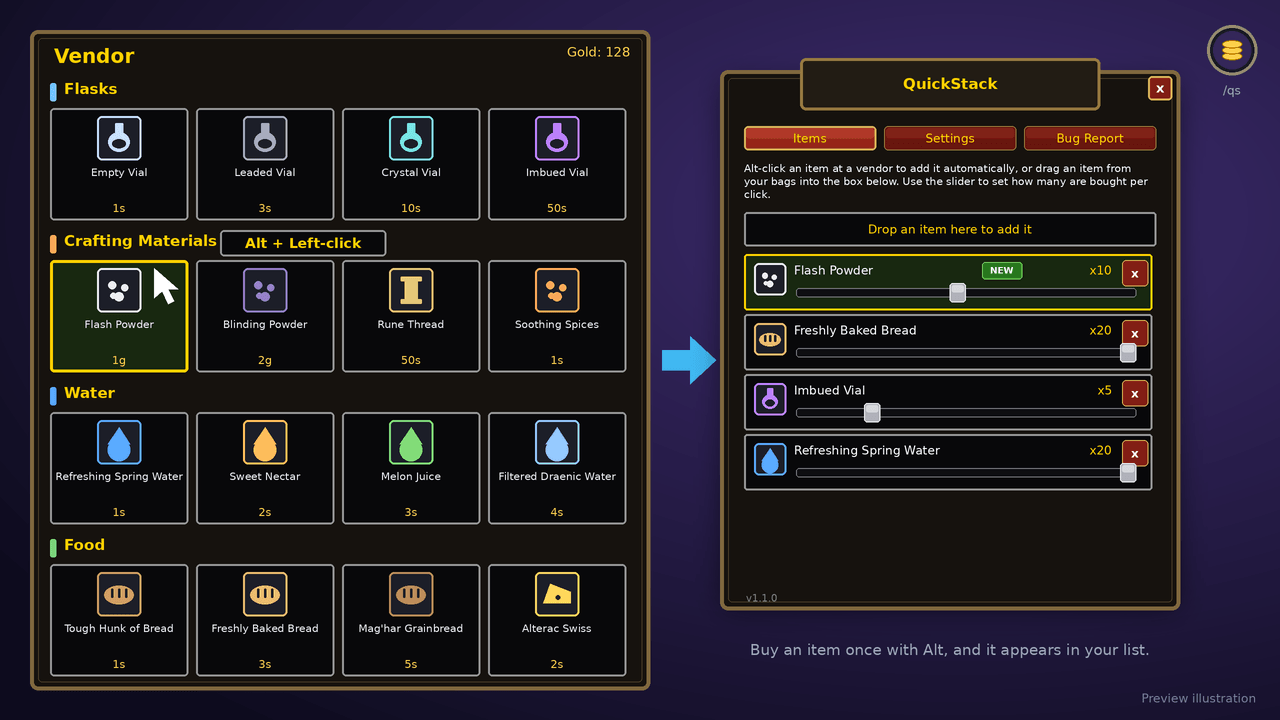
- Go shopping: at any vendor, hold Alt and left-click an item
There is no setup screen to fill in first. The first Alt-click on a new item buys it and adds it to your list automatically, ready to fine-tune. You can also drag items from your bags straight into the menu.
💡 Perfect for
- 🧪 Alchemists and crafters who restock vials, powders and thread constantly
- ⚔️ Raiders and farmers who always need the same water, food and consumables
- 🎒 Anyone who is tired of the quantity popup
✨ Features
- 🎚️ A different amount for every item: 15 water, 20 bread, 5 vials, saved automatically
- 🧭 Draggable minimap button: place it wherever you like along the minimap edge
- 🖼️ Feels native: a menu in the familiar WoW style with the classic frames, buttons and sliders
- 💰 Safe buying: never more than the vendor has in stock or you can afford
- ⌨️ Your key: Alt, Ctrl or Shift
- 🐞 Bug report in the game: describe the problem and get a report you can copy and post
- 🌍 English and German with automatic language detection
- 🪶 Lightweight: no libraries, nothing running in the background
⌨️ Commands
| Command | What it does |
|---|---|
/qs |
Opens or closes the QuickStack menu |
/qs alt · /qs ctrl · /qs shift |
Sets the modifier key |
🎮 Compatibility
Made for Retail and WoW Forever.
📦 Installation
Easiest: install with the CurseForge app. It puts everything in the right place for your game version.
Manually:
- Download the file and unzip it
- Copy the
QuickStackfolder into theInterface/AddOnsfolder of your game version (Retail or Forever) inside your World of Warcraft installation - Start the game and make sure QuickStack is enabled on the character selection screen
❓ FAQ
What does a new item buy before I set an amount? A full stack, up to 20, on the first Alt-click. The item is added to your list so you can adjust it.
The game says "Incompatible" or "Out of date". Tick Load out of date AddOns in the AddOns menu.
Nothing happens when I click. Type /reload and check that the folder is named exactly QuickStack and contains QuickStack.toc directly.
Where do I report bugs? Open the Bug Report tab in the menu and post the report in the comments, or create an issue on GitHub.
🇩🇪 Deutsch
Wasser für den Raid. Brot fürs Farmen. Phiolen, Garn und Pulver für den nächsten Handwerksauftrag. Du kaufst ständig dieselben Dinge, und jedes Mal das gleiche Spiel mit der Mengenabfrage.
QuickStack beendet das. Sag ihm einmal, wie viele du von jedem Item willst, dann hältst du nur noch Alt und klickst. Jedes Mal.
🚀 In 30 Sekunden startklar
- Menü öffnen über das Münz-Symbol an der Minimap oder mit
/qs - Menge einstellen: pro Item mit einem Regler von 1 bis 20
- Einkaufen: beim Händler Alt halten und ein Item linksklicken
Du musst vorher nichts einrichten. Der erste Alt-Klick auf ein neues Item kauft es und trägt es automatisch in deine Liste ein, bereit zum Feinjustieren. Du kannst Items auch direkt aus den Taschen ins Menü ziehen.
💡 Ideal für
- 🧪 Alchemisten und Handwerker, die ständig Phiolen, Pulver und Garn nachkaufen
- ⚔️ Raider und Farmer, die immer dasselbe Wasser, Essen und Verbrauchsgüter brauchen
- 🎒 Alle, die genug von der Mengenabfrage haben
✨ Funktionen
- 🎚️ Eigene Menge für jedes Item: 15 Wasser, 20 Brot, 5 Phiolen, automatisch gespeichert
- 🧭 Verschiebbarer Minimap-Button: platziere ihn frei am Rand der Minimap
- 🖼️ Fühlt sich nativ an: Menü im vertrauten WoW-Stil mit den klassischen Rahmen, Buttons und Reglern
- 💰 Sicher einkaufen: nie mehr, als der Händler vorrätig hat oder du bezahlen kannst
- ⌨️ Deine Taste: Alt, Strg oder Umschalt
- 🐞 Bug-Report im Spiel: Problem beschreiben und einen kopierfertigen Bericht erhalten
- 🌍 Deutsch und Englisch mit automatischer Spracherkennung
- 🪶 Leichtgewichtig: keine Bibliotheken, nichts im Hintergrund
⌨️ Befehle
| Befehl | Wirkung |
|---|---|
/qs |
Öffnet oder schließt das QuickStack-Menü |
/qs alt · /qs ctrl · /qs shift |
Setzt die Modifier-Taste |
🎮 Kompatibilität
Gemacht für Retail und WoW Forever.
📦 Installation
Am einfachsten: mit der CurseForge-App installieren. Sie legt alles passend zu deiner Spielversion ab.
Manuell:
- Datei herunterladen und entpacken
- Den Ordner
QuickStackin den OrdnerInterface/AddOnsdeiner Spielversion (Retail oder Forever) innerhalb deiner World-of-Warcraft-Installation kopieren - Spiel starten und auf dem Charakterbildschirm prüfen, ob QuickStack aktiviert ist
❓ Häufige Fragen
Was kauft ein neues Item, bevor ich eine Menge einstelle? Beim ersten Alt-Klick einen vollen Stack, höchstens 20. Das Item kommt in deine Liste, dort kannst du es anpassen.
Das Spiel meldet „Inkompatibel“ oder „Veraltet“. Im AddOn-Menü Veraltete AddOns laden anhaken.
Beim Klicken passiert nichts. /reload eingeben und prüfen, ob der Ordner exakt QuickStack heißt und direkt QuickStack.toc enthält.
Wo melde ich Fehler? Reiter Bug melden im Menü öffnen und den Bericht in die Kommentare posten oder ein Issue auf GitHub erstellen.
QuickStack Team