
QuickShout
- By
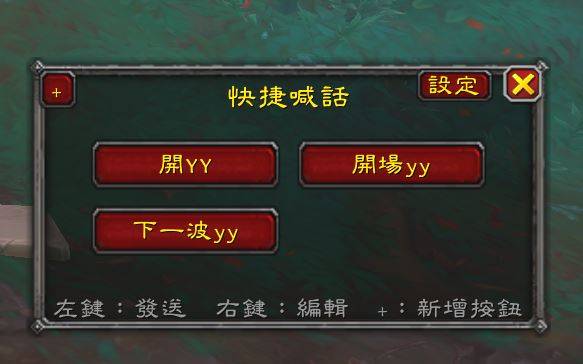
Customizable button grid that sends preset messages to any chat channel with one click.
1.JPG
Description
QuickShout
A customizable button grid addon. Each button can have its own label, chat channel, and message. Click it, and it instantly sends that message to the channel you configured — for example, a "Discord" button that yells "Join our Discord!" the moment you press it.
Features
- Button grid window that automatically sizes itself to fit however many buttons you have (or set a fixed number of columns in the options panel)
- Left-click: send the message configured for that button
- Right-click: edit that button's label, channel, and message (or delete it)
- + button in the title bar: add a new button
- Window position, button contents, and column settings are all saved between sessions
Usage
Type /qs (or /quickshout) to toggle the button window.
Right-click any button to edit it. The Channel field accepts these formats:
| Format | Meaning |
|---|---|
SAY |
Say |
YELL |
Yell |
PARTY |
Party chat |
RAID |
Raid chat |
RAID_WARNING |
Raid warning (requires lead/assist) |
GUILD |
Guild chat |
OFFICER |
Officer chat |
EMOTE |
Emote |
WHISPER:PlayerName |
Whisper a specific player |
CHANNEL:NameOrNumber |
A custom channel (must already be joined) |
Options
Open Esc → Options → AddOns → QuickShout to:
- Toggle automatic column count
- Manually set the number of columns (1–12)
- Quickly show/hide the button window
Changelog
1.1
- Added an in-game Options panel — column count no longer requires slash commands
- The button window now automatically sizes itself to fit the current number of buttons
- Fixed a layout bug in the edit-button window where a long channel-format hint could overlap other elements and push input boxes outside the frame
- Ships with two example buttons by default
1.0
- Initial release
License
All Rights Reserved. See LICENSE.txt for details.
Author
JAMES
QuickShout Team
