


QuickRP Forever
Lightweight addon for custom roleplay emotes and chat messages in WoW: Forever.
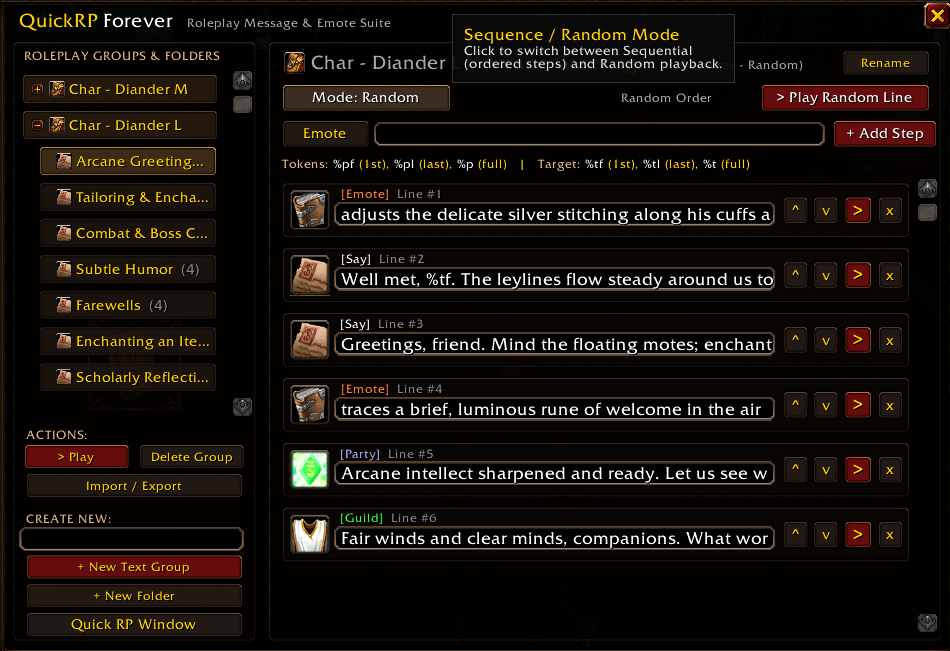
Editing window
Description
QuickRP Forever
QuickRP Forever is a lightweight, fast roleplay message, emote, and sequence manager for World of Warcraft. Organize your character's greetings, tavern banter, combat callouts, and multi-line RP scenes into folders and groups, then trigger them with a single click, macro slash command, or floating Quick RP bar.
Key Features
Character Profiles (AceDB-3.0)
- Automatic Per-Character Profiles: Each character gets its own dedicated profile automatically (
Character - Realm), keeping your RP lines separated per character. - Quick Profile Switcher: Switch between RP character profiles directly from the Profile button in the main window header.
- Full Profile Management: Create new profiles, switch profiles, copy lines from an existing profile, delete unused profiles, or reset the active profile in Blizzard AddOn Options.
Organized Folders & Drag-and-Drop Hierarchy
- Folders & Groups: Group your roleplay lines by character, location, or theme using collapsible folders and standalone groups.
- Drag & Drop: Drag groups in the sidebar to reorder them or move them into and out of folders.
- Inline Renaming: Rename any folder or group directly from the header bar with a single click.
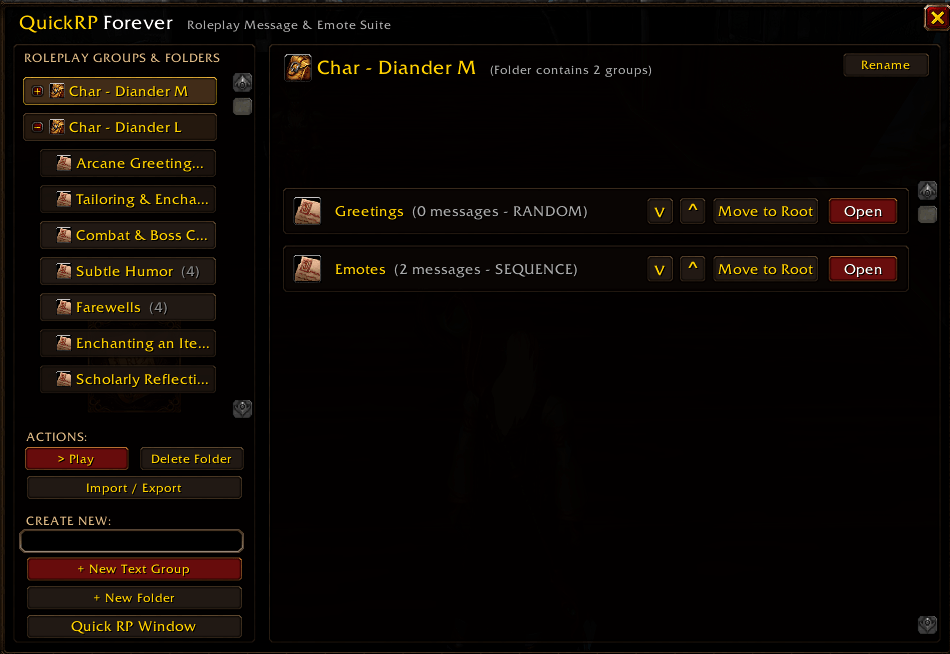
- Folder Dashboard: Select any folder to view all contained groups and trigger, edit, or delete them from one place.
Random Pools & Ordered Sequence Builder
- Random Mode: Plays a random line from the selected group each time you trigger it.
- Sequence Mode: Plays lines in exact step-by-step order, tracking your current step (
Step X/Y) with a one-click Reset button. - Built-in Sequence & Line Editor: Add lines with per-line chat channel selection, edit existing lines inline, and reorder steps up or down with arrow buttons.
Multi-Channel Support
Assign any individual line to one of six chat channels:
- Emote (
/e) - Say (
/s) - Yell (
/y) - Party (
/p) - Guild (
/g) - Raid (
/raid)
Dynamic Name Tokens
Personalize your roleplay lines automatically using your character and current target:
%pf- Your character's first name%pl- Your character's last name%p- Your character's full name%tf- Your target's first name%tl- Your target's last name%t- Your target's full name
Note: Compatible with Total RP 3 (TRP3) character names when TRP3 is installed, falling back gracefully to standard WoW unit names.
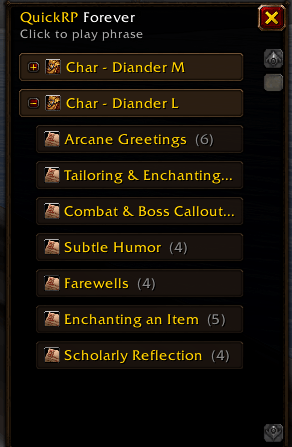
Floating Quick RP Window
- A compact, draggable Quick RP Window gives you one-click access to all your groups during active roleplay without keeping the full editor open.
- Includes a Show Floating Window toggle and stays synced with your groups, active profile, and sequence progress.
Import & Export
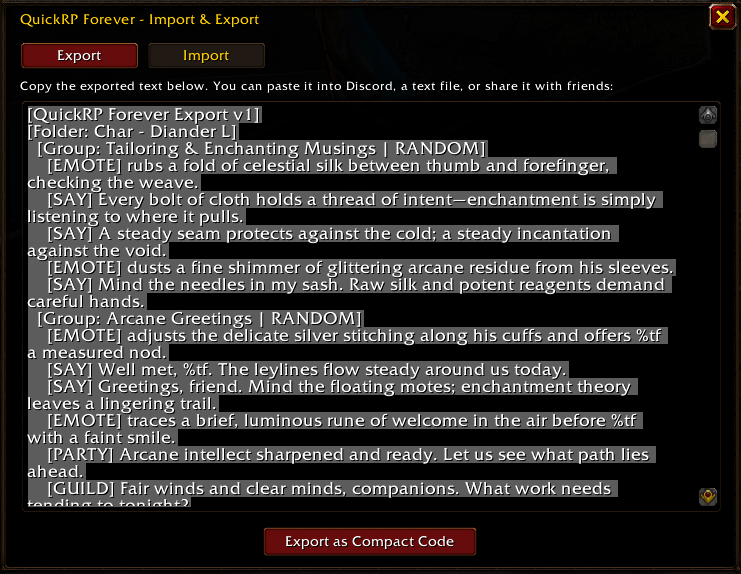
- Human-Readable Text Format: Export all folders and groups as clean plain text with
[Folder: ...],[Group: ... | RANDOM/SEQUENCE], and[Channel] messagetags. - Compressed Share Codes: Convert any export into a compact
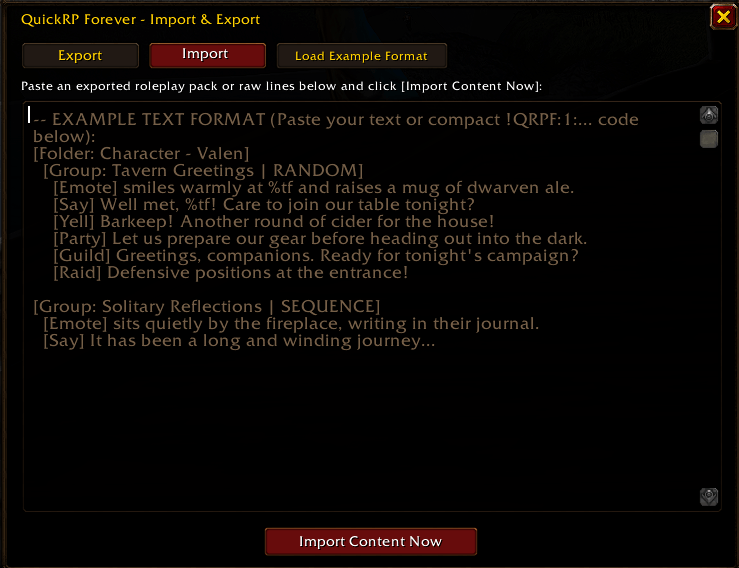
!QRPF:2:...string (powered by LibDeflate) for easy sharing on Discord or forums, with full backward compatibility for!QRPF:1:...codes. - Copyable Import Template: The Import tab opens with an editable, copyable example template so you can immediately copy (
Ctrl+A,Ctrl+C) and customize it, or click Clear to paste your own script.
Localization (11 Languages)
Fully localized for all 11 official World of Warcraft client languages:
- English (
enUS), German (deDE), Spanish (esES/esMX), French (frFR), Italian (itIT), Portuguese (ptBR), Russian (ruRU), Korean (koKR), Simplified Chinese (zhCN), and Traditional Chinese (zhTW).
Minimap Button & Blizzard Options
- Minimap Button (powered by LibDBIcon-1.0): Draggable around the minimap — Left-click opens the main editor, Right-click toggles the floating Quick RP Window, and visibility can be toggled in Options.
- Integrated Blizzard AddOn Options panel under Options -> AddOns -> QuickRP Forever.
Slash Commands
/qrpor/rp- Toggle the main QuickRP Forever window/qrp win- Toggle the floating Quick RP Window/qrp opt(oroptions/config/settings) - Open the QuickRP Forever options panel/qrp exp(orexport) - Open the Export window/qrp imp(orimport) - Open the Import window/qrp <group>- Trigger a group by name from a macro or chat
Installation
- Download and extract the
QuickRPForeverfolder into your World of WarcraftInterface/AddOns/directory. - Restart World of Warcraft or type
/reloadin chat. - Click the QuickRP Forever minimap button or type
/qrpto get started.
QuickRP Forever Team
