


QuickItem

Ekran Resmi 2026-09-02 14.04.12.png
Ekran Resmi 2026-09-02 14.04.18.png
Ekran Resmi 2026-09-02 14.04.36.png
Ekran Resmi 2026-09-02 14.04.28.png
Ekran Resmi 2026-09-02 14.03.55.png
Description
QuickItem
Swap gear without ever opening your bags.
Hold Alt over any slot on your character sheet and QuickItem shows every alternative you are carrying, right next to the slot. Click one and it is equipped. That is the whole idea — but the addon also carries a full gear set manager and a bag scanner that finds the upgrades you forgot you picked up.
Alt-hover flyout
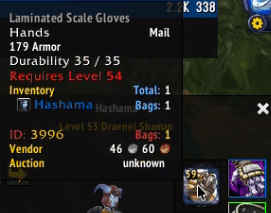
Hover an equipment slot with Alt held down. A compact panel opens flush against the slot listing every item in your bags that fits it, sorted best first.
- Left click to equip — no dragging, no bag windows.
- Item level shown on each icon, quality colours on the borders, stack counts where relevant.
- Opens directly beside the hovered slot and flips to the other side when it would run off screen.
- Adjustable icon size and column count.
- The modifier is yours to pick: Alt, Shift, Ctrl, or no key at all (show on plain hover).
Gear sets
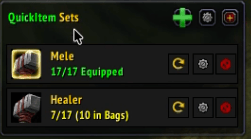
A movable panel lists your saved sets as cards. One click equips a set; the card shows at a glance how much of it is on you, how much is in your bags, and what is missing entirely.
- Hover, click, or always-open display modes — plus a pin button that keeps the panel open for good.
- Drag it anywhere, then lock it in place if you like.
- Per-spec auto-equip: bind a set to your primary or secondary spec and QuickItem swaps to it when you change talents. If you are in combat when the switch happens, it waits until you drop out.
Set Studio
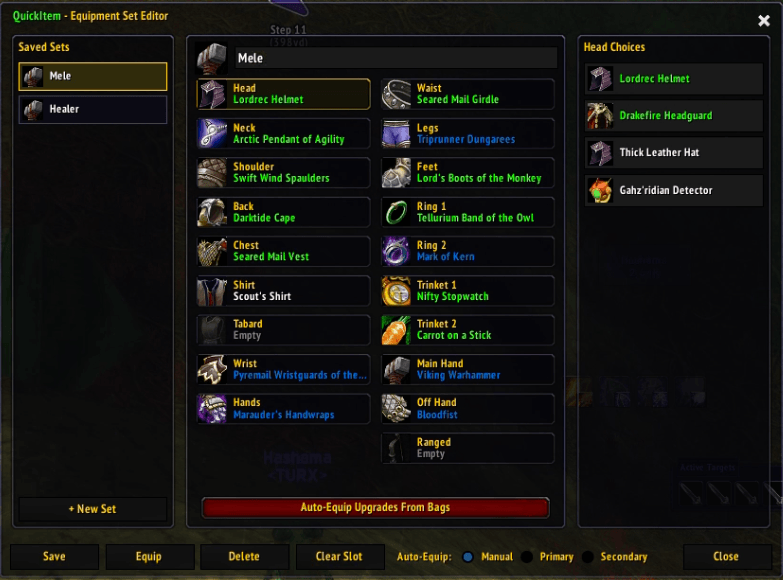
A three-panel editor for building sets exactly the way you want them, instead of just snapshotting whatever you are wearing.
- Left: your saved sets. Centre: every slot in the set with its current item. Right: every candidate for the selected slot, from your bags and your equipped gear.
- Rename sets, pick an icon, clear individual slots, save, equip, or delete.
- Closes with Escape, like a normal window.
Auto-Equip Upgrades
One button — or /qi upgrade — scans your bags and equips everything that beats what you are wearing. It is deliberately careful:
- Only items your character can actually use (class, level, and requirement restrictions are all checked).
- Your armour class is respected — a warrior will not be handed a higher item level cloth chest.
- Weapon types are never swapped. No surprise one-hander to two-hander changes, no proficiency errors.
- Empty ring and trinket slots get filled; shirt and tabard are left alone.
- You see the full list and confirm it before anything is equipped, so a bind-on-equip item never gets bound behind your back.
Set tags in tooltips
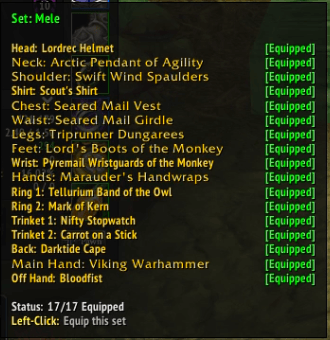
Any item that belongs to one of your sets says so in its tooltip — in your bags, on your character sheet, and on chat links. No more wondering whether that ring is part of your tank set before you vendor it.
Quality of life
- Minimap button — left click for the Set Studio, right click for settings, drag to reposition.
- ElvUI skinning when ElvUI is loaded, and a clean default look when it is not.
- Everything is saved per account and configurable in-game.
Slash commands
| Command | Does |
|---|---|
/qi |
Open settings |
/qi studio |
Open the Set Studio |
/qi upgrade |
Scan bags and equip upgrades |
/qi minimap |
Show or hide the minimap button |
/quickitem works everywhere /qi does.
Feedback
Bug reports and feature requests are welcome on the issue tracker. If something goes wrong, the WoW version and a copy of the Lua error make it far easier to fix.
QuickItem Team
