


QuickFocus Marks
- By
Hover-to-focus with raid marker and party callout; party interrupt-mark assignment
QuickFocus
QuickFocus combines three actions into one keypress in World of Warcraft Retail: set focus, apply a raid marker, and announce it in chat.
Hold Shift + Left Click on a hostile target and the addon will:
- set the target as your focus;
- apply your currently selected raid marker;
- announce in the chosen channel, e.g. "I mark ◆, current target: ✖ Target Name".
What's New in 1.6.7
- English UI with automatic locale detection; switch manually in Settings → General → Language.
- Callout language follows the interface language (English UI = English callout).
- Party interrupt-mark assignment, diamond easter egg and
/qf testself-check.
Screenshots
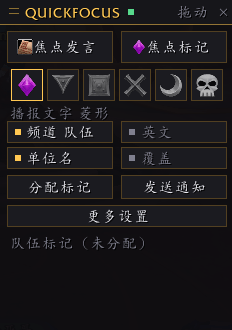
Chinese UI — main panel
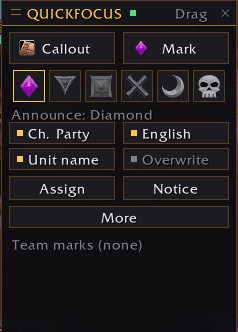
English UI — main panel
Features
- Hover-to-focus with configurable key, channel (Party / Raid Warning / Say / Yell / Guild / Instance), message templates and Chinese/English interface and callout; follows the game locale.
- Compact draggable panel: click a mark to select it, cycle channels, toggle callout language / unit name / overwrite; usable in combat.
- Party interrupt-mark assignment for 5-player parties: click Assign to give each interrupt-capable member a unique mark, sorted by name. Players who also have the addon sync automatically.
- Send Notice posts one line per assigned player to party chat.
- During assignment, "do not overwrite" and "show unit name" are locked, so nobody steals a teammate's mark and the target's current mark stays visible through the unit link.
- Diamond easter egg: "I mark ◆, current target: …".
- Built-in self-check with
/qf test.
Compatibility
- World of Warcraft Retail 12.1.5 / 12.1.0 (Interface 120105, 120100).
- No third-party libraries.
- Party play only; raids are not supported yet.
Installation
- Unzip the downloaded file.
- Place the
QuickFocusfolder intoWorld of Warcraft\_retail_\Interface\AddOns\. - Fully restart the game client.
- Enable QuickFocus in the AddOns list.
Commands
/qf— toggle the panel/qf config— open settings/qf status— show current status/qf test— self-test/qf assign— assign marks/qf send— send the assignment notice/qf lang [auto|zh|en]— switch interface language
Notes
- All actions are triggered by player keypresses. The addon only generates macro text and does not automate gameplay.
- The callout includes the target's current mark through the unit link, making duplicate marks easy to spot.
- Interface language can be set to Auto / Chinese / English; the callout language follows it by default and can still be overridden with the in-game English toggle.
Originality
All code, UI and the icon are original. No third-party code or assets are included.