Quick Comms Forever
- By
Quick Comms Forever enables instant, non-typed communication in WoW Forever. Save and send preset messages with one click or a radial wheel. Ideal for fast group coordination, players who prefer not to type, and non-native English speakers.
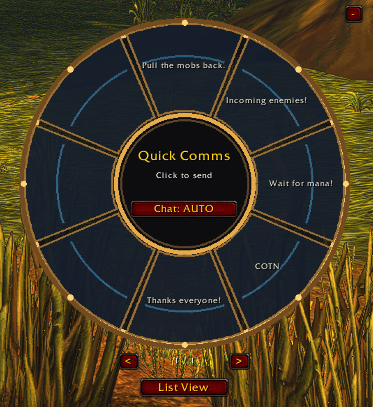
QCF Dial UI.png
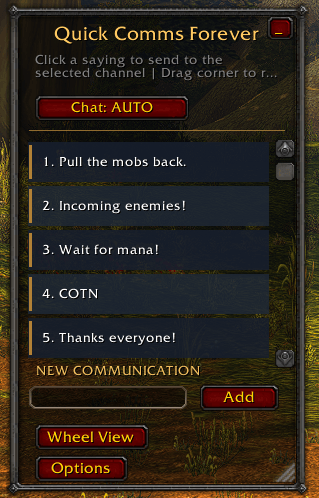
QCF List UI.png

QCF Minimized UI.png
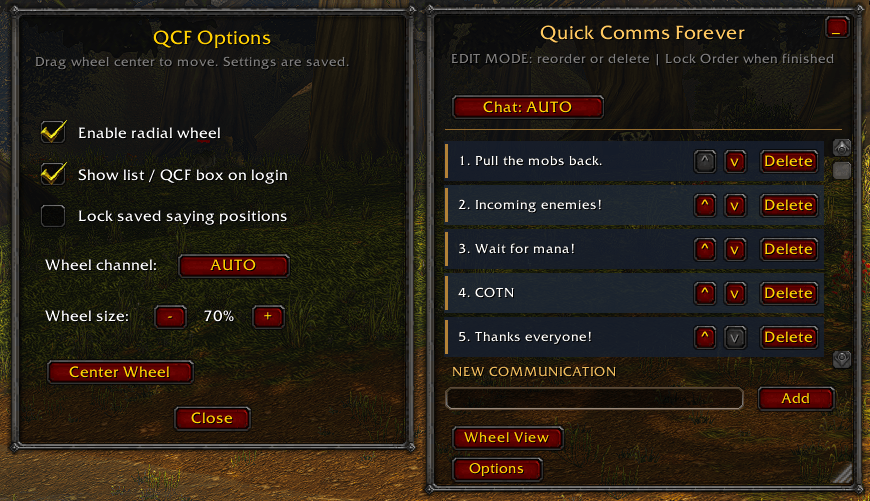
QCF Entry Edit UI.png
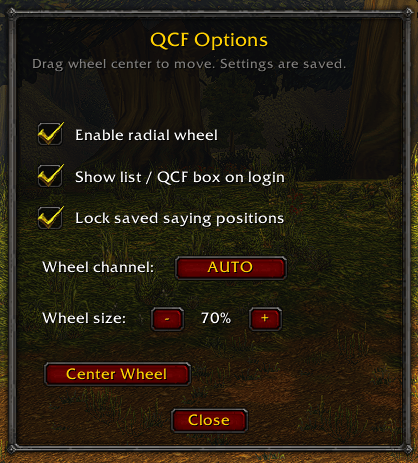
QCF Options UI.png
Description
Quick Comms Forever
Version 1.4.2 | World of Warcraft Forever
Quick Comms Forever is a lightweight communication addon designed to make in-game messaging faster, easier, and more accessible.
Whether you're coordinating a dungeon, participating in a raid, communicating during combat, or playing with others who speak a different language, Quick Comms Forever lets you instantly send predefined messages without typing or pressing Enter.
The addon is especially useful for non-native English speakers, players who prefer non-typed communication, and anyone who wants to communicate quickly without interrupting gameplay.
Features
Instant, Non-Typed Communication
-
Save frequently used messages and phrases.
-
Send messages instantly with a single click.
-
Communicate without manually typing or opening the chat box.
-
Prepare messages in advance for common situations.
-
Help overcome language barriers with consistent, easy-to-understand phrases.
Quick Communication List
-
Organize and access saved sayings.
-
Use color-coded buttons to choose your communication channel:
-
P (Blue): Party chat
-
S (White): Say chat
-
Y (Red): Yell chat
-
-
Resize and reposition the interface.
-
Minimize the window into a compact, movable QCF box.
-
Expand the interface whenever needed.
-
Automatically display the interface when logging in.
Radial Communication Wheel
-
Eight customizable message slots.
-
Access frequently used phrases through a circular communication wheel.
-
Activate the wheel using a configurable hotkey.
-
Select and send messages with a click.
-
Automatically select Party or Raid chat based on your group.
-
Keep the wheel hidden when not in use.
Accessibility and Language Support
Quick Comms Forever is designed to help players communicate regardless of typing speed or language proficiency.
Non-native English speakers can save commonly used English phrases in advance, allowing them to communicate effectively with English-speaking groups without having to translate or type messages during gameplay.
Players can also save phrases in their preferred language, subject to the game's chat character support.
Slash Commands
-
/qcf— Toggle the communication interface. -
/qcf minimize— Minimize to the QCF box. -
/qcf expand— Restore the full interface. -
/qcf hide— Hide the interface. -
/qcf wheel— Toggle the radial wheel. -
/qcf channel auto— Automatically select Party or Raid. -
/qcf channel party— Use Party chat. -
/qcf channel raid— Use Raid chat.
Compatibility
Designed for World of Warcraft Forever (Interface 16001).
Quick Comms Forever makes communication more accessible, reduces repetitive typing, and helps players coordinate efficiently across language barriers.
Quick Comms Forever Team