QuestX
- By
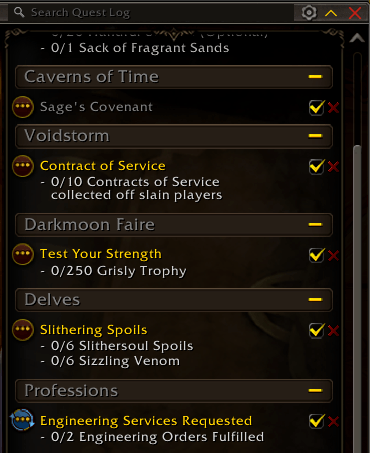
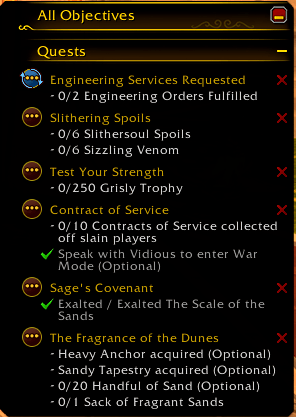
One-click quest abandon: a red X on every quest in the objective tracker and quest log.
Screenshot 2026-10-31 132108.png
Screenshot 2026-10-31 132057.png
Description
**One click, one abandoned quest.**
QuestX puts a small red X on each quest in the objective tracker and the quest log. Click it and the quest is gone, with no menus and no popup.
## Features
- **One-click abandon.** Every quest you can abandon gets a red X, lined up in the same spot for each quest.
- **Tracker and quest log.** The X sits in the top-right corner of each quest in the objective tracker, and next to the tracking checkbox in the quest log. Each one can be switched off on its own.
- **Only where it makes sense.** The X only shows on quests the game lets you abandon.
- **Optional safety.** Turn on Alt-click so a stray click can't throw a quest away.
- **Know what you dropped.** A chat message names the abandoned quest and any quest items that were removed with it. - - **Spot your paragon chests.** Paragon reward quests get a pulsing gold shine on the world map, so they stand out from normal turn-ins.
## Slash commands
- `/questx` shows the commands and what each setting is set to
- `/questx toggle` shows or hides the red X in the objective tracker
- `/questx log` shows or hides the red X in the quest log
- `/questx alt` requires Alt-click to abandon
- `/questx tooltip` shows or hides the tooltip on the X
- `/questx chat` shows or hides the chat message after abandoning - - `/questx paragon` shows or hides the shine on paragon turn-ins on the world map
## Good to know
- Abandoning a quest can't be undone. If you want a safety step, turn on Alt-click with `/questx alt`.
- Works with Blizzard's own objective tracker and quest log. Replacement quest trackers aren't supported.
- QuestX only adds its own buttons and doesn't change Blizzard's code, so quest item buttons keep working in combat.
Found a bug or have an idea? Open an issue on [GitHub](https://github.com/knnwo/QuestX/issues).
QuestX Team