QuestSections Forever
- By
Keeps the default quest tracker but groups your quests into collapsible sections by class, dungeon and zone, sorted easiest to hardest. Settings page included. Built for the WoW Forever beta.
Description
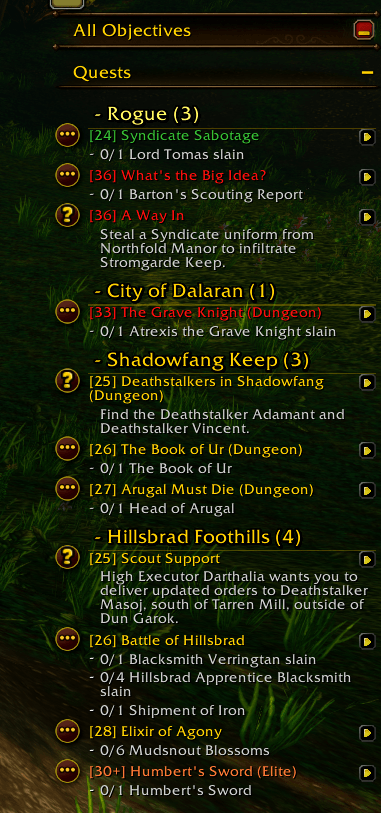
QuestSections Forever keeps Blizzard’s default quest tracker and reorganizes it. Instead of one long list, your quests are grouped under collapsible headings, so you can see at a glance what’s in your current zone, which dungeon quests you’re carrying, and which are class quests.
It doesn’t replace the tracker. Clicking quests, super-tracking, objective text and quest item buttons all still work the way they normally do.
Features
- Grouped by section: class quests first (headed with your class name, in your class color), then dungeons, then your current zone, then other zones in alphabetical order.
- Per-dungeon sections: dungeon quests are split out under each dungeon’s name, for example Shadowfang Keep.
- Elite quests stay with their zone: group and elite quests sit under the zone they belong to.
- Easiest to hardest: quests inside each section are ordered by quest level, lowest first.
- Collapsible headers: click a section title to fold or unfold it. Each title shows how many quests are in it.
- Settings page: change everything from Options > AddOns > QuestSections Forever, no commands needed.
- Adjustable look: change the title text size and the spacing under each title.
Settings
Open Options > AddOns > QuestSections Forever, or type /qs options. The page has:
- Turn the addon on or off
- Sort quests by level (easiest first) on or off
- Section title size
- Space under section titles
- Buttons to expand or collapse every section
Commands
Everything in the settings page also has a command. Type /qs for the full list. All of these also work as /questsections.
| Command | What it does |
|---|---|
/qs options |
Open the settings page |
/qs on / /qs off |
Turn the addon on or off |
/qs collapse / /qs expand |
Fold or unfold every section |
/qs sort |
Turn sorting by quest level on or off |
/qs size <8-32> |
Set the size of the section titles |
/qs gap <0-30> |
Set the space between a title and its first quest |
/qs assign <questID> <name> |
Move a quest into a section you name |
/qs assign <name> |
Same, for the quest you’re currently tracking |
/qs unassign [questID] |
Remove a manual assignment |
/qs debug |
Print diagnostic information for bug reports |
Moving quests by hand (/qs assign) is only available as a command.
Compatibility
Built and tested for the WoW Forever beta. The addon lists interface number 16001, which comes from other addon authors testing in the beta, since Blizzard hasn’t published one. The Retail interface numbers are also listed, but I haven’t tested it on Retail. Forever is still in beta, so things may change before launch.
Known issues and limitations
- Class quests are detected by the header they sit under in your quest log (the header named after your class). Forever has no class tag for quests. If one is missed, use
/qs assign. - Dungeon sections depend on how Forever labels dungeon quests. If a dungeon quest shows up under the wrong name, use
/qs assign. - Your settings may not survive a full restart. The Forever beta currently doesn’t reload addon saved settings, so your options, collapsed sections and manual assignments may reset. This is a client bug, not something the addon controls.
- The settings page depends on Blizzard’s options system, which has changed between versions. If it fails to build, the addon prints a message and the slash commands still work.
- Other quest tracker addons will likely conflict. Only run one addon that rearranges the quest tracker.
- If something goes wrong, the addon turns itself off and prints a message. Turn it back on with
/qs onor the settings page checkbox.
Reporting bugs
If you hit an error, please include:
- The error text from your error display (BugSack or similar).
- The output of
/qs debug. - A screenshot of your tracker, if the layout looks wrong.
QuestSections Forever Team