QuestPlateProgress
- By
Shows your quest progress on the nameplates of the mobs you still need, like "Kill 5/8" or "Cirrusfly Wing 3/10".
Quest Plate Progress
Shows your quest progress on the nameplates of the mobs you still need in
WoW: Forever: Kill 5/8 under a mob you are sent to kill, and
Cirrusfly Wing 3/10 under one that drops what you are collecting.
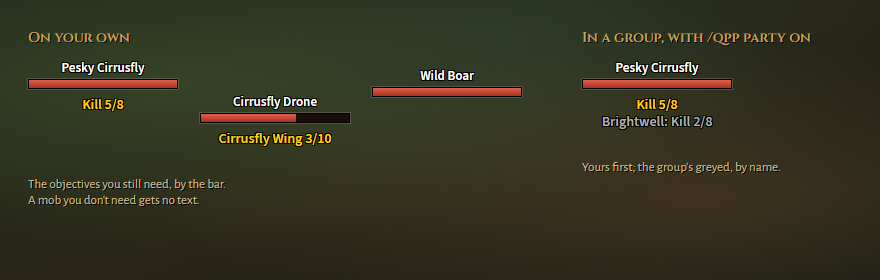
Images are drawn from the addon's own texts, not taken in game.
What it does
- Only what you still need. Finished objectives are left out, and a mob you don't need gets no text.
- Names what to loot. A mob you are sent to kill reads
Kill 5/8, one that drops a quest item names the item, such asCirrusfly Wing 3/10. - Your progress in a group. Only your objectives are shown, even when
others do the same quest.
/qpp party onadds theirs after yours, greyed and by name. - Stays put. The text sits by the health bar, and the first line stays where it is however many follow. Move it and change its size with commands or on the settings page.
- No guessing. The game already lists in a mob's tooltip which objectives it counts towards, the addon reads that list.
Not in dungeons yet. Inside dungeons the game keeps from addons what this one reads, so no progress shows there for now. Making it work in dungeons is a goal for a later version.
Commands
| Command | Does |
|---|---|
/qpp |
Show the current settings |
/qpp on / /qpp off |
Show or hide the text |
/qpp party on\|off |
Also show party members' progress (off by default) |
/qpp size <n> |
Text size, 6–24 |
/qpp move <x> <y> |
Move the text from the middle of the health bar |
/qpp center |
Back to the middle of the bar |
/qpp reset |
Default text size and placement |
/qpp options |
Open the settings page under Esc → Options → AddOns |
Settings are saved per character.
Credits
By Tziera. GPL-3.0-or-later.
QuestPlateProgress Team