


QuesToDone – Sort by Area (Zone Quest Tracker)
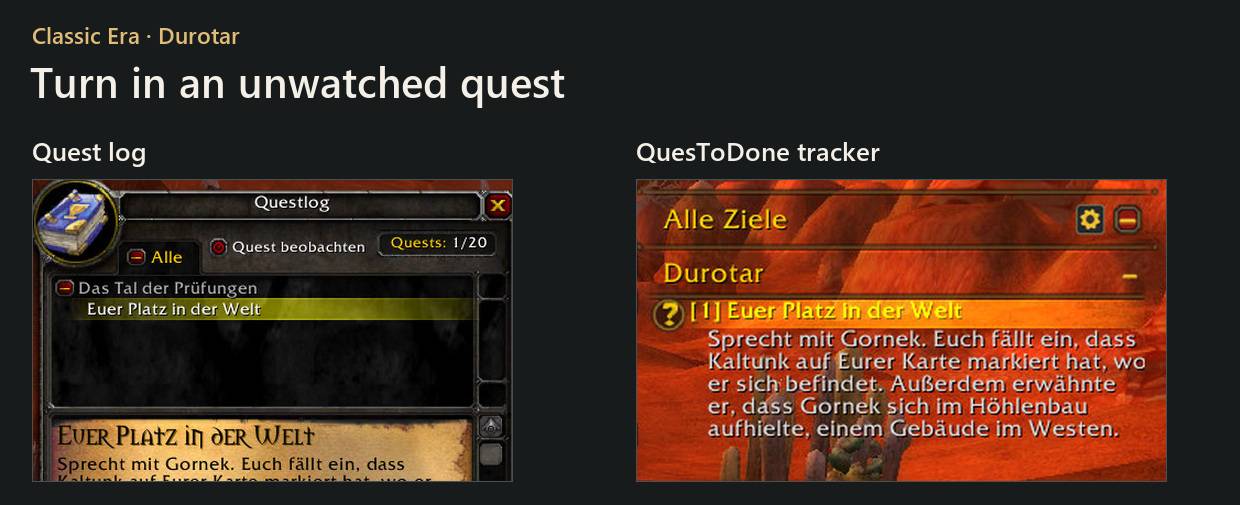
You can turn this quest in to Gornek in Durotar, even though you aren’t watching it.
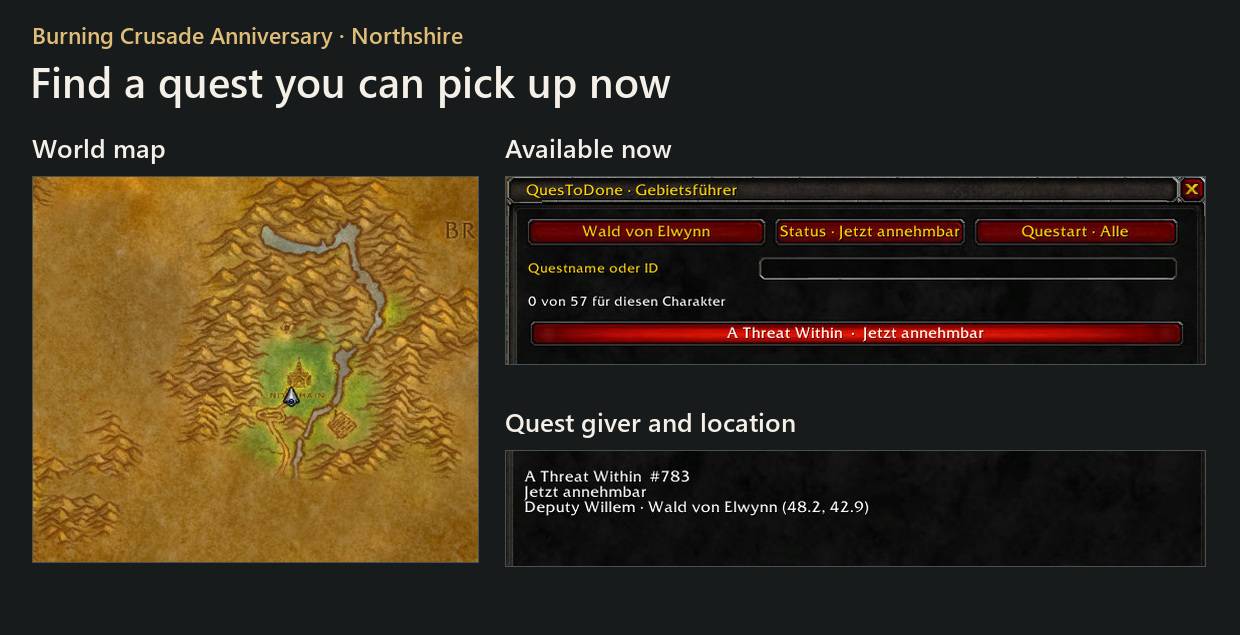
The zone guide shows that you can pick up A Threat Within and marks where to find Deputy Willem.
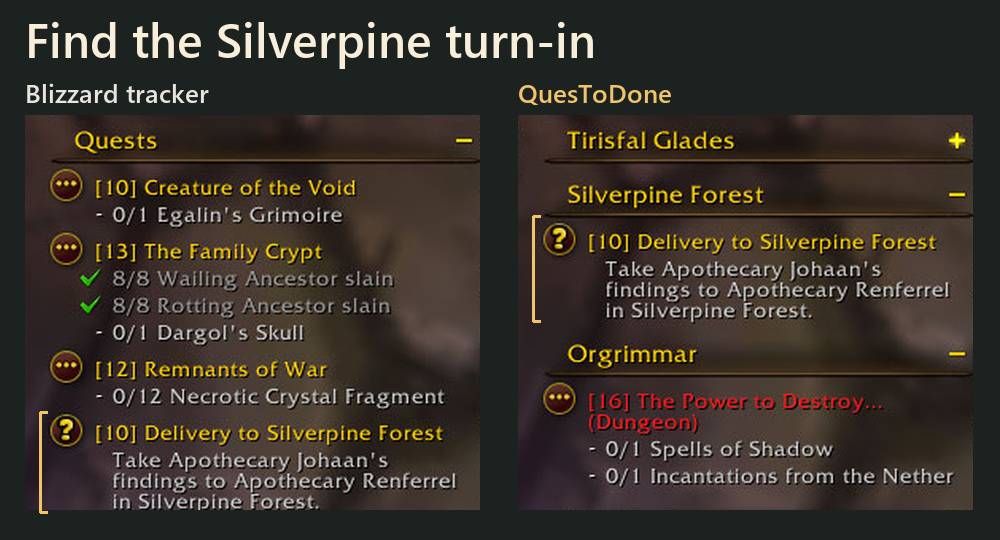
The same quest log with and without QuesToDone. Delivery to Silverpine Forest appears under its turn-in zone. Tirisfal Glades is collapsed in the right-hand tracker.
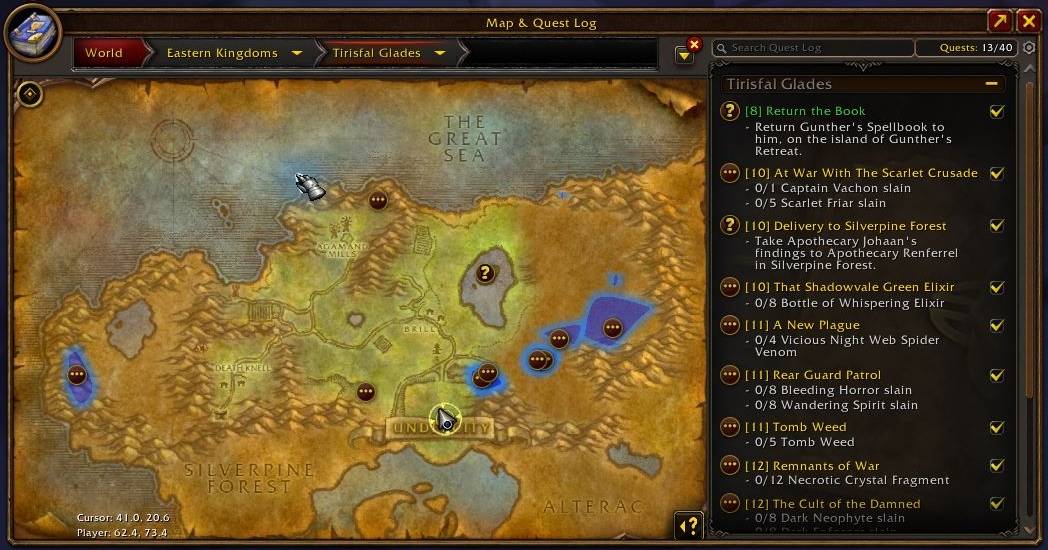
Blue areas in Tirisfal Glades show where your tracked quests have objectives. The quest list stays visible alongside the map.
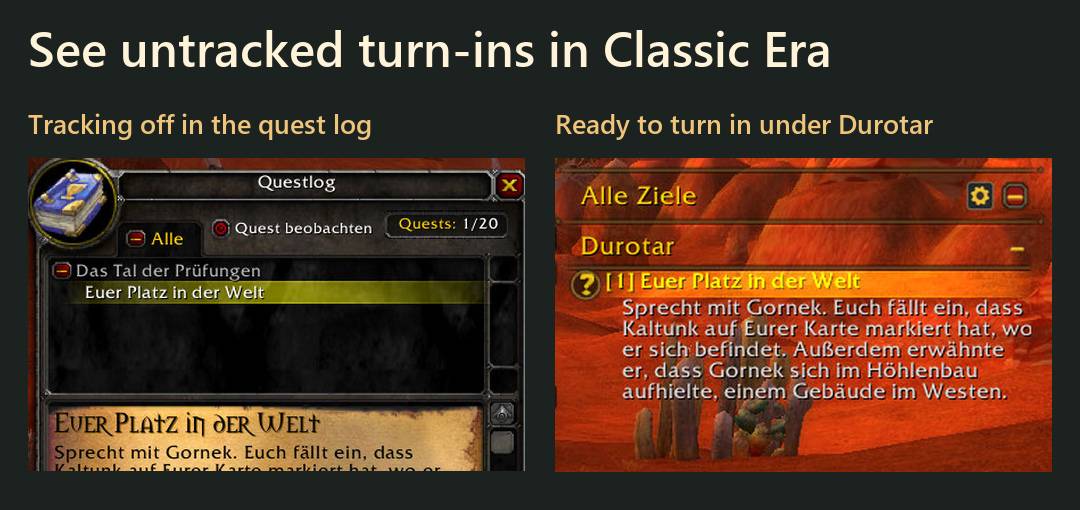
Your Place in the World is unchecked in the German Classic Era quest log. In QuesToDone 1.5 it appears under Durotar with a gold turn-in marker and directions to Gornek. Both panels show the same moment in game.
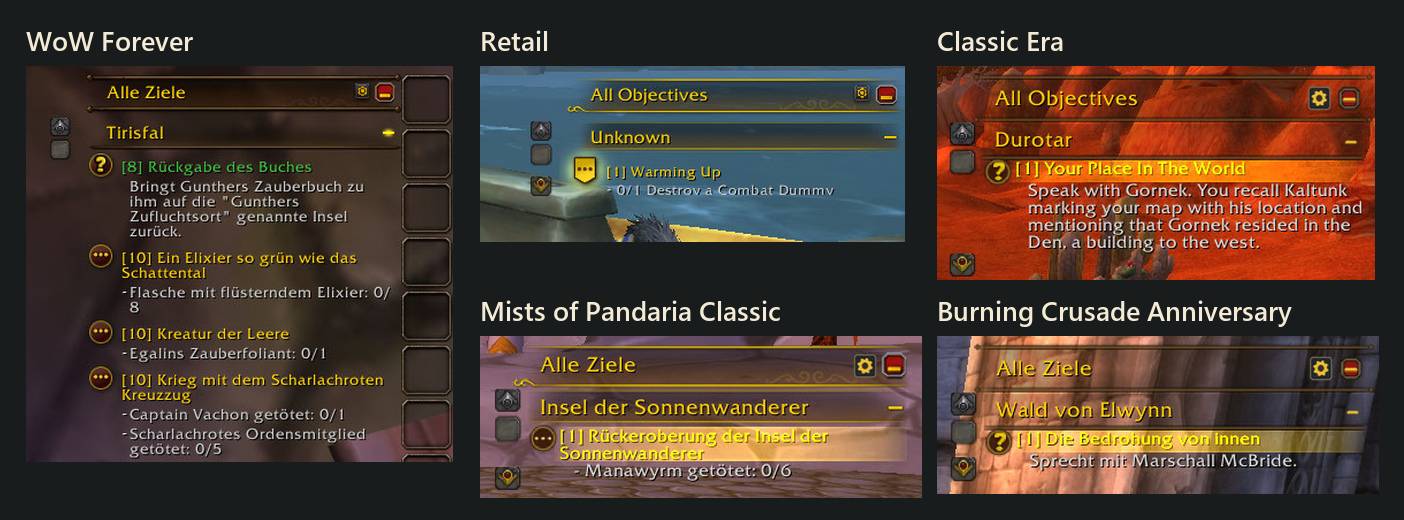
See grouped quests, turn-in directions and objective counts in Forever, Retail, Classic Era, Burning Crusade Anniversary and Mists of Pandaria Classic. Cropped from five in-game screenshots at the same magnification.
Description
What can I finish before I leave this zone?
QuesToDone groups accepted quests by the area of your next objective or turn-in. It includes quests you haven’t marked for tracking. In Durotar, for example, you can see that Your Place in the World is ready to turn in to Gornek even with tracking unchecked in the quest log.
You can turn this quest in to Gornek in Durotar, even though you aren’t watching it.
Which missing quests can my character pick up now?
To find incomplete quests you can start in this zone, open Settings → AddOns → QuesToDone, or click the gear in the tracker header. Check Enable the zone guide, click Zone guide, choose your area and select Available now. Select a quest to see its known giver and starting location. In Northshire, search for #783 to find A Threat Within. If your character can accept it, the guide shows Deputy Willem at 48.2, 42.9 in Elwynn Forest. Click Show on map to open the map.
The zone guide shows that you can pick up A Threat Within and marks where to find Deputy Willem.
Check your own progress. After turning in that quest, this character’s Elwynn Forest count rose from 0 of 57 to 1 of 57. The total counts quests in the catalogue for that area and edition. The guide lists Warband-only completion separately when your client supplies it.
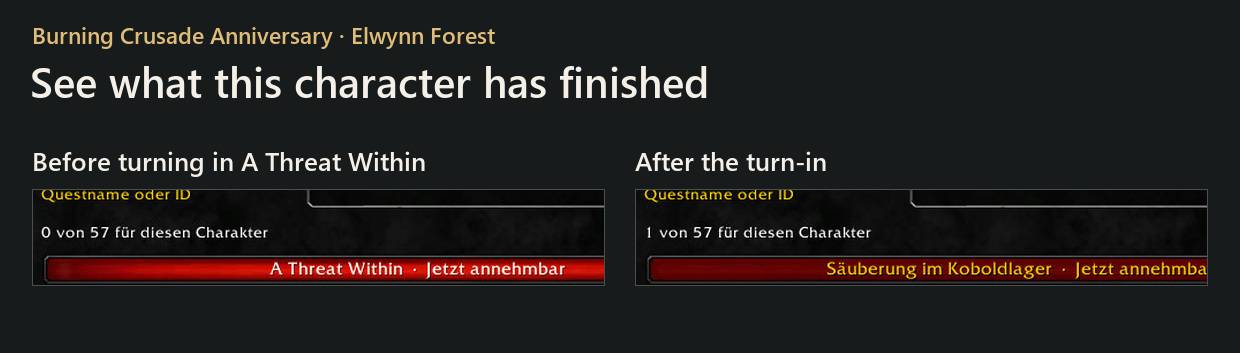
Turning in the quest moves this character’s Elwynn Forest progress from 0 of 57 to 1 of 57.
Find the right quest giver. Choose Show quest starts on the world map or Show nearby quest starts on the minimap in settings. Each map has its own switch and three filters for available, locked or excluded, and unconfirmed starts. For example, show only available quest givers on the minimap and include locked quests on the world map. A yellow exclamation mark means a confirmed offer. Hover over a shared marker to read each quest’s status and requirements. In Retail, Lady Jaina can offer Murloc Mania while its follow-ups are still locked.
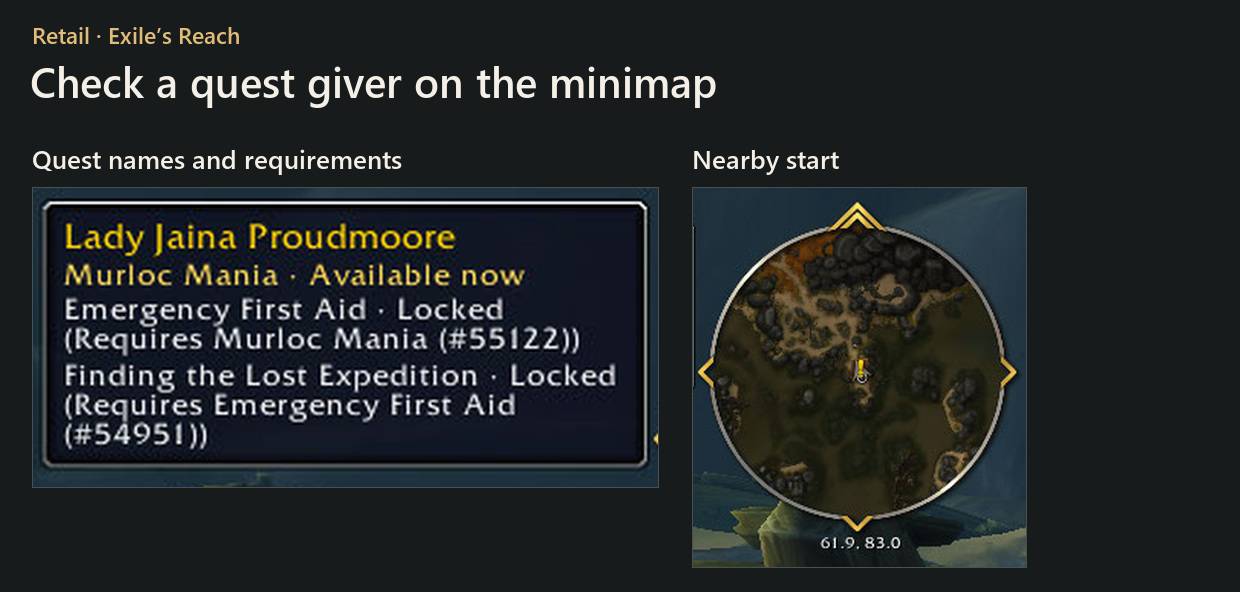
Hover over Jaina’s marker to see which quest is available and which follow-ups are still locked.
How do I plan the next zone?
With automatic sorting, your current zone comes first. Choose Distance for nearby objectives or Fewest region changes to order zones by the number of borders you need to cross. For the latter you can include boats and zeppelins, the Alliance Deeprun Tram and known flight paths. Visit a flight master’s map to record known connections. The tracker updates when you move or finish a step. A quest can appear under two verified zones. Unknown holds quests without a reliable destination.
How do I change the quest order?
Click a zone heading to collapse its quest list. You can turn reordering animations on or off in settings. Show all quests in your log or only watched quests. Put turn-ins first, last or among other quests. Sort automatically by level in either direction or title A–Z. For a manual order, hold a quest title with the left mouse button until it follows your cursor. Drop it on the upper or lower half of another title in the same zone to place it before or after that quest. Drag a zone heading to move the whole zone. Esc cancels. Choose Mixed with other quests to move across the turn-in grouping. Each character saves its own order. Settings can restore automatic sorting for zones, the quests in one zone or the quests in every zone.
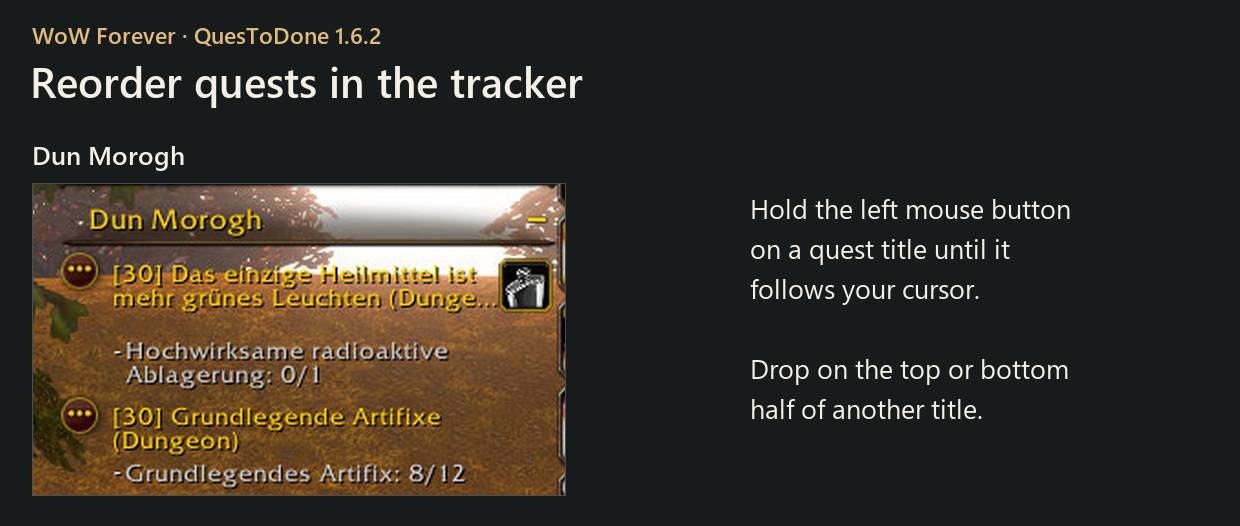
Hold the quest title, then drop it above or below another quest in the same zone. Drag a zone heading the same way.
Where is my next objective?
Enable Quest areas on the world map and the map’s quest markers. Blue shading shows where to work on an accepted quest when Blizzard supplies an area for that step. The zone guide’s exclamation marks show where to pick up quests. Click a quest for details or right-click for its available actions.
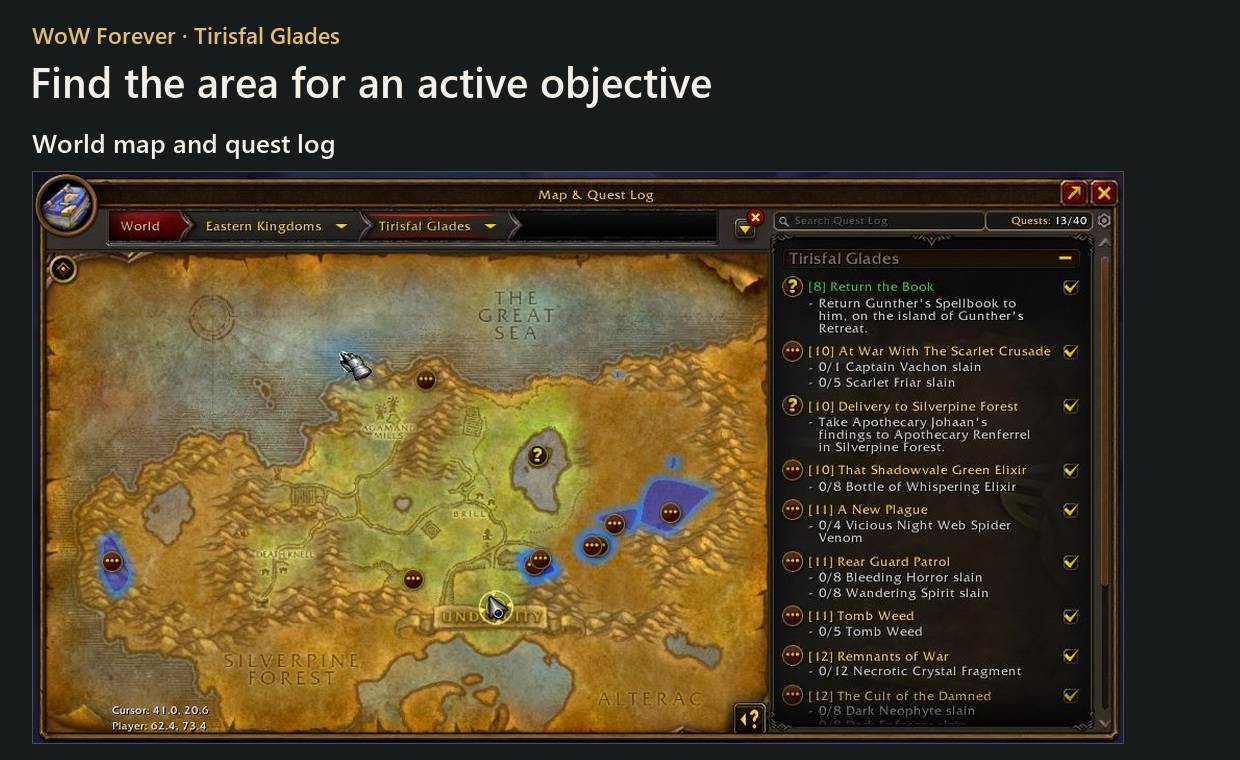
The blue areas show where to work on accepted quests. Look for exclamation marks when you want a new quest.
Why is a quest missing or locked?
Choose the current area or search for another. Look up a quest by name or exact ID. Switch between available, in your log, locked, excluded, completed, ever completed and unconfirmed quests. Check the listed level, class, race, faction, prerequisite quests or conflicting choices. The guide also remembers offers this character has encountered. Filter by quest type, including story, dungeon, raid, profession, holiday, world and PvP quests. Repeatable quests have daily, weekly, monthly and yearly filters. The current cycle is shown when the game or a recorded turn-in establishes it. Coverage varies by zone and edition. Some entries have a known giver but no verified map coordinates.
Install and get started
Install with the CurseForge app. One download covers Retail, WoW Forever, Classic Era (including Hardcore and Season of Discovery), Burning Crusade Anniversary, Wrath Classic, Cataclysm Classic, Mists of Pandaria Classic and Titan Reforged. For a manual install, copy the extracted Zielregionen folder into your edition’s Interface/AddOns.
The tracker starts enabled. In settings, Enable QuesToDone switches the tracker on or off and Refresh tracker reads your quest log again. Turn on the guide, quest starts and objective areas as needed. Use Tracker status if another tracker is active. Gamepad play uses the Blizzard tracker. Optional chat commands include /qtd options, /qtd guide, /qtd refresh, /qtd on, /qtd off. Enter /qtd to see the status.
Quests nach Gebiet sortieren und fehlende Quests finden
Was kann ich vor dem Gebietswechsel abgeben? QuesToDone gruppiert angenommene Quests im Tracker nach dem Gebiet des nächsten Ziels oder der Abgabe. Auch unverfolgte Quests zählen. In Durotar erscheint Euer Platz in der Welt unter dem Abgabegebiet bei Gornek, obwohl die Quest im Log kein Häkchen hat.
Welche Quest kann ich jetzt annehmen? Öffne Optionen → Addons → QuesToDone oder klicke auf das Zahnrad im Trackerkopf. Setze das Häkchen bei Gebietsführer aktivieren und klicke auf Gebietsführer. Wähle das Gebiet und unter Status den Eintrag Jetzt annehmbar. Suche in Nordhain nach #783. Wenn dein Charakter die Quest annehmen kann (im Bild A Threat Within), zeigt der Eintrag den Questgeber Deputy Willem bei 48,2 / 42,9 im Wald von Elwynn. Mit Auf Karte zeigen öffnest du die Karte.
Welche Quests fehlen diesem Charakter? Wähle dein Gebiet oder suche ein anderes. Du kannst nach Questname oder exakter ID suchen. Im Nordhain-Beispiel steigt der persönliche Fortschritt nach der Abgabe von 0 auf 1 von 57 erfassten Quests im Wald von Elwynn. Kriegsmeutenweite Abschlüsse stehen separat, sofern der Client sie meldet.
Wo ist der Questgeber? Aktiviere in den Optionen Queststarts auf der Weltkarte anzeigen oder Nahe Queststarts auf der Minimap anzeigen. Jede Karte hat drei eigene Filter für annehmbare, gesperrte oder ausgeschlossene und ungeklärte Starts. So kannst du auf der Minimap nur annehmbare Queststarts anzeigen und auf der Weltkarte zusätzlich gesperrte. Gelbe Ausrufezeichen zeigen bestätigte Angebote. Fahre mit der Maus über die Markierung. Bei Lady Jaina zeigt der Tooltip beispielsweise ein annehmbares Angebot und zwei gesperrte Folgequests mit ihren Voraussetzungen.
Wie plane ich das nächste Gebiet? Bei automatischer Gebietssortierung steht das aktuelle Gebiet zuerst. Wähle Entfernung für nahe Ziele oder Wenigste Gebietswechsel, um nach der Zahl zu überquerender Gebietsgrenzen zu sortieren. Schiffe und Zeppeline, die Tiefenbahn für die Allianz und bekannte Flugrouten lassen sich einzeln einbeziehen. Bekannte Flugverbindungen werden beim Öffnen der Flugkarte eines Flugmeisters erfasst. Quests mit Zielen in zwei Gebieten können unter beiden erscheinen. Ohne belegten Zielort steht die Quest unter Unbekannt.
Wie passe ich den Tracker an? Klicke auf eine Gebietsüberschrift, um die Liste einzuklappen. Die Verschiebeanimation lässt sich in den Optionen ein- und ausschalten. Zeige alle oder nur verfolgte Quests. Sortiere nach Stufe auf- oder absteigend oder nach Titel von A bis Z. Abgabebereite Quests können am Anfang, am Ende oder zwischen anderen stehen. Für eine eigene Reihenfolge hältst du die linke Maustaste auf dem Titel, bis er dem Mauszeiger folgt. Lass ihn auf der oberen oder unteren Hälfte eines anderen Titels im selben Gebiet los. So fügst du die Quest davor oder danach ein. Gebietsüberschriften verschiebst du genauso. Esc bricht ab. Wähle Mit anderen Quests, wenn du abgabebereite und offene Quests frei mischen möchtest. Jede Figur behält ihre Reihenfolge. In den Optionen kannst du die Gebietsreihenfolge sowie die Questreihenfolge eines oder aller Gebiete zurücksetzen.
Wo geht die angenommene Quest weiter? Aktiviere Questgebiete auf der Weltkarte und die Questmarkierungen der Karte. Eine blaue Fläche zeigt das Ziel eines angenommenen Schritts, sofern deine Edition eine Fläche liefert. Ein Ausrufezeichen des Gebietsführers zeigt dagegen einen Startort. Ein Klick auf die Quest öffnet Details, ein Rechtsklick die verfügbaren Questaktionen.
Warum fehlt eine Quest? Prüfe Status und Questart. Der Gebietsführer unterscheidet bestätigte Angebote, Einträge im Questlog, gesperrte, ausgeschlossene, erledigte, früher erledigte und ungeklärte Quests. Bekannte Voraussetzungen wie Stufe, Klasse, Volk, Fraktion, Vorquests und andere Entscheidungen stehen beim Eintrag. Suchfilter umfassen unter anderem Geschichte, Dungeon, Schlachtzug, Beruf, Festtag, Weltquests und PvP sowie tägliche, wöchentliche, monatliche und jährliche Wiederholungen. Der aktuelle Zyklus ist sichtbar, wenn Spiel oder protokollierte Abgabe ihn belegen. Manche Questgeber sind namentlich bekannt, ihre Koordinaten noch offen.
Installation und Hilfe. Das gemeinsame Paket deckt die acht oben genannten Editionen ab. Installiere es über die CurseForge-App oder kopiere Zielregionen nach Interface/AddOns deiner Edition. Der Tracker ist anfangs aktiv. Über QuesToDone aktivieren kannst du ihn ein- oder ausschalten. Tracker aktualisieren liest dein Questlog neu ein. Gebietsführer, Queststarts und Zielflächen schaltest du bei Bedarf in den Optionen ein. Trackerstatus zeigt den aktuellen Zustand. Bei Gamepad-Steuerung übernimmt der Blizzard-Tracker. Optional funktionieren /qtd optionen, /qtd gebietsführer, /qtd aktualisieren, /qtd an und /qtd aus.
Found an incorrect zone or missing start? Include the quest name or ID, edition, zone and current step in your issue report. Bei einem falschen Gebiet oder fehlenden Start helfen Questname oder ID, Edition, Gebiet und aktueller Schritt.
Fossil icon lettering adapted from Fraunces by Undercase Type.
QuesToDone – Sort by Area (Zone Quest Tracker) Team
