


QMAM(1).png
QMAM(2).png
Description
QuestMobAutoMarker
Please Leave a Comment if you encounter Any Bugs or Wanna Request a Feature or Change :)
QuestMobAutoMarker is a lightweight and efficient TBC addon designed to automatically assign raid target markers (like a skull or cross) to quest-objective mobs as soon as you target, hover over them, or encounter them in the game world. Never lose track of your specific quest targets in a crowded pack of monsters again!
📋 Requirements
Questie
✨ Key Features
- Smart Quest Auto-Detection: Automatically scans your active quest objectives (using Questie integration or built-in tooltip parsing) to identify exact target requirements.
- Automatic Targeting Markers: Instantly marks qualifying mobs with a rotating sequence of raid icons to help you easily distinguish them.
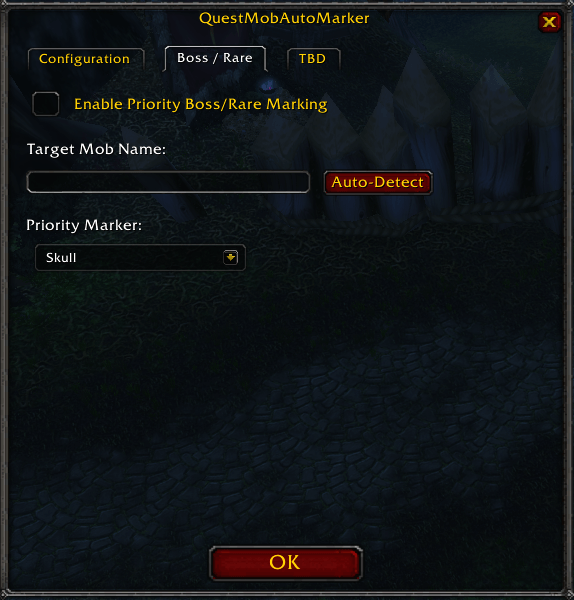
- Boss & Rare Scanner: Includes a customizable background scanner to automatically flag specific rare or boss targets the moment they appear on your nameplates, target, focus, or mouseover.
- Minimap Button Integration: Features a clean, movable minimap icon (powered by LibDBIcon) that lets you quickly toggle options or enable/disable the addon on the fly.
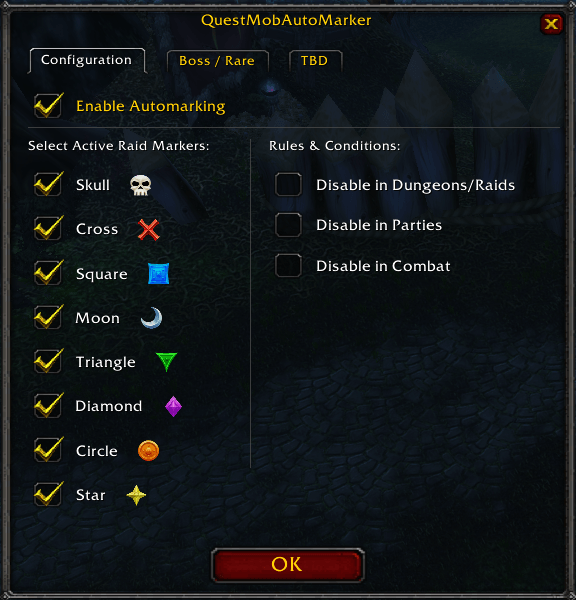
- Flexible Customization: A clean configuration interface (
/automarkor/am) allowing you to choose which raid icons to use, toggle combat restrictions, or disable the addon in instances/groups.
🎮 How to Use
-
Install the addon into your
Interface/AddOns/folder. -
In-game, type /automark or /am to open the options panel and customize your preferred markers.
-
Use the Minimap Button to quickly open the configuration menu or right-click it to toggle the addon on/off.
The QuestMobAutoMarker Team
