


QuestieAreas
- By
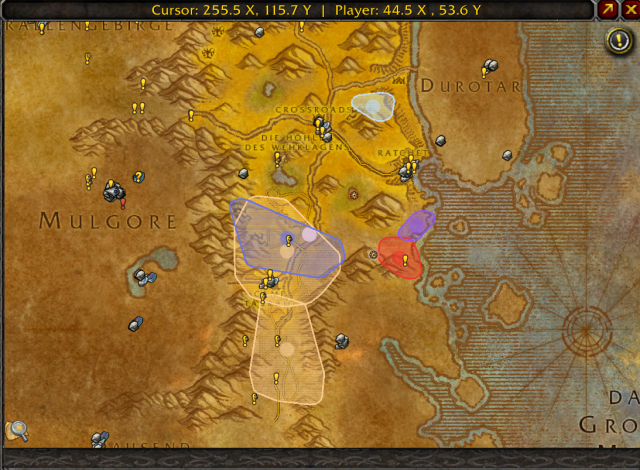
image.webp
Description
QuestieAreas
QuestieAreas turns tracked Questie objectives into colored search areas on the World of Warcraft Classic world map. Instead of showing every monster spawn as a separate marker, it groups nearby spawns into rounded areas that give you a clearer idea of where to look.
Features
- Search areas shaped by spawn locations: Colored, transparent areas follow the outer spawn points.
- Quest progress on hover: Hover over an area's marker to see the quest and objective progress, such as “Savannah Lion Tusk: 1/5.”
- Open quests from the map: Left-click a marker to open its quest in the quest log while keeping the map open.
- Tracked quests only: Areas appear for quests you are currently tracking.
- Map zoom support: Areas scale with the map when you zoom or switch between zone and continent views.
- Less marker clutter: Heavily overlapping areas for the same quest can be combined.
QuestieAreas covers monster objectives and items dropped by monsters. It leaves quest givers, turn-ins, object objectives, and the minimap unchanged.
Requirements and installation
Questie is required. Install QuestieAreas in your World of Warcraft/_classic_era_/Interface/AddOns folder, then restart the game. Make sure both addons are enabled.
Commands
/qareas on — show search areas
/qareas off — hide search areas
/qareas opacity 0.25 — set area transparency (0.05–0.8)
/qareas radius 7 — set the spawn grouping distance (2–15)
Search areas are estimates based on the spawn points Questie currently displays. Their shape may be less precise when spawn locations are sparse, widely scattered, or limited by Questie's displayed point count.
The QuestieAreas Team
