


Quest Tracker Plus
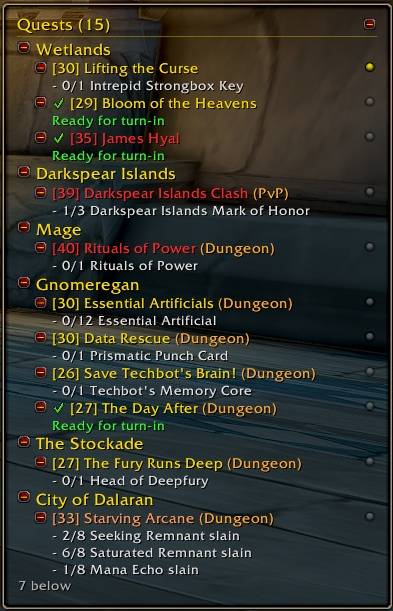
A tidier, adjustable quest and recipe tracker for WoW Forever. No guides, no arrows - just your quests, laid out the way you like.
QTP_1.jpg
Description
Quest Tracker Plus replaces the quest tracker on the right of your screen with one you can shape to your liking. It only shows what the game already knows - there is no quest database and no automation. The one guiding feature, an objective arrow, is optional and switched off unless you turn it on.
Layout
- Move, resize, lock, scale, font size
- Background color and opacity
- Borders: the Forever tooltip border, a thin line, or none - with your own color and thickness
- Auto height: only as tall as your quests need, up to the height you set; scroll with the mouse wheel when there are more
Your quests, your way
- Group quests by zone or by quest type (Elite, Dungeon, Raid…), or not at all
- Sort by the order you tracked them, by level, or with your current zone first
- Option to show only the quests of the zone you are in
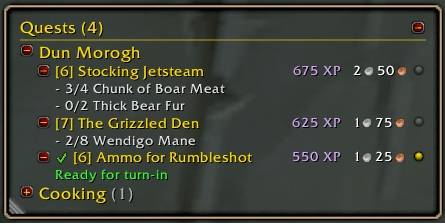
- Collapse the whole tracker, a group, or a single quest down to its level, title and progress (7/10)
- Quest titles colored by difficulty, just like the quest log; completed quests clearly marked and moved to the bottom
- Optionally show each quest's EXP and money reward right beside its title - money with gold, silver and copper coins, like your backpack
- New quests are tracked as soon as you accept them
Little touches
- A short gold flash and a quiet sound when an objective moves forward
- A focus bubble on every quest: click it to make that quest your focused one
- Click a quest to open it in the quest log, Shift-click to link it in chat, right-click to stop tracking it
Objective arrow (optional, off by default)
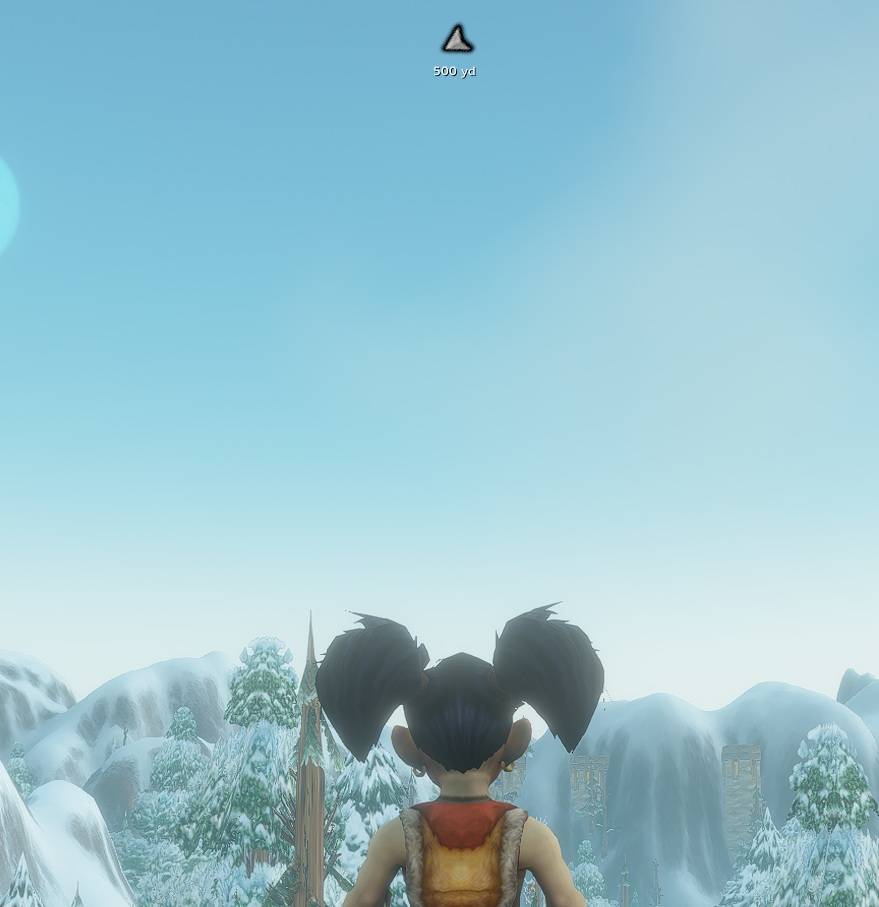
- Points to your focused quest's objective and shows how far away it is
- Resize it, recolor it and drag it anywhere on screen
- It uses the game's own quest locations, so it works wherever the game marks the quest
Immersion
- Fade or hide the tracker in combat, in dungeons and in raids - each set separately
Grouping
- Hover a quest to see how far everyone in your group is, objective by objective
- Group members need Quest Tracker Plus too to share their numbers; without it you see whether they are on the quest. Only quest IDs and counts are shared, and only with your own group.
- A small person icon on each quest for every group member who is on it with you, each member in their own color - hover it for the name (preview it alone with
/qtp testparty)
Professions
- Recipes you track appear under your quests, grouped by profession, with how many of each reagent you carry
Minimap button
- Click to show or hide the tracker, right-click for the options, drag it around the minimap - or hide it
Commands
/qtp- options (also: right-click the tracker header)/qtp toggle- show or hide the tracker/qtp lock//qtp unlock- unlocked, drag the header to move it and the bottom-left corner to resize it/qtp reset- position, size and scale back to default (the arrow's too)/qtp minimap- show or hide the minimap button
Quest Tracker Plus hides the game's own quest tracker while it is shown; untick Hide the default tracker in the options to keep both.
Made for WoW Forever and tested on the beta. Feedback and bug reports are very welcome.
Quest Tracker Plus Team

