Quest Marker Forever
- By
Quest Marker Forever adds visible diamond quest markers above NPCs in WoW Classic Forever. Easily find quest givers, objectives and turn-ins with optional QuestieDB support and automatic quest learning.
Description
Quest Marker Forever
WoW Classic Quest Markers • Quest NPC Indicators • Quest Objectives • Nameplate Diamonds • QuestieDB Integration
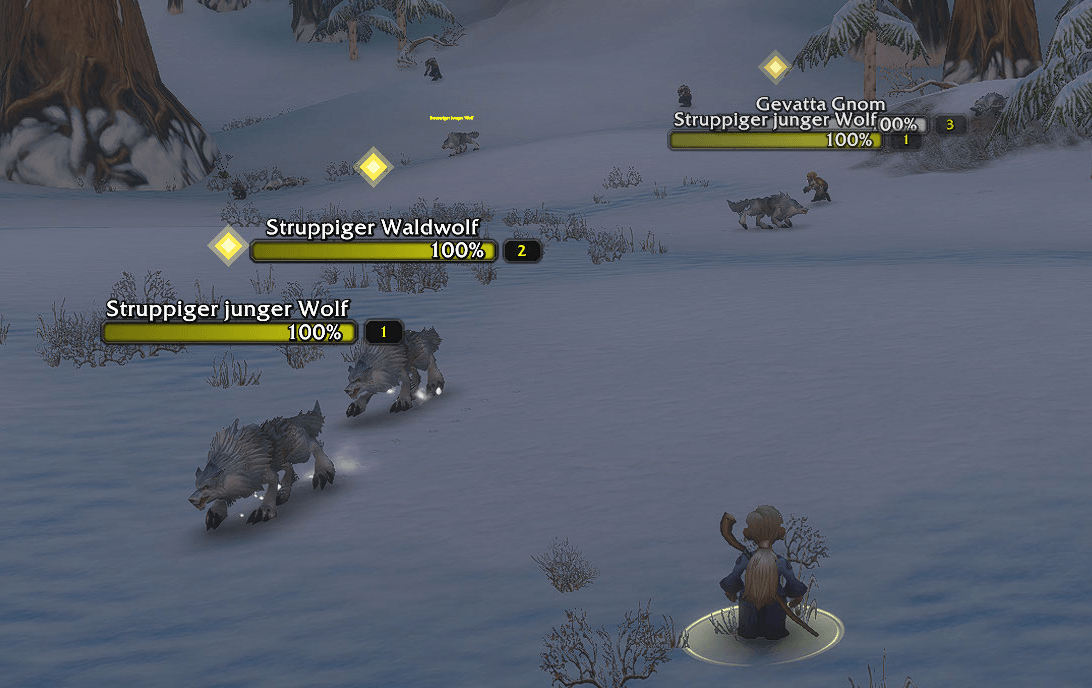
Quest Marker Forever is a lightweight World of Warcraft Classic Forever quest marker addon that displays clear, customizable diamond indicators above enemy nameplates when those enemies are relevant to your active quest objectives.
Easily identify quest-related enemies, find quest objectives faster, and enjoy a cleaner leveling experience without constantly checking your quest log.
See your quest targets. Stay focused. Keep leveling.
IMPORTANT — QuestieDB Installation
QuestieDB is strongly recommended for full quest data coverage!
Quest Marker Forever uses QuestieDB as its primary external quest information source to identify quest-related enemies reliably.
Install both addons for the intended experience:
-
Quest Marker Forever — displays the customizable diamond indicators.
-
QuestieDB — provides the quest and NPC information used by the marker system.
Download QuestieDB:
https://www.curseforge.com/wow/addons/questiedb
QuestieDB must be downloaded and installed separately. It is not included in Quest Marker Forever.
Without QuestieDB: Quest Marker Forever can still operate using its independent local quest-learning system, but quest coverage will be significantly more limited.
For the best experience, install QuestieDB before playing.
Features
Diamond Quest Markers Above Enemies
Instantly recognize enemies associated with your active quests.
-
Displays diamond-shaped quest indicators above relevant enemy nameplates.
-
Helps identify enemies associated with active quest objectives.
-
Makes quest-related targets easier to spot while leveling.
-
Automatically updates markers based on available quest information.
-
Keeps the interface clean and focused.
No need to constantly open your quest log just to identify which nearby enemies matter.
QuestieDB Integration
Quest Marker Forever supports the separately installed QuestieDB addon.
-
Uses available quest and NPC information from QuestieDB.
-
Helps identify enemies associated with active quest objectives.
-
Improves quest coverage compared with local learning alone.
-
Works alongside QuestieDB without bundling or redistributing its database.
QuestieDB is strongly recommended for reliable quest identification.
Automatic Local Quest Learning
Quest Marker Forever also includes its own independent quest-learning system.
-
Learns certain quest-item and enemy associations during gameplay.
-
Stores learned information locally.
-
Remembers observations between gaming sessions.
-
Provides limited functionality when QuestieDB is unavailable.
Local learning is a supplementary feature and does not replace the broader quest coverage provided by QuestieDB.
Customizable Diamond Indicators
Make the quest markers fit your interface.
-
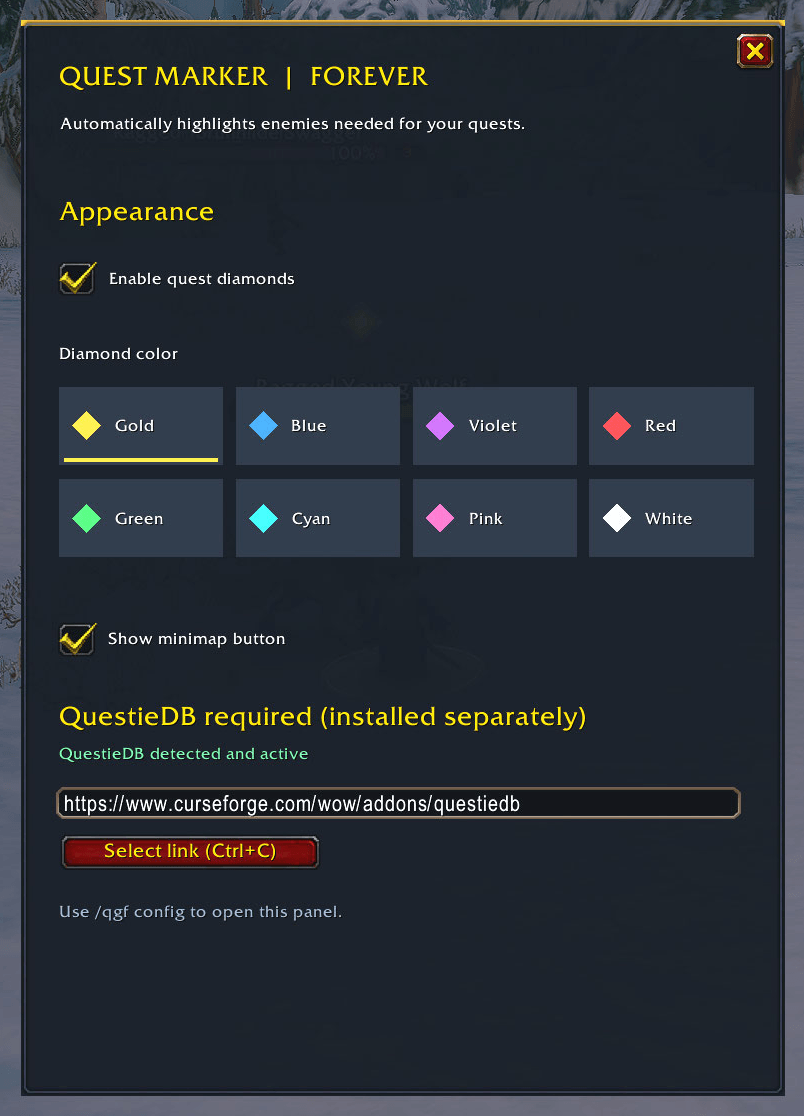
Eight selectable diamond colors.
-
Adjustable marker size.
-
Clean and recognizable diamond design.
-
Settings saved automatically between sessions.
Choose a marker appearance that remains easy to recognize while exploring and fighting.
Minimalistic Interface
Quest Marker Forever is designed to stay out of your way.
-
Lightweight visual quest assistance.
-
No unnecessary quest panels.
-
No complicated setup.
-
Movable minimap settings button.
-
Localized interface strings for supported client languages.
Focus on playing instead of managing your interface.
Installation
Step 1 — Install QuestieDB
Download the compatible QuestieDB version:
https://www.curseforge.com/wow/addons/questiedb
Extract QuestieDB into your World of Warcraft Interface/AddOns directory.
Step 2 — Install Quest Marker Forever
Download Quest Marker Forever and extract the QuestMarkerForever folder into the same Interface/AddOns directory.
Step 3 — Enable Both Addons
Launch World of Warcraft and make sure both addons are enabled.
Step 4 — Start Playing
Quest-related enemies will display diamond markers on their visible nameplates when the necessary quest information is available.
Step 5 — Customize
Type /qmf config to open the settings menu and adjust your markers.
Important: Enemy nameplates must be visible for the markers to appear.
Commands
/qmf config — Open the settings menu.
/qmf on — Enable quest markers.
/qmf off — Disable quest markers.
/qmf scan — Refresh quest information.
/qmf dbstatus — Check QuestieDB integration status.
/qmf install — Display installation information.
/qmf learnstatus — Display local learning status.
/qmf debug — Debugging information.
/qmf lootdebug — Loot-learning debugging.
/qmf clearloot — Clear locally learned quest-item observations.
The legacy /qgf command alias remains supported for existing users.
Compatibility
World of Warcraft Classic Forever
Addon Version: 1.0.0
Client Interface: 16001
Recommended Companion Addon: QuestieDB
Quest Marker Forever is designed to display quest markers on visible enemy nameplates.
Marker accuracy and availability depend on the game client, available quest information, and supported nameplate behavior.
The addon does not guarantee complete coverage for every quest, enemy, or client language.
Privacy & Local Data
Quest Marker Forever stores its settings and learned quest observations locally using World of Warcraft SavedVariables.
-
No account registration required.
-
No automatic uploading of learned quest information.
-
No external community synchronization in version 1.0.0.
Your locally learned information remains on your own installation.
Feedback & Bug Reports
Found an enemy that should display a quest diamond but doesn't?
Please report the issue through the CurseForge project page.
Helpful information includes:
-
Quest name or quest ID.
-
Enemy name.
-
Character level.
-
Whether QuestieDB is installed and enabled.
-
A short description of the problem.
Your feedback helps improve quest coverage and reliability in future updates.
Credits & Licensing
Developed by Paircrafted Addons
Quest Marker Forever is an independently developed addon.
QuestieDB is a separate project distributed under its own GPLv3 license. Quest Marker Forever does not bundle or redistribute QuestieDB or its database.
Special thanks to the QuestieDB developers for their work on Classic quest data and their response to our integration inquiry.
Quest Marker Forever is not affiliated with Blizzard Entertainment or the QuestieDB development team.
Quest Marker Forever v1.0.0
Find your quest targets. Follow the diamonds. Keep leveling.
by Paircrafted Addons
Quest Marker Forever Team