
Quest Level Colours
- By
2-minimap-tracked.png
3-zone-map.jpg
Description
See at a glance which quest is worth your time.
Quest Level Colours puts a clear, coloured mark on every quest in your quest log: on the zone map, the continent map and the minimap. The colour tells you how hard the quest is, the number next to it tells you its level, and the sign inside tells you where you stand with it. No setup needed. Install it, open your map, and it works.
The colours
They are the colours you already know from the quest log:
- Red: far above your level
- Orange: above your level
- Yellow: around your level
- Green: below your level
- Grey: so low it gives little or no experience
The signs
- ! a quest you can pick up
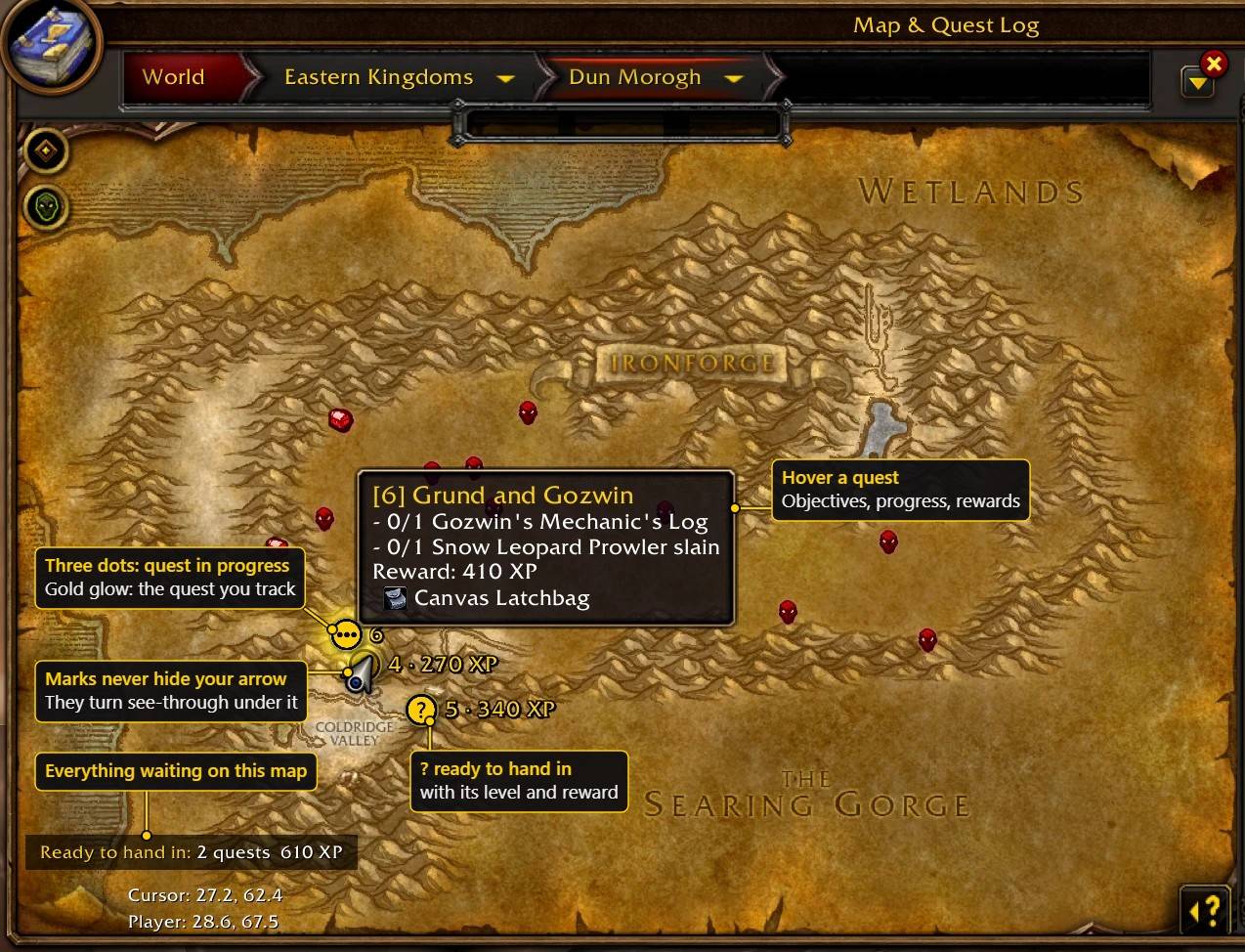
- three dots a quest in progress
- ? a quest ready to hand in
What you get
On the zone map
- A coloured mark with the quest's level next to it (a + marks an elite quest).
- Quests ready to hand in show their reward right there: experience and money. The total waiting for you on the map is shown in a small box.
- Marks never cover each other: where two would overlap, they move apart just enough.
- Marks never cover you: a mark under your arrow turns see-through.
On the continent map
- All your quests in one view, each on its real spot.
- Click a mark to track that quest without leaving the continent.
- A box lists the rewards waiting for you, zone by zone.
On the minimap
- A coloured mark and level for every quest near you.
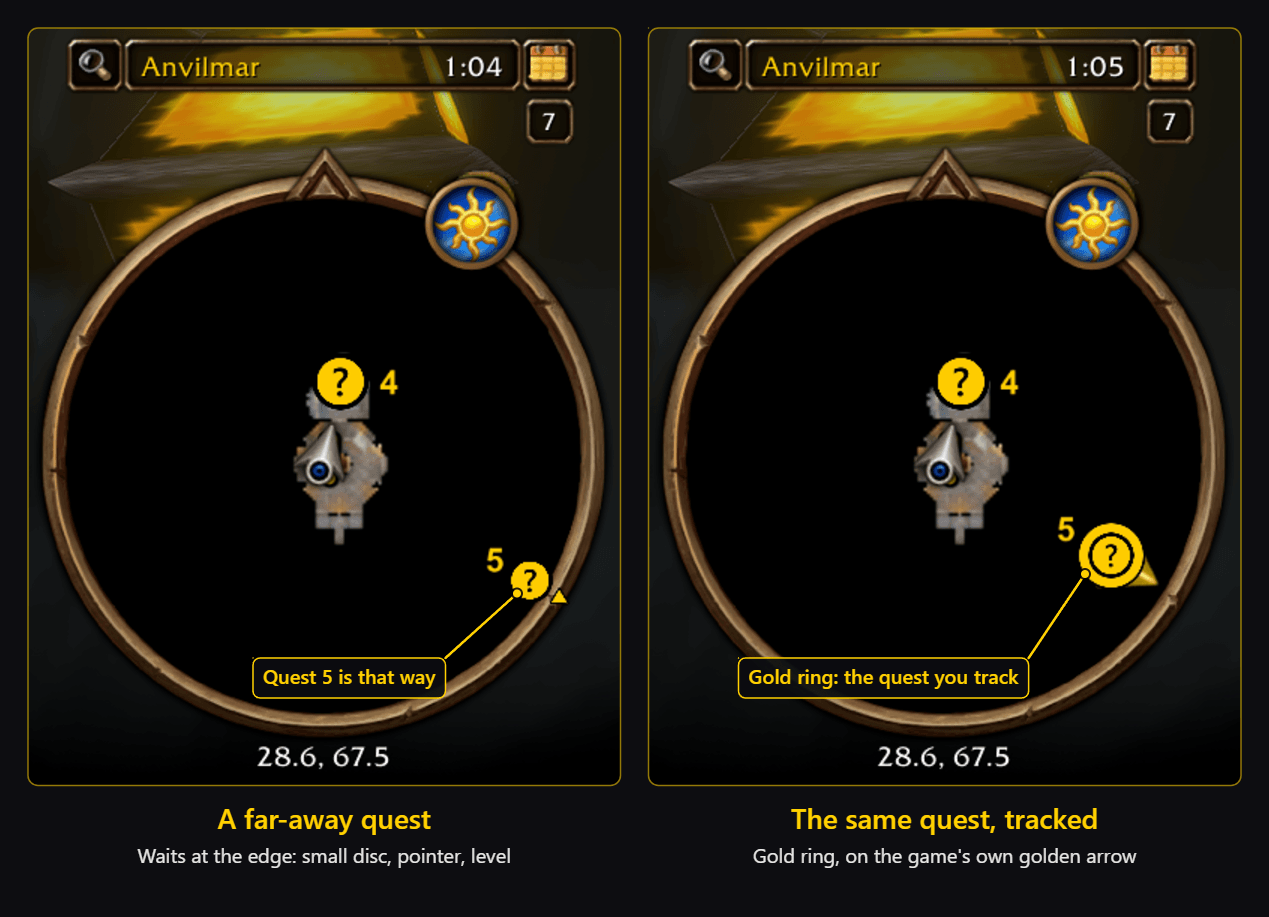
- Quests that are too far away wait at the edge of the minimap with a small pointer, and their tooltip tells you the distance. You choose: only the quest you track (the default), all of them, or none.
- When you walk onto a quest, its mark fades so you can always see your own arrow.
The quest you track
- It gets a gold ring on every map, so you find it at once.
Tooltips that answer the next question
- Hover a quest on the map to see its objectives with your progress, and its rewards: experience, money and items.
For colour-blind players
- "Difficulty shapes" gives each difficulty its own ring shape as well as its colour. It switches itself on if you use the game's colour-blind mode.
Simple and light
- Works on its own. No other addon is needed.
- Colours update by themselves when you level up.
- It stays light: it updates when a quest changes, when you level up or change zone, and while a map is open.
Settings
Open Esc > Options > AddOns > Quest Level Colours, or type /qlc. Every part has its own tick box:
- Colours on the world map
- Quest level on the world map
- Coloured quest marks on the minimap
- Quest level on the minimap
- Show far-away quests at the minimap edge
- At the edge: only the quest you track
- Coloured ! on the minimap for quests you can pick up
- Rewards next to quests ready to hand in
- Detailed quest tooltips
- Difficulty shapes (colour-blind help)
Updating from 1.2?
Version 2.0 is a new look and a lot more. Three things to know:
- Restart the game completely after updating (not just /reload), so it finds the new pictures.
- The level is now written next to the mark instead of on a corner badge.
- On the continent map, a click on a quest mark now tracks the quest. Click anywhere else to open the zone, as before.
Your settings are kept. The full list of changes is in the changelog.
Good to know
We would rather tell you than have you wonder:
- The game's own golden arrow for your tracked quest at the minimap edge cannot be removed by addons. Our mark sits on its tail, so the two work as one pointer. This is tuned for the game's standard round minimap.
- The game's own minimap marks cannot be hidden or recoloured, so our mark is drawn on top of them.
- Quests you can pick up (!) are coloured on the minimap only where the game tells addons about them. Elsewhere you see the game's own yellow !.
- Quest areas: the game gives addons one spot per quest, not its whole area.
- Not yet tried together with Questie or addons that replace the minimap.
- English only for now.
Found a problem? Have an idea?
Type /qlc test in the game and post a screenshot of the chat in the comments. That tells us almost everything we need. Ideas are just as welcome.
Credits
Idea, design and code by Martin. All rights reserved.
Thanks to the authors of the libraries included in this addon, which keep their own licences:
- HereBeDragons by Hendrik Leppkes (Nevcairiel), BSD licence
- CallbackHandler-1.0 by the Ace3 Development Team, BSD-style licence
- LibStub by Kaelten, Cladhaire, ckknight, Mikk, Ammo, Nevcairiel and joshborke, public domain
Quest Level Colours Team
