Quest Beacon
- By
Every tracked quest on a compass bar, a marker in the world on the nearest, and quest givers and flight masters nearby.
Quest Beacon
Every tracked quest on a compass bar. The nearest one marked in the world.
No more opening the map to see where to go next.

Features
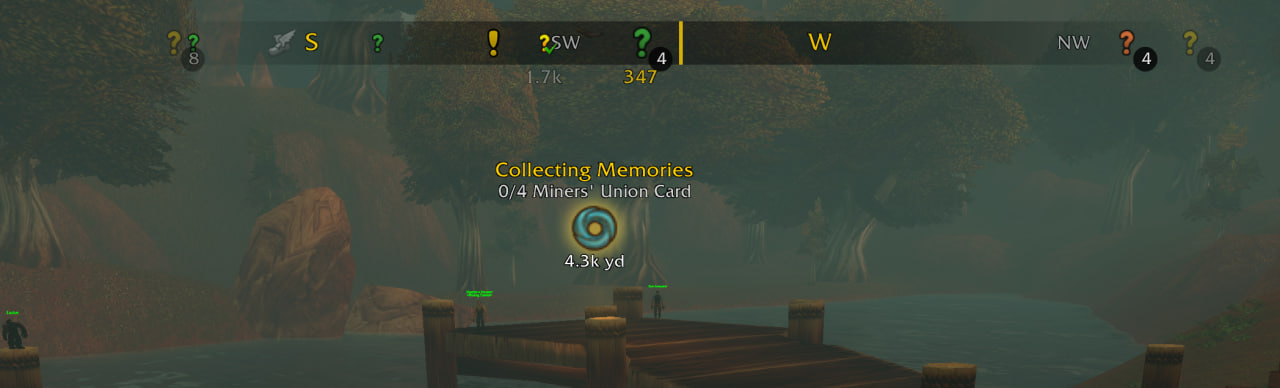
- Compass bar: a pin for every tracked quest at its real direction, with the distance. Turns with your character.
- World marker: stands on the quest you're heading to, with its name, next objective and distance. Replaces the game's diamond.
- Nearest first: navigation switches to the closest quest as you move. Pick one yourself and it sticks until it's done.
- Click to go: click a pin to navigate there. Right-click to skip that quest and go to the next nearest.
- Grouping: quests close together share one pin with a count. Hover for the list, nearest first.
- Tells quests apart at a glance: yellow "?" ready to turn in, dungeon and raid icons, coloured by level from grey to red like the quest log (can be turned off).
- What's nearby: flight masters, and quest givers with a quest you can take (with QuestieDB), show on the compass when they're close, each kind within its own range. A new one pulses as it comes into range, even behind you. Undiscovered flight masters stand out, known ones are greyed.
- Your own pins: the map pin you place (Ctrl+click on the map) is on the compass and never replaced; navigation goes there until you reach or remove it. Notes you add with HandyNotes show too.
- Stays out of the way: fades while you swing the camera, hides on flight paths, sits under the rest of the UI.
- Your layout: move it anywhere, top or bottom, and set its size, width and opacity. Distances and tooltips flip above the bar at the bottom of the screen.
Better with QuestieDB
Install QuestieDB and pins point at the nearest mob, object or NPC the quest actually needs, not just the game's quest area. It also shows the quest givers near you with a quest you can take.
Works with
- QuestieDB (optional, better locations and quest givers)
- HandyNotes (optional, your own notes on the compass)
- Leatrix Plus and other minimap button collectors
- QuestMaster: also picks the navigated quest, so turn off one of the two world markers
Setup
Nothing to set up. To change things: /qb, the minimap button, or Options → AddOns → Quest Beacon.
| Command | |
|---|---|
/qb |
settings |
/qb next |
next quest by distance (also a key binding) |
/qb move |
unlock the compass to drag it (also in the settings) |
/qb compass / marker / auto |
toggle compass, world marker, nearest first |
/qb why |
where each quest is believed to be |
Good to know
The game lets addons place only one point in the 3D world, so only one quest gets a world marker at a time. The compass covers the rest.
Bugs and ideas
Quest Beacon Team