QQue
- By
qque_banner_en.png
{870874AF-E51D-4F7A-8E25-71E2DE13B3E6}.png
{A220936B-5612-4272-946B-E2687A0008E9}.png
{2789358C-2609-454E-9307-4D127671D750}.png
{7B11DED7-62EA-481D-8296-991FD9891F07}.png
Description
QQue – one-button sequences that measure themselves
QQue plays one-button sequences (no GSE needed), measures your dummy fights, compares them with the top players of your spec – and builds better sequences in-game. Plus a gear advisor, Mythic+/delve tools and a raid kit. Works for every class and spec. German and English.
Features
Sequences
- One-button sequences with their own keybinds, editor and step preview
- Reads
!GSE3!strings (unprotected), backups and Raidbots tables - "Optimised" sequences: built and simulated in-game (up to ~25 s search) against the top players of your spec or your own Raidbots sim
- Single-target and multi-target versions, AoE toggle key, CD mode on a modifier
Test fights
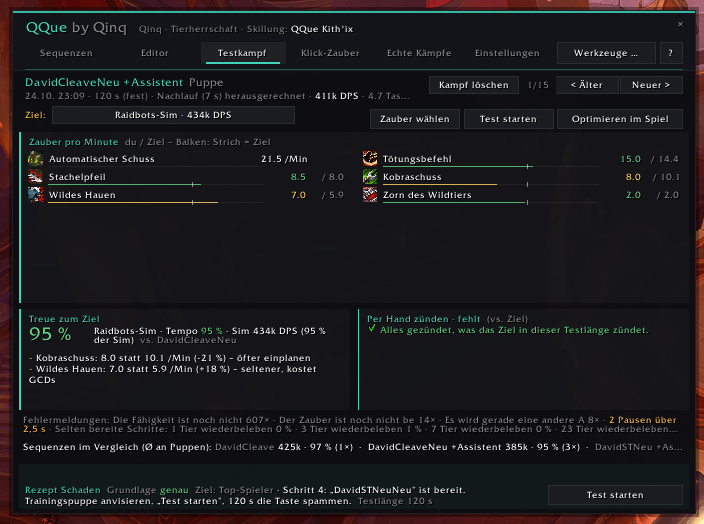
- Start a test at a training dummy, press your key – QQue shows fidelity to the target, what you never cast ("fire manually"), dead steps, idle time
- "Improve" turns the measured fight into a better sequence
Dungeon check (M+)
- On entering a dungeon: talents, hero tree and trinkets of the top players for exactly this dungeon, buffs, durability – one click to switch
- Optional comparison with the top players of your key level
Smart reminders
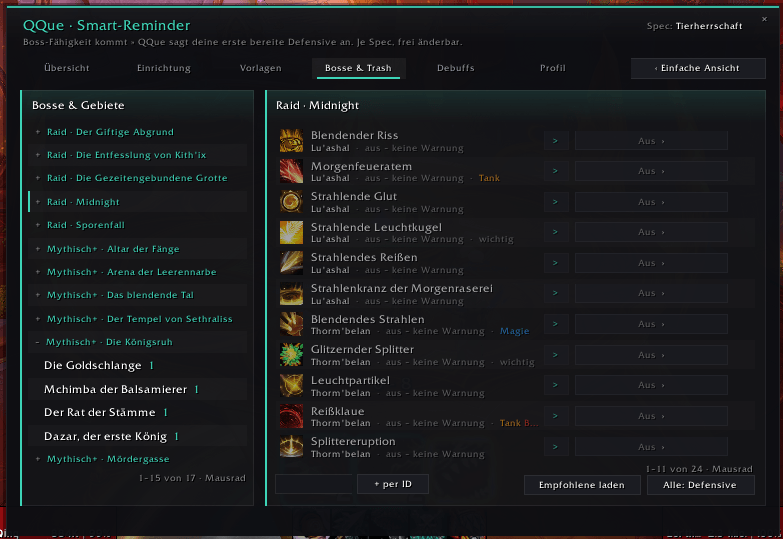
- Boss ability incoming (BigWigs/DBM) → QQue calls your first ready defensive, with icon, text and voice
- Tank busters, deadly and healer abilities from the Adventure Guide work automatically per role
- Trash warnings in M+ with EXBoss (optional)
- Mechanic tags (frontal, soak, spread, knockback …), previews, call log
Gear & tools
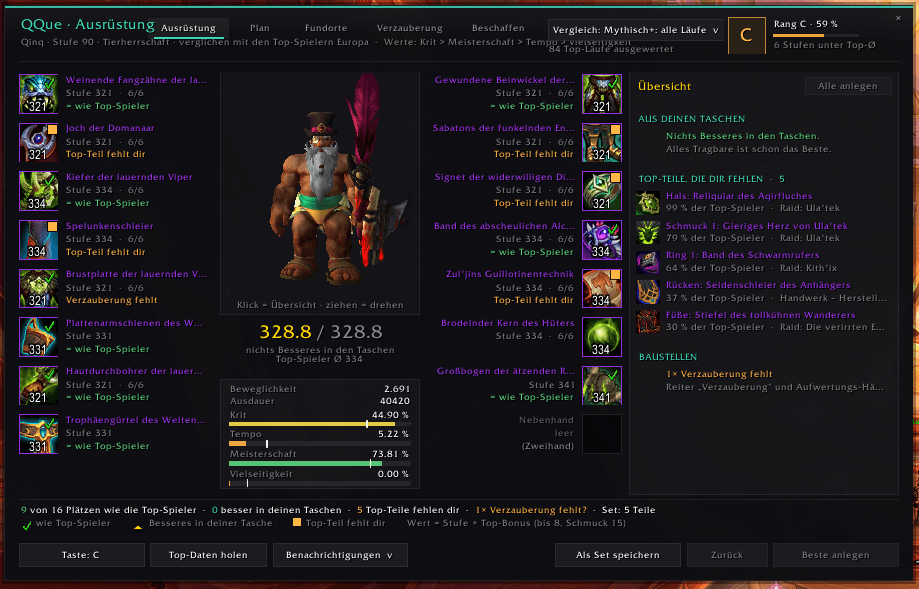
- What the top players wear, where it drops, upgrade plan, crest calculator ("what can I upgrade right now"), Great Vault, catalyst
- Weekly check, "ready for the key", group overview, delves planner (bountiful delves, coffer keys, Valeera)
- Raid kit: ready check, break timer, note reminders (MRT), raid lead helpers, raid callouts
Rules QQue follows
- One action per key press – nothing is automated. Utility spells and big cooldowns are always yours.
- No graphics settings changed, no keybinds of other addons touched, chat/whispers only when you click.
- QQue never contacts websites. Warcraft Logs / Raidbots data comes from optional helper bookmarks that read the page you opened in your browser; you paste the result yourself.
Getting started
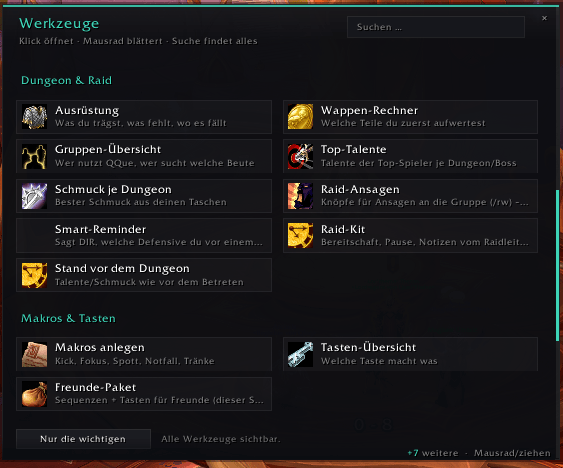
/qque opens the window · "?" = quick guide · "Tools …" = all tools.
- Sequences → "+ New sequence" → "Optimised: …" → pick a key
- Tools → "Get top players" (once) for a comparison target
- Target a training dummy → "Start test"
Optional addons
BigWigs or DBM (boss timers), LittleWigs (dungeon bosses), EXBoss (M+ trash timers), SimulationCraft (for Raidbots), MRT (notes). QQue can import your own settings from Naowh Smart Reminders.
Bugs & ideas
Type /qque bug (or Tools → "Report a bug / idea"). QQue builds a ready-made report – version, game, class/spec, relevant addons, last QQue errors, no character or realm names. Paste it as a comment here. Ideas: /qque idea.
Licence & credits
QQue is free software under the GNU GPL v3 (or later). The knowledge base is derived from the SimulationCraft action priority lists (GPL-3, github.com/simulationcraft/simc) – thank you, SimulationCraft team. QQue is not affiliated with Blizzard, Warcraft Logs, Raidbots, GSE, BigWigs, DBM, EXBoss or Naowh.
Deutsch
QQue spielt Ein-Tasten-Sequenzen (ohne GSE), misst deine Puppen-Kämpfe, vergleicht sie mit den Top-Spielern deines Specs – und baut im Spiel bessere Sequenzen. Dazu Ausrüstungs-Berater, M+- und Tiefen-Werkzeuge und ein Raid-Kit. Für alle Klassen und Specs, Deutsch und Englisch.
Funktionen
Sequenzen
- Ein-Tasten-Sequenzen mit eigenen Tasten, Editor und Schritt-Vorschau
- Liest
!GSE3!-Strings (ungeschützt), Backups und Raidbots-Tabellen - „Optimiert“: im Spiel gebaut und simuliert (bis ca. 25 s Suche) – gegen die Top-Spieler deines Specs oder deine Raidbots-Sim
- Einzelziel- und Mehrziel-Version, AoE-Umschalt-Taste, CD-Modus auf einer Mod-Taste
Testkampf
- Test an der Trainingspuppe starten, Taste drücken – QQue zeigt Treue zum Ziel, was du nie gezündet hast, tote Schritte, Pausen
- „Verbessern“ macht aus dem gemessenen Kampf eine bessere Sequenz
Dungeon-Check (M+)
- Beim Betreten: Talente, Heldenbaum und Schmuck der Top-Spieler für genau diesen Dungeon, Buffs, Haltbarkeit – ein Klick zum Wechseln
- Optional Vergleich mit den Top-Spielern deiner Schlüsselstufe
Smart-Reminder
- Boss-Fähigkeit kommt (BigWigs/DBM) → QQue sagt deine erste bereite Defensive an – Symbol, Text, Stimme
- Tankbuster, tödliche und Heiler-Fähigkeiten aus dem Abenteuerführer automatisch je Rolle
- Trash-Warnungen in M+ mit EXBoss (optional)
- Mechanik-Hinweise (Frontal, Soak, Verteilen, Rückstoß …), Vorschau, Protokoll
Ausrüstung & Werkzeuge
- Was die Top-Spieler tragen, wo es fällt, Aufwertungs-Plan, Wappen-Rechner („was geht jetzt“), Schatzkammer, Katalysator
- Wochen-Check, „Bereit für den Key“, Gruppen-Übersicht, Tiefen-Planer (reichhaltige Tiefen, Kastenschlüssel, Valeera)
- Raid-Kit: Bereitschaftscheck, Pause, Notiz-Reminder (MRT), Raidleitung, Raid-Ansagen
Regeln, an die sich QQue hält
- Ein Tastendruck = eine Aktion, nichts läuft automatisch. Nutz-Zauber und große Cooldowns zündest du selbst.
- Keine Grafik-Einstellungen, keine Tasten anderer Addons, Chat/Flüstern nur auf deinen Klick.
- QQue nimmt keinen Kontakt zu Webseiten auf. Warcraft-Logs-/Raidbots-Daten kommen über optionale Hilfs-Lesezeichen, die die Seite lesen, die du im Browser geöffnet hast; das Ergebnis fügst du selbst ein.
Loslegen
/qque öffnet das Fenster · „?“ = Kurzanleitung · „Werkzeuge …“ = alle Werkzeuge.
Fehler & Ideen
/qque bug eingeben (oder Werkzeuge → „Fehler melden / Idee“). QQue baut einen fertigen Bericht – Version, Spiel, Klasse/Spec, wichtige Addons, letzte QQue-Fehler, ohne Charakter- und Realm-Namen. Hier als Kommentar einfügen. Ideen: /qque idee.
Lizenz & Danke
QQue ist freie Software unter der GNU GPL v3 (oder später). Die Wissensbasis ist aus den Prioritätslisten von SimulationCraft abgeleitet (GPL-3, github.com/simulationcraft/simc) – danke an das SimulationCraft-Team. QQue gehört nicht zu Blizzard, Warcraft Logs, Raidbots, GSE, BigWigs, DBM, EXBoss oder Naowh.
QQue is free and stays free – nothing is ever locked. If it helps you and you want to say thanks: paypal.me/QQueWoW
QQue Team