
PvP 20 Rating
Provides a PvP rating system at level 20, including rating for Arena Skirmishes.
PvP_20_Rating-1.png
PvP_20_Rating-2.png
PvP_20_Rating-4.png
PvP_20_Rating-3.png
Description
PvP 20 Rating
A World of Warcraft addon that implements a PvP rating system for level 20 and 21 twink characters. The addon exposes Blizzard's hidden skirmish rating and provides a rated-PvP-style interface at level 20.
Rating System
The arena skirmish rating uses Blizzard's internal hidden rating value retrieved via GetInspectArenaData(5). No custom rating calculation is performed — the addon displays the value that Blizzard tracks but does not expose at level 20.
Important: This rating exists for all players who participate in skirmishes, regardless of whether they have the addon installed. The addon merely reveals the data.
Random Battlegrounds, Solo Shuffle, and Wargames will use separate custom ratings derived from the skirmish rating. This feature is not yet implemented.
PvP Frame Modifications
Visual Changes
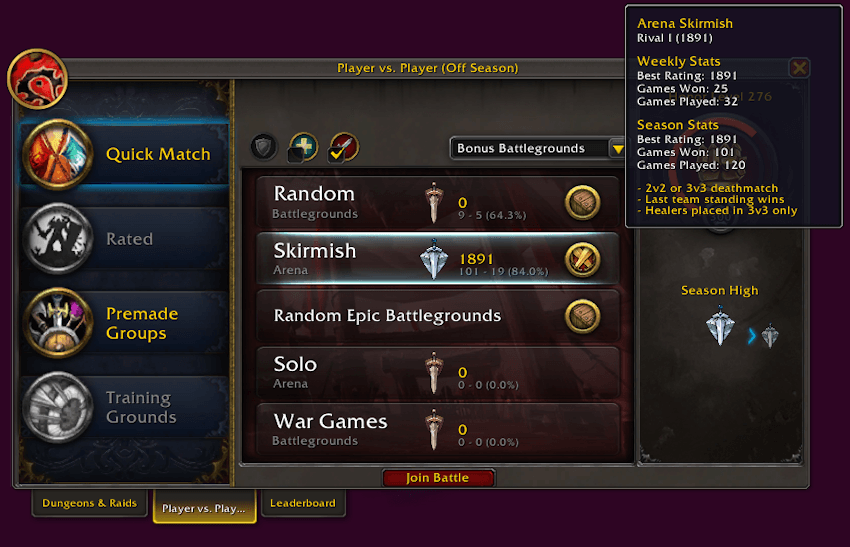
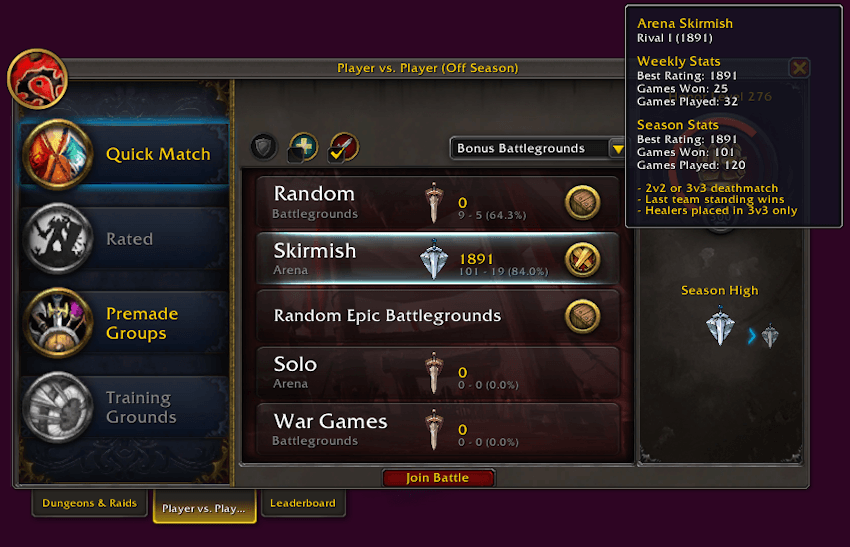
The default casual PvP UI is modified to replicate the appearance of the rated PvP interface available at max level:
- Custom textures for buttons and background panels
- Rank icons with corresponding rank titles
- Win rate percentage display
- Button tooltips are updated to display weekly and seasonal statistics in the same format as rated PvP tooltips at max level.
Inspect Frame Integration
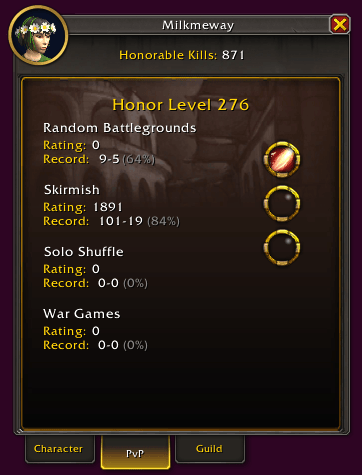
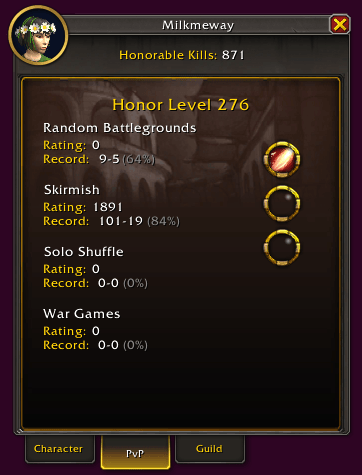
When inspecting a level 20–21 player, the addon modifies the standard InspectPVPFrame:
- Hidden elements: Rated Battlegrounds, Rated Solo Shuffle, Rated BG Blitz, Arena 2v2, Arena 3v3
- Displayed elements: Custom InspectPVPFrame containing skirmish-specific data.
The custom inspect frame shows sections and their data displayed:
- Random Battlegrounds
- Skirmish Arena
- Solo Shuffle
- War Games
War Games Interface
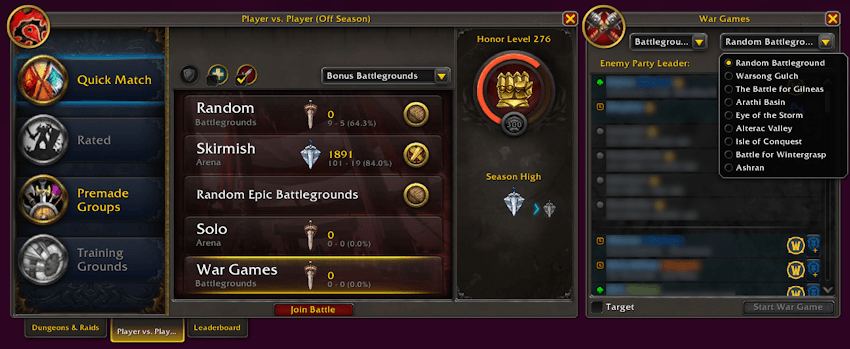
New Buttons
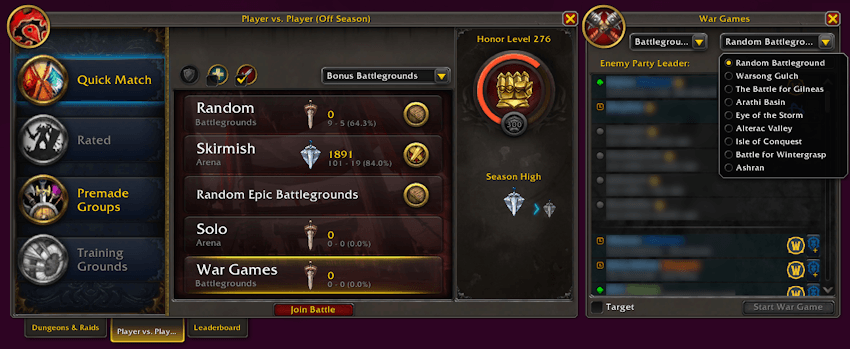
Two buttons replace the former Brawl options (Weekly Brawl, Duel Decorators):
- Solo Shuffle 3v3 - Dedicated Solo Shuffle wargame launcher
- War Games - Unified launcher for all other war game types
War Game Menu Features
The War Game selection interface includes:
- Level-filtered maps: Only battlegrounds and arenas available at level 20 are listed
- Random selection options: Random Arena and Random Battleground with group-size-aware selection logic
- Battle.net friends list: Integrated friend list with selection, invite buttons, search box for filtering by name, battleTag, note, account name, etc
- Bracket selection: Battlegrounds, Arena 2v2, Arena 3v3, Arena 5v5
War Game Initiation
Two methods to start a wargame:
Method 1 — Friend Selection:
Select a Battle.net friend from the integrated list. The addon communicates with the opposing group via addon messages to identify the group leader and initiate the war game. So you don't have to ask who is the leader of the group everytime.
Requirements:
- The Battle.net friend must have the addon installed
- The actual group leader must be on your Battle.net friends list
Otherwise war game will start with your selected Battle.net friend as usual.
Method 2 — Target:
Enable the "Target" option and target the opposing group leader directly. The addon validates:
- Target exists and is a player
- Target is not in your group
- Target is a group leader
- Both you and the target must be in same level range
Note: Solo Shuffle cannot be initiated via the Target method.
Group Validation
Before wargame initiation, the addon validates the opposing group to save you from getting "dead queue":
- Group size below minimum/above maximum for selected map/bracket
- One or more group members are disconnected/dead/in a separate group instance
Leaderboard
Overview
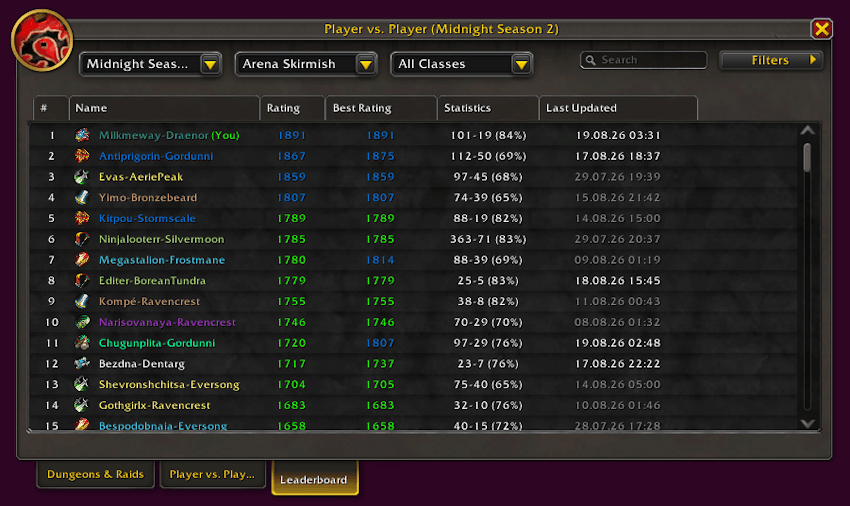
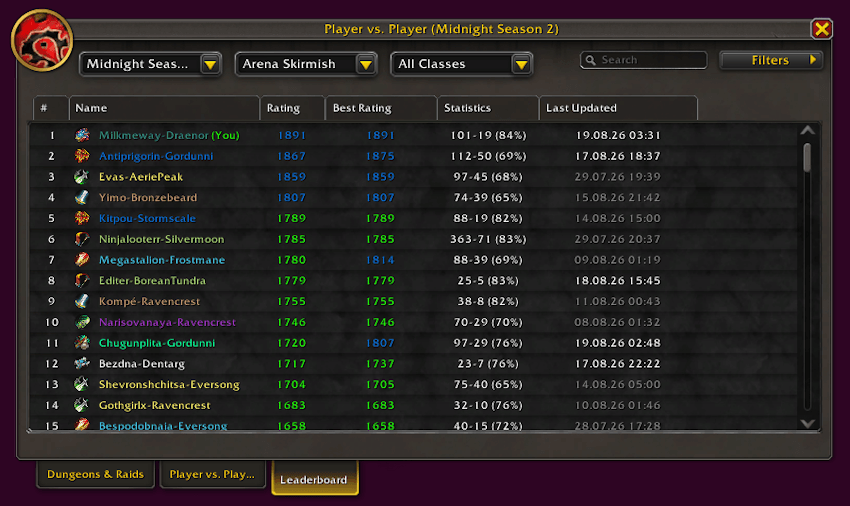
A new tab ("Leaderboard") is added alongside the existing "PvP" and "Dungeons & Raids" tabs in the PVE Frame. It displays all level 20 players encountered during the current season who have participated in arena skirmishes.
Displayed Columns:
- Rank — Position sorted by rating
- Name — Player name in class color with class icon
- Rating — Current rating color progression matching the rated PvP tier system (Combatant → Challenger → Rival → Duelist → Elite)
- Best — Season best rating
- Statistics — W-L record with win rate percentage
- Last Updated — Timestamp of last received data
Filtering Options
- Season dropdown: Current Season (extensible for future seasons)
- Bracket dropdown: Random Battlegrounds (disabled), Skirmish (active), Solo Shuffle (disabled), War Games (disabled)
- Class dropdown: All Classes + individual class filter
- Rating filter: Multi-select checkboxes for rank tiers (Unranked through Elite)
- Search box: Text search by player name
Sorting
- Click column headers to sort
- Default sort: Rating descending
- Name sort: Alphabetical ascending
- Time sort: Most recent first
- Toggle ascending/descending on repeated clicks
Data Acquisition
Players are added to the Leaderboard through:
- Manual inspection: Inspecting a player with rating > 0 adds them to the database
- Automatic group inspection: Group members are periodically inspected automatically
- Addon communication: Other addon users can share player data via addon messages
Right-Click Context Menu
Right-clicking a player row opens a context menu with:
- Copy Character Name — Copies full "Name-Realm" to clipboard via StaticPopup
- Copy Armory Link — Generates World of Warcraft Armory URL and copies to clipboard
Name Transliteration
For non-English clients (e.g., ruRU), character names and realm names displayed in Cyrillic are transliterated to Latin characters for consistent display and Armory link generation:
- Character names: Жайна → Zhaina
- Realm names: Ревущий фьорд → HowlingFjord
A predefined mapping table is used for Russian realm names to ensure accurate Armory URLs.
Tooltip Integration
Hovering over a player with cached data displays their skirmish rating and statistics in the game tooltip.
Join our discord for more! https://discord.gg/BNcNm2MAV
PvP 20 Rating Team

