
Pulsaris Level-Up
- By
Guild-wide level-up banners for WoW Forever & Retail: when a guildmate dings a milestone, everyone with the addon sees their class icon, faction crest, name and level, with an optional sound.
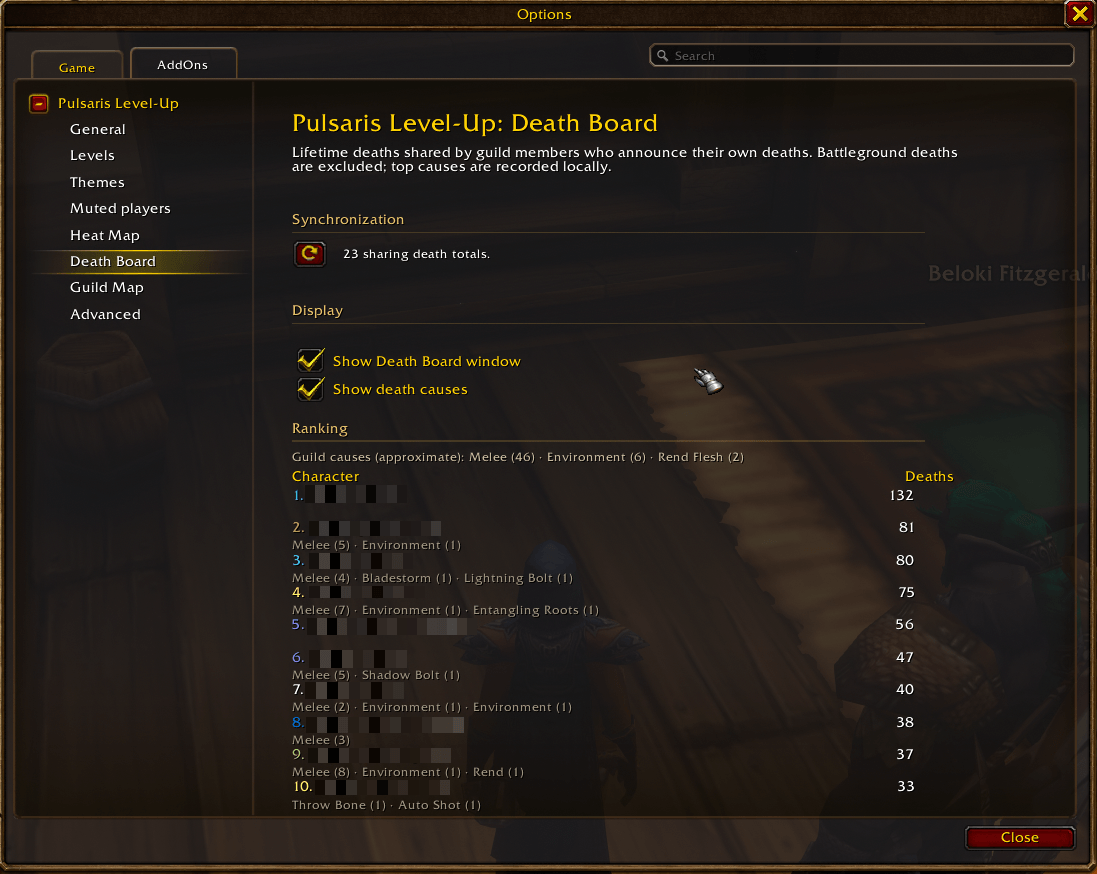
Here you can setup and view the rankings if it comes to the deaths across the guild.
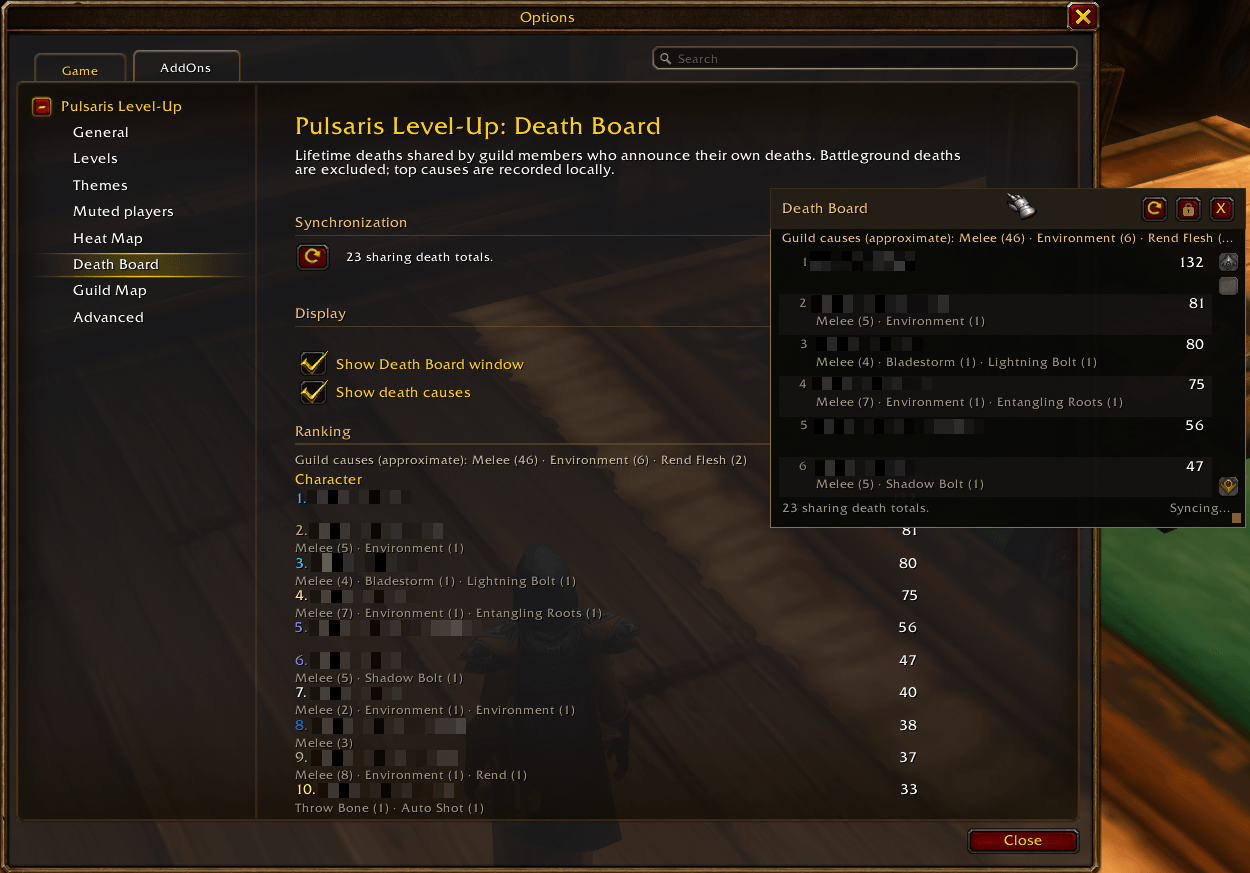
If you enable "Show Death Board window" you will get a moveable frame which shows the death ranking as well to have this all the time visible if you want.
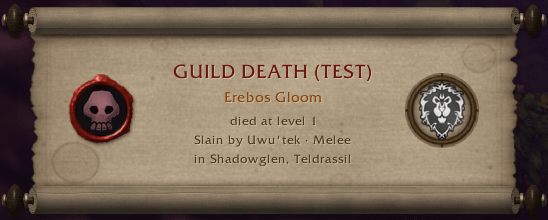
death_scroll.png
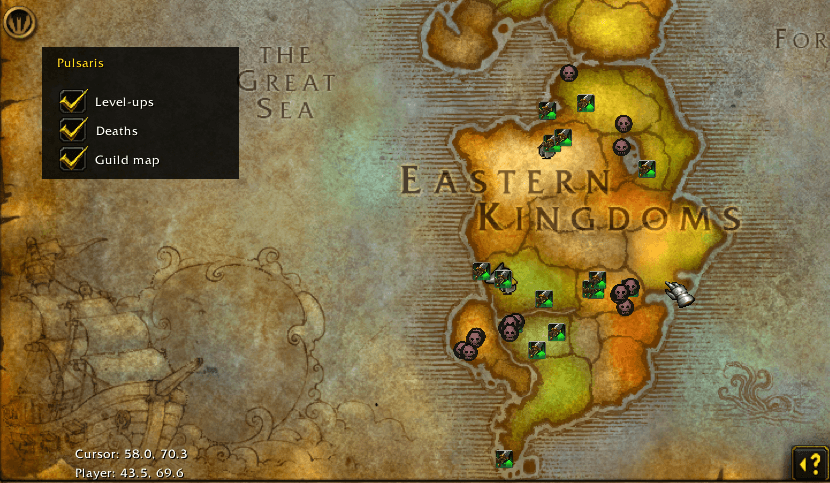
Shows deaths and level-ups which is also configurable
Description
Pulsaris Level-Up turns guild milestones into a shared moment.
When a guildmate running Pulsaris Level-Up dings, everyone in the guild who has the addon sees a short heraldic banner with the player's class icon, faction crest, name and the level they reached. Guild deaths can be shared the same way: a muted gray banner, a tombstone in place of the class icon, and the killing blow and zone when the game provides them. It is a small celebration that stays out of the way and never clutters guild chat.
Features
- Level-up banners for the default milestones from 10 through 60, every 5 levels, every level, or any individual levels
- Guild death banners, with a separate sound, tombstone marker, cause and zone. Your own deaths can be announced too
- Heraldic flag styling: silver for normal banners, gold corner filigree on every 10th level, and a gold dragon plus screen-wide celebration at level 60
- Separate durations for normal and milestone/level-60 banners. Click to dismiss or keep a banner open until dismissed
- Class icon and faction crest on level-ups. The tombstone replaces the class icon on deaths
- Optional sound with built-in choices: Level Up, Boss Defeated, Quest Complete and Ready Check
- Custom
.ogg/.mp3sounds from the addon'ssoundsfolder - Optional local chat mirror for accepted events, so you can catch up after being AFK
- Movable banner and zone-highlight frames, moved and locked together
- A Death Board with shared all-time death totals, automatic sync and manual Sync now
- A local world-map heat map with green level-up arrows, death skulls and corpse-marker suppression while ghost
- Optional zone-entry highlights with the local death and level-up counts, configurable duration and dismissal
- Hide banners while you are in a dungeon or raid
- English and German interface, following the game client's language
How it works
When a guildmate with the addon levels up or dies, their client shares the event over the hidden GUILD addon channel. Every guildmate running Pulsaris Level-Up receives it and applies their own level selection, so one player can follow every level while another only sees milestones. Nothing is posted in guild chat.
A few things to know:
- Everyone who wants to see the banners needs the addon.
- It only works for guild members.
- If you are offline when someone levels up or dies, the event is not replayed when you log back in.
- Banners queue up when several events arrive at once.
- The addon celebrates character level-ups, not guild levels.
Settings
Open the settings with /glu options, or find Pulsaris Level-Up under Settings → AddOns. The addon entry expands into General, Levels, Heat Map, Death Board and Advanced subcategories. Use them to choose which guild banners you see, select milestones, every 5 levels, every level or individual levels, toggle your own level-up and death announcements, show or hide your own banners, mirror accepted events to chat, configure sounds and custom files, adjust durations and dismissal, move and lock the frames, toggle the heat-map overlay and zone highlights, open the Death Board, or restore the defaults.
Commands
/glu options: open settings/glu test levelup//glu test death: preview a banner without announcing anything to your guild/glu on//glu off: turn all banners and own announcements on or off/glu sound: toggle the level-up sound/glu own: toggle whether your own banners are shown/glu move: move or lock the banner and zone-highlight frames/glu status: show your current settings/glu reset: restore all defaults/glu help: list the available commands
Good to know
- Milestones are every 10 levels, from 10 through 60 by default. The Levels page can switch to every 5 levels, every level or any individual levels.
- Several level-ups at once are shown one after another.
- Guild death banners and your own death announcements are on by default. Deaths use their own sound setting, Boss Defeated by default.
- Death causes come from the game's own death recap and may be missing. The addon never reads the combat log.
- The Death Board only counts deaths recorded while the addon was active, and only from characters that announce their own deaths. It is a guild estimate, not a server history.
- The Death Board keeps the last synced rankings locally, so logging in before anyone else still shows the last known list.
- Custom sound files must be placed in the addon's
soundsfolder and exist before logging in or reloading. They may be replaced when the addon updates. - The banner and zone-highlight positions are saved locally and restored after logging in or reloading.
- The heat map and zone highlights are local and only count events received while the addon was active. Positions are not shared with other players.
- The addon does not post anything in guild chat.
Pulsaris Level-Up Team

