
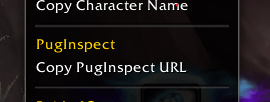
Skærmbillede 2026-07-02 211849.png
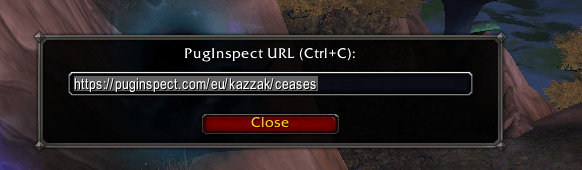
Skærmbillede 2026-07-02 211947.png
Description
PugInspect
Right-click any player, then PugInspect > Copy PugInspect URL, and paste into your browser to open their puginspect.com page.
Like RaiderIO, it puts character info a right-click away, no typing required. Checking a whole group? /pi export hands you the entire party or raid in a single paste.
Where it works
- Group Finder applicants, so you can vet people the moment they apply
- Any player unit menu: party/raid frames, friends, guild, chat names, target/focus, and PvP scoreboards
- Your whole group at once, with
/pi export
Check an entire raid in one go
Type /pi export while in a party or raid. You get the same small popup, so hit Ctrl+C, then paste it into the Roster Check page at puginspect.com/roster. The site looks up every member together, with class colors and tank/healer/DPS tags already attached.
Up to 30 characters per export. Specs are filled in by the website, so there is no inspecting and no waiting on the game client.
Why a popup instead of the clipboard
WoW gives addons no clipboard access, so the URL (or roster export) appears pre-selected in a small box. Just hit Ctrl+C.
Tip: You can paste the URL anywhere on the PugInspect page, it does not have to go in the search field or your browser's address bar.
Handles the tricky bits
- Builds the exact
puginspect.comURL, so the link always lands on the right character - Resolves cross-realm players to the correct realm slug
- Maps localized realms, including Cyrillic/RU servers, to their proper web names
- Roster exports keep each member's own realm, so mixed-realm pugs resolve correctly
No setup, no config. Install and right-click.
PugInspect Team
